
gjkbiebjbpngglhnmpenmangmbcekfip
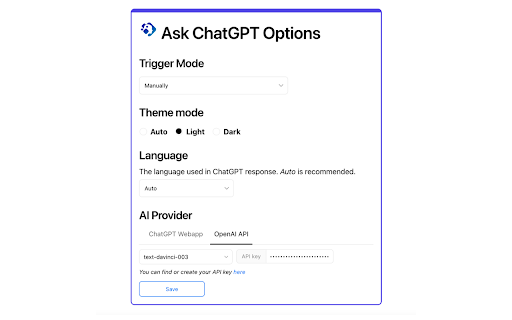
Display ChatGPT response alongside search engine results This is an extension that show response from ChatGPT alongside Google You can also start a chat with ChatGPT immediately after getting an answer. Features: * Supports all popular search engines * Chat with ChatGPT about the query and answer. * Supports official OpenAI API (Both GPT-3.5-Turbo and GPT-3) * Supports ChatGPT Plus and GPT-4 (GPT-4 requires manual enable in options) * Access ChatGPT from extension popup * Markdown rendering * Code highlights * Dark mode * Feedback to improve ChatGPT * Custom trigger mode * Copy to clipboard

MetaPrompt - AI Prompt Engineer & Optimizer for ChatGPT & Claude
Transform unclear questions into expert prompts. Get better AI responses from ChatGPT and Claude with one click. Metaprompt: Your AI Whisperer Transform how you interact with AI MetaPrompt transforms your ChatGPT and Claude experience by intelligently enhancing your prompts. Powered by advanced GPT 4.1 models, our Chrome extension analyzes your questions and refines them to generate clearer, more precise AI responses - saving you time and frustration. Simple, Powerful Workflow 1. Type your question as you normally would 2. Click the MetaPrompt button to apply expert prompt engineering 3. Watch as your request transform into an optimized prompt that gets real results What Sets MetaPrompt Apart - Instant Optimization: Turn unclear questions into structured prompts that deliver exactly what you need - Seamless Integration: Works naturally within ChatGPT's and Claude's interface with zero learning curve - Universal Compatibility: Use our popup anywhere you interact with AI tools Choose Your Perfect Plan MetaPrompt Pro ($5.99/month) - 5000 monthly prompt enhancements - Access to larger, more powerful models for even better results Who Needs MetaPrompt? - Students seeking deeper explanations and research assistance - Professionals requiring accurate information for critical tasks - Writers looking for better creative input - Developers needing precise code solutions - Researchers formulating complex queries - Anyone tired of wasting time on unhelpful AI responses Stop struggling with AI miscommunications. Download MetaPrompt today and start getting the quality responses you deserve.

AI Chat for Search
🔥Display intelligent answers from leading AI models alongside your search engine's general results. Enhance your browsing experience with AI! AI Chat for Search is an extension that shows AI responses alongside Google, Bing, DuckDuckGo, and other search engines. Compared to the scattered and chaotic information from search engines, our AI has already summarized and categorized this information for you, allowing you to see the results you want more intuitively. Moreover, you can ask further questions based on the AI responses to gain a deeper understanding of the topic. 💪The Key Features: 👉Search Enhance: Obtain concise, accurate answers to your questions right within the search engine interfaces you already use. 👉Search Agent: Just ask a question, and AI Chat for Search will search using multiple keywords, review all the results, and find the right answer for you. 👉All-In-One-Chat: Compare the answers from several powerful AI models on one page to enhance your search experience. 👉Quick Ask: Enter "gpt" in the browser address bar, then press "Tab" or "Space" to enter quick ask mode. In Quick Ask mode, enter your query and hit "Enter" to instantly send it to your selected AI model. 🥳 How AI Chat for Search Outshines the Competition? ✔️ Supports all popular search engines: Google, Bing, DuckDuckGo, and other search engines. ✔️ Supports connections to official APIs (including advanced and turbo models). ✔️ Markdown rendering ✔️ Code highlights ✔️ Dark mode ✔️ Custom trigger mode ✔️ Custom content text size ✔️ Supports 50+ languages — ❓ Frequently Asked Questions: 📌 What is AI Chat for Search? AI Chat for Search is a browser extension that enhances search engines with the power of advanced AI. It works by showing AI-generated responses alongside normal search engine results. 📌 Is AI Chat for Search free to use? Yes, we offer limited use for free. For unlimited access, you can choose the Premium Plan. 📌 What search engines are supported? Currently, AI Chat for Search supports Google, Bing, DuckDuckGo, and other search engines. More search engines will be supported in the future. 📌 Do I need an account with an AI provider? AI Chat for Search offers two usage modes: a free mode and a subscription-based mode. In the free version, users can utilize the search enhancement feature by either signing into their personal account with an AI provider or by applying their own API key. Conversely, the premium mode allows users full access to all features without the need for any external API keys or accounts.

ChatGPT for Google by cloudHQ
This extension gives you ChatGPT query responses alongside Google search engine results. This extension is easy to use and enhances your Google search experience. Features: ✅ OpenAI Responses alongside your Google search results ✅ A summary of search results ✅ Supplement responses with data after 2021 via search results ✅ OpenAI API and multiple version support ✅ Toggle on/off as desired ✅ Copy to clipboard ~~~How to use it~~~ 1. Get an OpenAI account here if you don't already have one: https://chat.openai.com/chat and create an account 2. Install this extension 3. Open Chrome and search for anything in Google Search 4. AI-generated responses alongside conventional search engine results will be displayed on the right side of your window 5. When in ChatGPT, simply type in your prompt, and the results will be ChatGPT's response, and will then provide you with a Google Search summary on the subject (very helpful for up to date information) ~~~FAQ~~~ 1. What is ChatGPT? ChatGPT is a computer program created by OpenAI that can generate human-like text. It's like a super-advanced version of autocorrect: it predicts and generates what it thinks should come next in a conversation or a piece of writing. This is useful for many things, such as writing emails, creating content, answering questions, and even tutoring in different subjects. It's important to note that it doesn't know any personal data unless you tell it during the conversation, and it doesn't know specifics about the documents it learned from. 2. What does this extension do? This browser extension is developed by cloudHQ LLC. The extension enhances search engine results with the power of artificial intelligence from OpenAI. The extension operates by displaying AI-generated responses alongside conventional Google search engine results, offering users an enhanced search result experience. 3. Is this extension free to use? Yes, the extension is free to use. 4. Is this extension integrated with other cloudHQ products? Yes. This extension is fully integrated with other cloudHQ products such as Save Emails to PDF by cloudHQ, Export Emails to Sheets by cloudHQ, and more. 5. Do I need an OpenAI (chat.openai.com) account? Yes, you need to have an OpenAI account to use this extension. Go to https://chat.openai.com/chat and create an account. If you choose to use an API, you need to have a developer account. You can create it here: https://platform.openai.com/ We hope you enjoy your new search result experience and find it helpful for your overall knowledge about anything you wish to know about. cloudHQ. Helping your productivity, 1 click at a time. cloudHQ website: https://www.cloudhq.net/ App website: https://www.chatgpt-for-google-search.com/ Pricing: https://www.chatgpt-for-google-search.com/pricing Support page: https://support.cloudhq.net/category/browser-extensions/chatgpt-for-google/ FAQ page: https://support.cloudhq.net/ Blog: https://blog.cloudhq.net

YouChat AI for Google
A browser extension to display YouChat response - like ChatGPT, but with knowledge of recent events and source citation - alongside Google and other search engines results, supports Chrome/Edge/Firefox Troubleshooting: Please check out https://github.com/fedebotu/youchat-google-extension for troubleshooting. Feel free to submit issues there! Changelog: 1.0.1 - Fix error due to API change - Better documentation and troubleshooting solutions 1.0.0 - Dynamics links: numbering of links is done automatically - Reference listing: for each reference in the main response, there is now the corresponding source link! - Update to latest YouChat API Source code: https://github.com/fedebotu/youchat-google-extension Also check out: https://github.com/wong2/chat-gpt-google-extension
