
gjggkgofabnkfcnpnhkfbcglfodbmobk
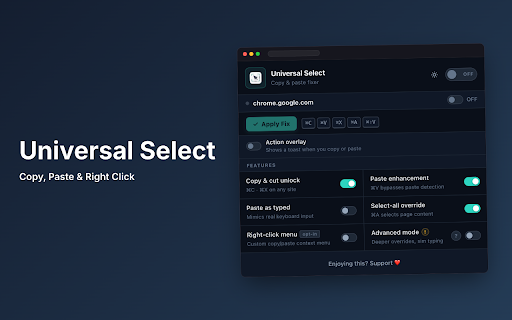


Restores copy, paste, cut, and text selection on websites that disable them. Helps you access web content more efficiently. Enable Copy Paste, Right Click and Text Selection on Any Website Universal Select fixes copy paste not working, enables right click, and allows text selection on any website that blocks it. Fix copy paste issues instantly and take full control of your browser. Many websites disable copy paste, right click, text selection, and Inspect Element. Universal Select removes these restrictions and restores copy paste, right click, and full browser functionality instantly. Enable Copy Paste Everywhere Copy text from any blocked website Paste into restricted input fields Works even on protected and monitored forms Allow Text Selection Select text even with user-select: none Click and drag to highlight content Double-click to select words Enable Right Click and Inspect Restore right-click context menu Enable Inspect Element on blocked websites Open links in new tabs Universal Select simulates real human typing to bypass anti-paste protection, keypress tracking, and input restrictions. Works on modern websites built with React, Angular, and Vue. Supports editors like Monaco and CodeMirror without breaking functionality. Smart and Controlled Usage Enable the extension only on selected websites. No unnecessary background activity. Lightweight and performance-friendly. Removes blocking scripts such as oncopy, onpaste, oncut, oncontextmenu, and onselectstart. Restores normal browser behavior even on heavily restricted websites. Best For Fixing copy paste not working Enabling right click on websites Allowing text selection anywhere Students, developers, and professionals Works instantly with one click Simple and clean interface No setup required Reliable across most websites Install Universal Select and restore copy paste, right click, and full browser control.

Allow Copy +
🤩 If you like "Allow Copy +" rate 5 stars to extension 🤩 FEATURES: - remove copy protection, enable copy text, remove block selection; - allow right mouse click and turn on context menu; - activate / deactivate for specific domain; - sync with all chrome browsers with the same google account; - free and easy to use. 🚨🚧🚨BETA FEATURES: (Please, do not be scrupulous about these features, they are still in test mode) - grab text from image https://youtu.be/0rgolOJs_7g (extract text from images on linkedin wall, from instagram wall and some other websites); - extract text from google docs, and extract text from same technology used websites HOW TO USE: Just click ICON. GREEN - activated copying. ORANGE - deactivated copying. Activization works for the website(domain). HOW TO USE, DETAILY: Its turned off by default, and you can see ORANGE icon. To activate text selection and copying: - open copying protected web site; - click on extension's icon. After this the icon should be GREEN, it means that "Allow Copy +" is activated on current website. If you close and reopen current website the "Allow Copy +" will be activated. To deactivate for website just click icon one more time (the icon must changed to ORANGE color). - How do I copy a copy protected web page? - How can one copy text from a site in which the copy function is disabled? - How do I copy text from a protected webpage on Chrome? - How do I copy text from a content-protected website? - How can I copy text from a web page where the text is copy protected? - How do I copy text from a website that cannot be copied? - How do I copy text from websites that don’t allow it? - Why can't I copy text from some websites? - How do you force copy text from a website? - How do I copy past an unselectable text? - How do I absolute enable right click & copy if disabled? - How do I copy text when right click is disabled? - How do I enable right click copy in Chrome? - How do you copy and paste without right clicking? - Why can I not right click to copy and paste? I'm happy to help. Please, add review to "Allow Copy +" extension. Thank you.

Absolute Enable Right Click & Copy Mv3
Unlock your browser's full power. Restore Right Click, Copy, Paste, and Text Selection on any website. Unlock your browser's full power. Absolute Enable Right Click & Copy Mv3 restores essential browser actions on any website: Right Click, Text Select, Copy, and Paste, even when sites try to block you. Easily bypass copy-protection scripts used on news articles, educational resources, blogs, documentation, or any page where copying and context menu actions are disabled. Your privacy is our top priority. Absolute Enable Right Click & Copy Mv3 does not collect, store, or transmit any personal data. No analytics, no metrics, no tracking period. All functionality happens entirely within your browser and your device. Whether you need to copy quotes, take notes, save citations, or simply access what should be yours, this extension puts you back in control, fast, safely, and simply. What's New in Version 1.4.9: Bug fix for one website. What's New in Version 1.4.8: Bug repair for some websites. - Added support for 11 new languages: Czech, Indonesian, Italian, Japanese, Korean, Polish, Russian, Turkish, Ukrainian, Vietnamese, and Traditional Chinese. - New Feature: Pages Exclusions. - Fixed issue where close buttons on lightboxes and modals were not working when the extension was active. - No longer reset event handlers on interactive elements (`BUTTON`, `A`, `INPUT`, `SELECT`, `TEXTAREA`, `LABEL`, `VIDEO`, `AUDIO`). - Added detection for elements with classes containing `close`, `button`, `btn`, or `control` to preserve their functionality. - Multi-language Support: Interface now available in 8 languages (English, French, German, Spanish, Hindi, Portuguese, Chinese). - Backup & Restore: Easily Export and Import your whitelist/settings. - Storage Indicator: Visual display of your settings storage usage. - Enhanced Engine: Stronger unblocking algorithms (Shadow DOM support) for modern websites. 1. Navigate to the web page where copy, paste, or right-click is blocked. 2. Click the Absolute Enable Right Click & Copy icon in your browser's toolbar. 3. Select your preferred mode: - Enable Copy: for standard unlocking (most sites). - Aggressive Mode: for maximum unlocking (defeats advanced protections). 4. Refresh the page if prompted. 5. Copy, select, and right-click freely - no more restrictions. You can manage your enabled sites at any time through the extension's options page. 1. Re-enable right-click, copy, paste, and text selection on nearly any blocked website. 2. Two powerful modes: - Enable Copy: quick and effective for most situations. - Aggressive Mode: advanced defense against even the toughest site scripts. 3. New: Interface available in 8 languages. 4. New: Export and Import your settings (JSON) for easy backup. 5. New: Storage usage indicator in Options. 6. Works with dynamic content, multi-frame, and single-page applications. 7. No ads, no popups, no tracking, no bloat. 8. Minimal, transparent permissions - only what's required to do the job. 9. Works automatically on saved/whitelisted sites. 10. Lightweight and fast: designed for performance with no impact on browsing speed. - Absolute Enable Right Click & Copy Mv3 respects your privacy. - No personal data is collected, logged, or transmitted. - No analytics or third-party tracking. - No background metrics scripts. - All operations are performed locally on your device. - You can review the code or contact support with any privacy concerns. How do I copy a copy protected web page? How can one copy text from a site in which the copy function is disabled? How do I copy text from a protected webpage on Chrome? How do I copy text from a content-protected website? How can I copy text from a web page where the text is copy protected? How do I copy text from a website that cannot be copied? How do I copy text from websites that don't allow it? Why can't I copy text from some websites? How do you force copy text from a website? How do I copy/paste non-selectable text? How do I absolute enable right click & copy if disabled? How do I copy text when right click is disabled? Why can I not right click to copy and paste? How do I enable right click copy in Chrome? How do you copy and paste without right clicking? How do I copy a copy-protected web page or text? How do I enable right-click on sites that block it? Why can't I copy or select text on some websites? How do I force copy/paste on Chrome or Edge? How do I copy from a website that disables copying or right-click? Answer: All these challenges are solved instantly by installing Absolute Enable Right Click & Copy Mv3. Just activate the extension on the website - choose the mode that works best, and enjoy unrestricted copying and right-click access. This extension is based on the popular "Absolute Enable Right Click & Copy" extension, originally created by Absolute. The current version is a fully reworked, Manifest V3-compliant release - built for modern Chrome and Edge with improved privacy. For reference, the legacy Manifest V2 version is archived at: https://web.archive.org/web/20250501061406/https://chromewebstore.google.com/detail/absolute-enable-right-cli/jdocbkpgdakpekjlhemmfcncgdjeiika

Superb Copy
Superb Copy: Break Free from Copy Restrictions! Unblock Context Menu, Right Click, Copy, and Selection on Any Website. Are you tired of being restricted when browsing websites? Do you often find yourself unable to right click, copy, or access the context menu? We have the perfect solution for you! Introducing Superb Copy, the ultimate browser extension that empowers you to unleash the full potential of your web browsing experience. 🚀💻 🔓🖱️ Unlock Copying and Selection 🔓🖱️ With Superb Copy, you can effortlessly unblock right click, context menu, selection, and copy functionalities on any website. No longer will you be held back by restrictive website settings. Copy and paste text, images, and more with ease, just the way you want it! 💪✂️ 🌐💥 Enable and Disable with Ease 🌐💥 Superb Copy gives you the flexibility to enable or disable its powerful features for specific websites. Customize your browsing experience and tailor it to your needs. You're in control! ⚙️🔌 Please note that in rare cases, the extension may temporarily disrupt website functionality. But don't worry! We've got you covered. By default, Superb Copy is disabled to ensure smooth browsing. Simply manually enable it on the websites where you want to utilize its exceptional features. It's that easy! 😎🔧 To experience the incredible functionality of Superb Copy, we invite you to put it to the test. Visit our test site at 👉 https://pcc-app-by-cldmapps.myshopify.com/ and witness how Superb Copy effortlessly unblocks copy restrictions and enhances your browsing capabilities. 🌐✨ 🚀 Don't wait any longer! Download Superb Copy today and liberate your web browsing experience! 🚀

Allow Copy - Select & Enable Right Click
Enable copy on protected websites: allow right click, unblock context menu. Enable text highlight and allow copy. Have you encountered situations where attempting to choose text, access a context menu, or copy content resulted in no response? Some website operators employ technical methods to prevent users from selecting and copying material from their webpages. Enable Right Click stands out as an advanced and comprehensive remedy for websites that impede users from utilizing right-click context menus, selecting text, or copying content." Features: - remove copy protection, enable copy text, remove block selection; - allow right mouse click and turn on context menu; - activate / deactivate for specific domain; - free and easy to use. Other similar extensions frequently break websites, so you are forced to disable and activate manually every time you want to use right click. In contrast, Enable Copy uses a unique technology, which minimizes effect on normal functions of websites which are unrelated to right click, text selection, and copy. Enable Copy extension is very easy to use. If you come across a website that has disabled the right-click button, simply click on the extension icon and it will reload the page. This will enable you to use the right-click button once again, giving you full access to all the functions and information on that website. Enable Context Menu and Select, Allow select, Allow right click in so restricted pages and Copy and Paste. Unlock Copying and Selection You can effortlessly unblock right click, context menu, selection, and copy functionalities on any website. Unblock context menu and Select is a tool that helps you bypass web site copy protection. No longer will you be held back by restrictive website settings. Copy and paste text, images, and more with ease, just the way you want it! Control of your browser context menu again. Please, add review to Allow Text extension. Embark on a stress-free, efficient, and productive browsing journey. Don't let website limitations hold you back any longer—break free and unlock the true potential of the internet!
