
gjedjcpoakppkpklidcmombflpkoaajd
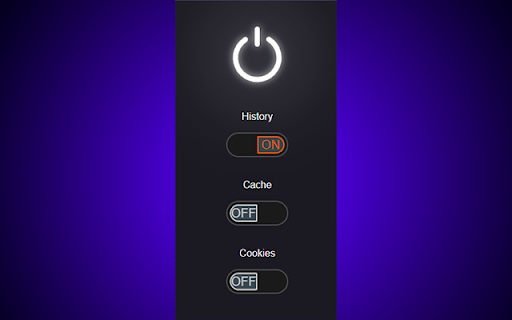
Remove a website's history, cookies, and cache on a per-site basis. Sneaky Clean is a privacy extension for Google Chrome that automatically removes browsing history, cache, and/or cookies when a tab is closed, navigated away from, or the browser is closed. How to use: Browse to any website, open the extension, and tick the slider from any of the following options: History Cache Cookies SneakyClean will remember the choices you've made for each website. Great for developers and privacy lovers who want more control over their browser's history, cache, and cookies with just two clicks!

Clear Browsing Data
Delete browsing data directly from the browser toolbar. Clear cookies, history and cache with a single click. Clear Browsing Data is a browser extension which enables you to delete browsing data, such as cookies, history and cache, directly from the browser toolbar. The toolbar button can be configured to clear all browsing data with a single click, or to show a list of data types available for clearing. Clear Browsing Data is an open source project made possible thanks to a community of awesome supporters. If you'd like to support the continued development of the extension, please check out https://armin.dev/go/patreon. The extension also supports closing and reloading tabs, these features can be configured from the extension's options. Supported data types: • Cookies • Browsing history • Cached images and files • Cache storage data • Autofill form data • Download history • Service Workers • Local storage data • IndexedDB data • Web SQL data • Website file systems • Application Cache The data types and their order can be customized from the extension's options. The extension is also available for Edge and Firefox: https://github.com/dessant/clear-browsing-data#readme The developer does not collect any personal data from this extension, visit the extension's privacy policy for more information. Reviews are not monitored for bug reports, please use GitHub for issues and feature requests.

Cache Clear
Quickly delete browser cache, clear cookies, and history. Optimize browsing performance with Cache clear. 🚀 Introducing: Your Ultimate Browser Cleanup Companion. 😩 Are you tired of your browser slowing down due to accumulated clutter? 📝 Do you worry about your online activities being tracked or your personal data being stored without your consent? 🛡️ Say goodbye to these concerns with Cache clear chrome – the definitive Google Chrome extension designed to streamline your browsing experience and safeguard your privacy. ⚡ What is cache clear? It is a comprehensive browser tool meticulously crafted to declutter your digital footprint effortlessly. 💥 With just a few clicks, you can: 1️⃣ Delete cache 2️⃣ Delete search history 3️⃣ Clean cookies 4️⃣ Delete downloads 5️⃣ Clear storage 6️⃣ Clear passwords chrome And much more, all within the familiar confines of your Chrome browser. 🔑 Key Features: ☑ Cache clear: Instantly eliminate cache buildup that can bog down your browser's performance. ☑ Clear search history: Safeguard your privacy by delete web history in a flash. ☑ Manage cookies: Take control of your online identity by easily clearing cookies that track your browsing habits. ☑ Delete browsing history: Bid farewell to your clear browsing history chrome with a single click, ensuring your online activities remain confidential. ☑ Secure password management: Effortlessly delete stored passwords to enhance security and protect sensitive information. ☑ Customizable Settings: Tailor cache cleaner to suit your preferences with customizable settings for clear website cache, cookie cleaner, clean chrome browser history, and more. 🎉 How to Use: 1. Install the Extension: Visit the Chrome Web Store and add our app to your browser. 2. Click on the Cache Clear icon in your Chrome toolbar to access the extension's settings. 3. Select the data you want to clean, such as cache, cookies, and browsing history, clear browsing data. 4. Hit the "Clear" button, sit back, and watch as cache cleaner swiftly tidies up your browser. Why Choose? ⏱️ Efficiency: our extension streamlines the process of clearing cache, delete all history, and cookies, saving you time and hassle. 🛡️ Privacy Protection: Rest easy knowing that your online activities are kept confidential with clear cache and cookies thorough data deletion capabilities. 🚀 Enhanced Performance: By regularly clearing cache and other clutter, clear cache helps optimize your browser's performance for a smoother experience. 🌀 User-Friendly Interface: With its intuitive design, clean cache is accessible to users of all experience levels, making browser maintenance a breeze. 💪 Comprehensive Cookie Control: ■ Cookies are essential for many online tasks, but they can also clutter your browser and compromise your privacy. ■ Our tool empowers you to manage your cookies effectively, giving you the control to delete unwanted cookies and maintain your online privacy. ⚡ Streamlined History Cleanup: 🔸 Your browsing history can reveal a lot about your online activities. 🔸 With this tool, you can clear history with ease, ensuring that your online footprint remains private and secure. 📌 FAQs: ❓ How to clear cache in Chrome? 💡 Simply install our extension from the Chrome Web Store, access the extension's settings, and choose the cache clearing option. Click "Clear," and delete browser cache. ❓ How to clear cookies? 💡 Access the extension, and choose the clearing cookies option. Click delete cookies. ❓ How to delete search history? 💡 Access the extension, and choose the delete history option. ❓ Is this extension compatible with other browsers? 💡 Currently, our app is designed specifically for Google Chrome. ❓ Will using this app on chrome affect my saved passwords? 💡 No, our app gives you the option to delete stored passwords for added security, but it won't interfere with your ability to save new ones. ❓ How often should I use browser cleaner? 💡 It's recommended to use this app regularly to keep your browser running smoothly and your online activities private. Download Today: 💫 With our tool, you'll never have to worry about slow browsing speeds or cluttered browser histories again. 💻 Don't let unnecessary cache files and cookies slow you down. 🛠️ Take control of your browsing experience and safeguard your privacy with clear browser cache. 🌟 Say goodbye to cluttered caches, unwanted cookies, and prying eyes – download Cache clear from the Chrome Web Store today and experience a browser cleaner, more secure browsing experience.

Clear Cache for Specific Site
Quickly clear cache and cookies for the current website with a single click. Site-specific cleaning without affecting other sites. ✨ Clear Cache for Specific Site - Fast, Simple, Efficient Clear Cache for Specific Site is the easiest way to delete cache and cookies for individual websites without affecting your entire browser. Whether you're a developer testing changes, a user fixing display issues, or someone who values privacy, this extension gives you precise control over your browsing data. 🚀 Why Clear Cache for Specific Sites? Most browsers force you to clear all cache and cookies at once, logging you out of every website and slowing down your browsing. That's frustrating when you only need to refresh one site. This extension solves that problem by: Targeting only the current website - other sites stay untouched. Showing real-time statistics - see cookies and cache size before clearing. Auto-refreshing the page - instantly see the results. Whether you need to clear browser cache, delete cookies, or remove cached data, this tool makes it instant and site-specific. Click the extension icon while on any website. View the current site's cookie count and cache size. The page automatically reloads with fresh data. No complicated settings, no accidental data loss - just fast, targeted cleaning. Perfect for developers using clear cache chrome extensions or users who want to clear cache for one site at a time. 🌟 Key Features You'll Love ✨ Site-specific clearing: Only affects the current website ✨ Real-time statistics: Shows cookie count and cache size instantly ✨ One-click operation: Clear cache or cookies with a single button ✨ Auto-refresh: Page reloads automatically after clearing ✨ Clean interface: Simple, intuitive design ✨ Lightweight: Minimal resource usage ✨ Privacy-focused: No tracking, no data collection ✨ Offline-ready: Works without internet connection Unlike bulk chrome cache cleaner tools, this extension gives you surgical precision. It's like having a clear cache shortcut built into your browser toolbar. 👨💻 For Developers Web developers constantly need to test changes, but clearing all cache wastes time and disrupts workflow. This extension is the perfect developer tool for: Testing CSS and JavaScript changes without browser cache issues. Examples from real workflows: ➡ A front-end developer tests responsive design after clearing cached CSS. ➡ A QA tester reproduces bugs by clearing cookies for one site. ➡ A back-end engineer verifies API responses without stale cache data. This is more than a simple chrome clear cache extension - it's built specifically for professional workflows. No need to open DevTools or remember keyboard shortcuts. Just click, clear, and continue coding. 🌐 For Everyday Users Even if you're not a developer, you've probably experienced: This extension fixes all of that. Use it to: It's the easiest way to clear cookies chrome users can find - no digging through settings, no confusing options. Privacy matters. This extension helps you: 🛡 Remove tracking cookies from specific sites 🛡 Clear login sessions without losing others 🛡 Delete site-specific data on demand 🛡 Control what websites remember about you 🛡 Avoid bulk clearing that forces re-login everywhere Unlike cache cleaners that wipe everything, this tool lets you decide exactly what to remove. Perfect for privacy-conscious users who want control without inconvenience. Scenario 1: Website Updates Not Showing You visit a website, but it still shows old content. Click the extension, hit "Clear Cache," and the page reloads with the latest version. Scenario 2: Login Problems A website won't let you log in or shows errors. Click "Clear Cookies" to reset the session and try again. Scenario 3: Testing Website Changes You're building a website and need to see fresh changes. Use this extension instead of Ctrl+F5 or opening DevTools. Scenario 4: Privacy Control You want to remove cookies from a specific site without logging out of others. Clear cookies for that domain only. Scenario 5: Fixing Broken Layouts A website looks wrong because of outdated CSS. Clear the cache to force the browser to download fresh files. 🎯 Why Choose This Extension? ⚡ Fast: One click and you're done 🎯 Precise: Only affects the current site 📊 Informative: See data before clearing 🔄 Automatic: Page reloads instantly 💻 Lightweight: No performance impact 🔒 Private: No tracking or analytics 🌍 Universal: Works on any website This extension is designed for simplicity and precision. It's the clear cache chrome extension you'll actually use. Q: What's the difference between clearing cache and clearing cookies? 👉 Cache stores files (images, CSS, scripts) to load sites faster. Cookies store login info and preferences. Clearing cache refreshes content. Clearing cookies logs you out. Q: Will this log me out of other websites? 👉 No. Only the current site's cookies are removed when you click "Clear Cookies." All other sites remain logged in. Q: Does it affect my entire browser? 👉 No. This extension only clears data for the specific website you're viewing. Everything else stays intact. Q: Why does the page reload automatically? 👉 To show you the immediate effects of clearing cache or cookies. You'll see the updated version right away. Q: Can I clear cache without clearing cookies? 👉 Yes. The extension has separate buttons for cache and cookies. Choose whichever you need. Q: Is this better than Ctrl+Shift+Delete? 👉 For site-specific cleaning, absolutely. The browser's built-in tool clears everything, while this extension targets only the current site. Q: Does it work offline? 👉 Yes. You can clear local cache and cookies even without an internet connection. 🔥 Take Control of Your Browsing Data Thousands of users trust this extension to manage their cache and cookies efficiently. Whether you're debugging code, fixing website issues, or protecting your privacy, this tool gives you the control you need without the hassle of bulk clearing. ✨ Simple, fast, and site-specific 📊 Real-time statistics at a glance 🔒 No tracking, no data collection 🚀 Perfect for developers and everyday users 👉 Install Clear Cache for Specific Site now and experience the easiest way to manage your browsing data.

Clear cookies for one site
Clear cookies for one site with one click. Easily clear browser cookies for the current site. Clear cookies for one site – your essential Chrome extension for seamlessly and efficiently deleting cookies tailored to your needs. This extension empowers you to effortlessly clear cookies for a specific site, enhancing your browsing experience and privacy. Dive into the ultimate solution that combines simplicity, customization, and speed. 🍪 3 ways to clear browser cookies with Clear cookies for one site extension 1️⃣ Icon click: start by clicking on the extension icon in the Chrome tray. This instantly triggers the delete cookies for the current site. 2️⃣ Keyboard shortcut: for a faster option, utilize the Alt+C (Option+C on macOS) key combination. A quick keystroke, and remove cookies, giving you immediate control over your browsing data. 3️⃣ Floating artifact: enable the floating artifact at the bottom of the page for seamless, one-click access. Click the artifact, and voila – delete site cookies, and the page reloads without a hitch. 💪 Advantages of Clear cookies for one site Extension 1. Safeguard your online privacy by clear browser cookies for specific sites, preventing unwanted tracking and data collection. 2. Enjoy a seamless online journey with the extension's user-friendly interface and quick-access features. No more unnecessary clicks or complex procedures. 3. Boost your productivity with the extension's swift, one-click solutions. Save time navigating through settings and menus, allowing you to focus on what matters most. 4. Tailor your cookie management experience according to your liking. Choose between automatic or manual page reloading and decide whether to display the floating artifact – it's all about personalized control. 5. Ideal for SEO specialists, the extension seamlessly integrates into your research workflow, providing targeted delete cookies for specific sites without disrupting your tasks. 👉 Optimized online experience ➤ Ensure a clean, distraction-free browsing environment, enhancing concentration on important tasks without compromising data privacy. ➤ Manage cookies on e-commerce sites effortlessly, ensuring a smoother shopping experience and avoiding unnecessary clutter in your browsing data. ➤ Focus on your studies or research without concerns about cookie clutter. Maintain a clean digital slate for accurate information gathering. ➤ Embrace a customizable browsing experience with the ability to control automatic reloads and access quick cookie clearance at your fingertips. ➤ Maintain privacy on shared computers or public devices by easily managing cookies for the sites you use, ensuring a secure online experience wherever you go. 📌 What does Clear cookies for one site do? - It's a Chrome extension that swiftly clears cookies for the current site, enhancing privacy and providing a cleaner online experience. 📌 How do I access the extension? - Simply click the extension icon in the tray, use the Alt+C shortcut, or enable the floating artifact for quick, one-click access. 📌 Can I customize the extension according to my preferences? - Absolutely! Tailor your experience by toggling settings like automatic page reloading and the display of the floating artifact to suit your browsing style. 📌 Does it save time? - Yes! Enjoy time-saving efficiency with a straightforward, one-click solution – no more navigating through complex menus. 📌 Can I control when the page reloads after clear browser cookies? - Absolutely! Adjust the settings to toggle automatic page reloading on or off, giving you full control over your browsing experience. 📌 Is the extension regularly updated? - Yes! Expect constant optimizations and updates to keep the extension in sync with the ever-evolving online landscape. 📌 What sets Clear cookies for one site apart? - Its focus on targeted cookie management, time-saving efficiency, privacy enhancement, adaptability to user preferences, and a commitment to continuous improvement make it a standout choice for browsing control. 🚀 Clear cookies for one site goes beyond just deleting cookies – it's about empowering users with control, efficiency, and a tailored approach to online privacy.
