
jakjgacnfiechbpinegcjkomhfhnbhhe

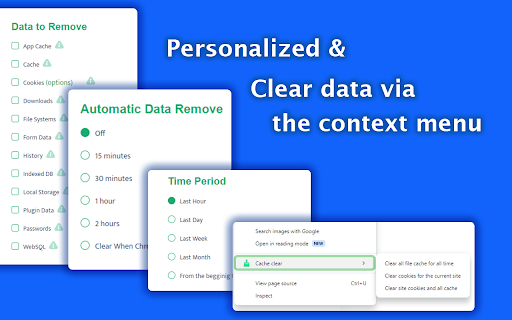
Quickly delete browser cache, clear cookies, and history. Optimize browsing performance with Cache clear. 🚀 Introducing: Your Ultimate Browser Cleanup Companion. 😩 Are you tired of your browser slowing down due to accumulated clutter? 📝 Do you worry about your online activities being tracked or your personal data being stored without your consent? 🛡️ Say goodbye to these concerns with Cache clear chrome – the definitive Google Chrome extension designed to streamline your browsing experience and safeguard your privacy. ⚡ What is cache clear? It is a comprehensive browser tool meticulously crafted to declutter your digital footprint effortlessly. 💥 With just a few clicks, you can: 1️⃣ Delete cache 2️⃣ Delete search history 3️⃣ Clean cookies 4️⃣ Delete downloads 5️⃣ Clear storage 6️⃣ Clear passwords chrome And much more, all within the familiar confines of your Chrome browser. 🔑 Key Features: ☑ Cache clear: Instantly eliminate cache buildup that can bog down your browser's performance. ☑ Clear search history: Safeguard your privacy by delete web history in a flash. ☑ Manage cookies: Take control of your online identity by easily clearing cookies that track your browsing habits. ☑ Delete browsing history: Bid farewell to your clear browsing history chrome with a single click, ensuring your online activities remain confidential. ☑ Secure password management: Effortlessly delete stored passwords to enhance security and protect sensitive information. ☑ Customizable Settings: Tailor cache cleaner to suit your preferences with customizable settings for clear website cache, cookie cleaner, clean chrome browser history, and more. 🎉 How to Use: 1. Install the Extension: Visit the Chrome Web Store and add our app to your browser. 2. Click on the Cache Clear icon in your Chrome toolbar to access the extension's settings. 3. Select the data you want to clean, such as cache, cookies, and browsing history, clear browsing data. 4. Hit the "Clear" button, sit back, and watch as cache cleaner swiftly tidies up your browser. Why Choose? ⏱️ Efficiency: our extension streamlines the process of clearing cache, delete all history, and cookies, saving you time and hassle. 🛡️ Privacy Protection: Rest easy knowing that your online activities are kept confidential with clear cache and cookies thorough data deletion capabilities. 🚀 Enhanced Performance: By regularly clearing cache and other clutter, clear cache helps optimize your browser's performance for a smoother experience. 🌀 User-Friendly Interface: With its intuitive design, clean cache is accessible to users of all experience levels, making browser maintenance a breeze. 💪 Comprehensive Cookie Control: ■ Cookies are essential for many online tasks, but they can also clutter your browser and compromise your privacy. ■ Our tool empowers you to manage your cookies effectively, giving you the control to delete unwanted cookies and maintain your online privacy. ⚡ Streamlined History Cleanup: 🔸 Your browsing history can reveal a lot about your online activities. 🔸 With this tool, you can clear history with ease, ensuring that your online footprint remains private and secure. 📌 FAQs: ❓ How to clear cache in Chrome? 💡 Simply install our extension from the Chrome Web Store, access the extension's settings, and choose the cache clearing option. Click "Clear," and delete browser cache. ❓ How to clear cookies? 💡 Access the extension, and choose the clearing cookies option. Click delete cookies. ❓ How to delete search history? 💡 Access the extension, and choose the delete history option. ❓ Is this extension compatible with other browsers? 💡 Currently, our app is designed specifically for Google Chrome. ❓ Will using this app on chrome affect my saved passwords? 💡 No, our app gives you the option to delete stored passwords for added security, but it won't interfere with your ability to save new ones. ❓ How often should I use browser cleaner? 💡 It's recommended to use this app regularly to keep your browser running smoothly and your online activities private. Download Today: 💫 With our tool, you'll never have to worry about slow browsing speeds or cluttered browser histories again. 💻 Don't let unnecessary cache files and cookies slow you down. 🛠️ Take control of your browsing experience and safeguard your privacy with clear browser cache. 🌟 Say goodbye to cluttered caches, unwanted cookies, and prying eyes – download Cache clear from the Chrome Web Store today and experience a browser cleaner, more secure browsing experience.

Clear Browsing History
Clear Browsing History Extension lets you clear browsing history on closing browser and disable browsing history saving easily! Keeping your browsing activity private is essential in today’s digital world. Our Chrome extension is the ultimate solution to clear browsing history quickly, efficiently, and securely. Whether you want to clear browser history for privacy reasons or to free up space, this tool makes it incredibly simple. Why Use This Chrome Extension?🗂️ 1. Instant History Cleaning – With just one click, you can clear history without any hassle. 2. Customizable Options – Choose whether you want to clear web browser history for the past hour, day, week, or all time. 3. Secure & Private – No data is stored or shared. Your information remains yours alone. 4. User-Friendly Interface – A clean and easy-to-use design ensures smooth navigation. 5. Works with Google Chrome – Specifically designed to clear browsing history Chrome without affecting other browser settings. If you’re wondering how to clear browser history effortlessly, this extension is the answer. With a simple installation, you can: * Delete all browsing logs in one click * Clear browsing history without needing to navigate deep into settings * Clean Chrome browser history without disrupting your workflow * Clear web logs while keeping other browsing preferences intact Benefits of Using This Extension 🤯 1️⃣ Speed Up Your Browser Over time, stored history and cached files can slow down your browser. By regularly cleaning browser history, you improve speed and performance. 2️⃣ Enhanced Privacy Protection Protect yourself from prying eyes by making sure you clear browsing stories after every session. Whether you’re using a shared computer or just want extra privacy, this tool ensures your data isn’t left behind. 3️⃣ Free Up Storage Space A cluttered history can take up unnecessary storage. When you delete all browsing history, you also remove redundant cached files, making your browser lighter and more efficient. 4️⃣ Hassle-Free User Experience Forget about navigating through complex settings. This tool makes it effortless to clear the browsing history with just a single button press. ➤ Instant Clean-Up – Clear browsing data in seconds ➤ Flexible Time Range Selection – Remove history from the past hour, day, or all time ➤ Privacy-Oriented – No data tracking or sharing ➤ Compatible with Latest Chrome Updates – Always up-to-date ➤ Lightweight & Fast – No impact on browser performance Who Needs This Extension? If you frequently search for ways to clear web browser history, then this tool is perfect for you. It’s especially useful for: - Professionals who use shared computers - Students who want to maintain their online privacy - Anyone who needs to clean my browser history quickly and efficiently Step-by-Step Guide to Use 1️⃣ Install the Extension – Download and add it to your Chrome browser. 2️⃣ Open the Extension – Click the icon to access the settings. 3️⃣ Select Time Range – Choose how far back you want to clear browser history. Why This is the Best Tool to Clear Web History ? 🌟 Not all extensions offer the flexibility and ease of use that this one does. With a browser delete history function that works instantly and efficiently, you won’t need to waste time digging through settings. Q: Will this extension affect my saved passwords? A: No, the extension only clears the browsing history and does not interfere with saved passwords or autofill data. Q: Can I choose a specific time range? A: Yes! You can clear web browser history for the last hour, day, week, or all time, depending on your needs. Q: Does this extension work on all versions of Chrome? A: Yes! It’s regularly updated to remain compatible with all the latest Chrome versions. 👆🏻 Ready to clean Chrome browser history in seconds? Install the extension today and take control of your privacy. With just one click, you can clear browsing history and browse with peace of mind. Don’t wait – protect your online activity now!

Clear History & Web Cache
Clear your browser history, cache and cookies for Google Chrome in just one click! Clear History and Web Cache is a useful plug-in that helps you quickly clear data from Google Chrome. This helps remove all traces of your online activities to protect your privacy. ★ Clear browsing data from your user profile. ★ Make your Google Chrome browser faster and protect your personal data! ★ This extension supports Chrome 19 and later. ★★★ Main Features ★★★ ★ Instant removal of cache, history, cookies and much more with one click ★ Clear Chrome History ★ Clear download history ★ Clear cache ★ Delete cookies and other sites and plugin data ★ Clear saved passwords ★ Clear saved form data ★ Ability to select a period of time to clear the cache ★ This software is 100% free and does not require payment. Enjoy browsing the web faster if you use Clear History & Web Cache

Browser History Cleaner
Use Browser History Cleaner to clear history Chrome, clear cache, and remove browsing data fast. The browser history cleaner extension is here to solve that problem. With a few simple clicks, you can clear cookies and cache chrome, and delete the chrome history to boost your browser’s performance and enhance your privacy. With this powerful tool, you can easily clear browsing history chrome. Here’s why you should clear cache chrome regularly. 📌 Why Should You Regularly Clear Data with the Browser Cleaner? 1️⃣ Speed Up Your Browser: Over time, cache files can pile up, making your browser sluggish. Clearing cache ensures smoother and faster browsing. 2️⃣ Free Up Storage: history cache cleaner not only clears unnecessary data but also frees up storage space on your device, which is crucial for keeping things running efficiently. 3️⃣ Fix Website Loading Issues: Sometimes, old cached data may cause websites to malfunction. Cleaning cache can solve this problem and ensure websites load correctly. 4️⃣ Enhance Privacy: Old files might contain sensitive information or tracking data. Removing them helps safeguard your online privacy. 🔶 Clear Data in just a few clicks with the Browser History Cleaner 🔺 Not only can you clear cache on Chrome, but you can also clear browsing history chrome in seconds. 🔺 Delete the Chrome history: You can delete all of your data from any time period, or you can opt to delete only selected items. 🔺 Delete history Chrome: remove all your browsing records, including visited websites, cached images, and stored data. 🔺 сlear history сhrome: Safeguard your privacy by routinely removing your browsing history. 🔍 How to Delete Search History Chrome Effectively? ➤ Easy to delete search results. You can choose specific periods (like the last hour, last 24 hours, or all time) or chrome history delete select all to clear everything at once. ➤ By chrome clear search history you can Delete all search queries you’ve made while using the web. ➤ Choose to delete search from specific time periods: last hour, last day, last week, or even since the beginning of time. ➤ Remove specific searches from your browsing if you don’t want to clear everything. ➤ Ensure privacy: Anyone who uses your device won’t be able to view your search data, improving security and privacy. 📌 Clean Your Data with Chrome Clear Browser Cache Extension 💡 Maintain browser performance: With less data, websites run faster and smoother. 💡 Fix issues with websites: Sometimes websites don’t display properly due to old cache. Clear history Chrome to fix these issues. 💡 Increase your browsing speed: Without a clogged cache, your browser can quickly load pages without unnecessary delays. 📌 A Comprehensive Cookie and Cache Cleaner Cookie and cache cleaner allows you to remove these cookies and cached files to ensure your data stays private. 📌 Clean Up Your Browser for Better Privacy 🔹 Delete search history Chrome: Erase all your recent search queries with a single click. 🔹 Clear history in Chrome: Clean out your browser history to prevent prying eyes from seeing where you’ve been online. 🔹 Easily clear history Google Chrome and chrome history delete select all for maximum privacy. No matter the type of data you want to remove, this tool can handle it. You can choose simply remove particular websites. Here are the key benefits of regularly clearing your chrome clear history. 📌 Clear Your Chrome Clear History and Stay Protected 💡 Protect your privacy: Prevent others from seeing your browsing activity. 💡 Optimize your performance: Clean data improves speed and loading times. 💡 Fix issues with websites: Get rid of outdated cookies and cache files that may cause problems. 💡 Speed up device: Over time, accumulated data can slow down your browser and device. Clearing it helps regain performance. 💡 Prevent tracking: Remove data that websites use to track your activity and preferences. 💡 Resolve login issues: Sometimes old credentials or session data can cause problems with logging in - clearing can fix that. 💡 Avoid data overload: Reducing excess data helps your browser stay more organized and efficient. 💡 Stay compliant: If you handle sensitive information, regularly clearing helps maintain compliance with data privacy standards Conclusion: Your All-in-One Browser Cleaner 🚀 The Browser History Cleaner extension is the simplest way to manage your browsing data.

Clear cache, cookies, and delete history
Clear cookies, local storage, plugin data, and service worker threads for the current website. 🚀 Unleash your browser's full potential with one click: The Ultimate Cache and Privacy Cleaner Tired of slow loading times and cluttered browser data? This extension is your ultimate solution for a clean, fast, and secure browsing experience. Clear your cache and cookies with just one click, giving your browser a fresh, clean, and secure browsing experience! We don't just clean, we provide comprehensive management of your personal data. ✨ Core Features: More than just cleaning, we optimize your digital life. One-click, ultra-fast cleaning. Forget navigating complex settings menus. With just one click, you can instantly clear your cache, history, and all temporary files, and experience a noticeable increase in browser speed. Precise Cookie Control. Easily delete cookies, say goodbye to annoying ad tracking, and truly control your data for enhanced privacy. Thorough History Clearing. Whether you need personal privacy or work, clear your history with one click, leaving no trace. Keep your online activities private and secure. Deep Data Cleaning. Our cleaning engine goes beyond the surface. It penetrates cache storage and the file system to thoroughly remove stubborn junk files that slow down your browser, freeing up valuable system resources. 🛡️ Why choose us? Unique advantages protect you Comprehensive management, not just deletion. Unlike other tools, we provide a powerful control panel that allows you to granularly manage all types of browsing data. Privacy is our core commitment. In the digital age, your privacy is paramount. By regularly clearing cookies and browsing history, our extension effectively helps you combat online tracking, protect your personal information, and give you peace of mind while surfing. "It's a Chrome lifesaver! My browser used to be so slow it felt like dial-up, but now it works like new every time I open it. Clearing cache and cookies is especially easy and effective!" - Review from a satisfied user Download now and experience a refreshing browsing experience like never before! No more slowdowns and clutter. Click "Add to Chrome" now and join millions of others in enjoying a faster, cleaner, and more secure internet. Your browser deserves to be this good!
