
bjilljlpencdcpihofiobpnfgcakfdbe
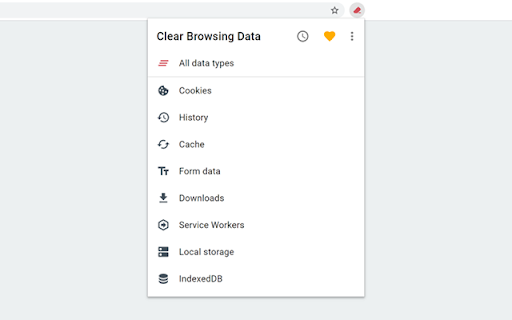

Delete browsing data directly from the browser toolbar. Clear cookies, history and cache with a single click. Clear Browsing Data is a browser extension which enables you to delete browsing data, such as cookies, history and cache, directly from the browser toolbar. The toolbar button can be configured to clear all browsing data with a single click, or to show a list of data types available for clearing. Clear Browsing Data is an open source project made possible thanks to a community of awesome supporters. If you'd like to support the continued development of the extension, please check out https://armin.dev/go/patreon The extension also supports closing and reloading tabs, these features can be configured from the extension's options. Supported data types: • Cookies • Browsing history • Cached images and files • Cache storage data • Autofill form data • Download history • Service Workers • Local storage data • IndexedDB data • Web SQL data • Website file systems • Application Cache The data types and their order can be customized from the extension's options. The extension is also available for Edge and Firefox: https://github.com/dessant/clear-browsing-data#readme The developer does not collect any personal data from this extension, visit the extension's privacy policy for more information. Reviews are not monitored for bug reports, please use GitHub for issues and feature requests.

Clear History & Web Cache
Clear your browser history, cache and cookies for Google Chrome in just one click! Clear History and Web Cache is a useful plug-in that helps you quickly clear data from Google Chrome. This helps remove all traces of your online activities to protect your privacy. ★ Clear browsing data from your user profile. ★ Make your Google Chrome browser faster and protect your personal data! ★ This extension supports Chrome 19 and later. ★★★ Main Features ★★★ ★ Instant removal of cache, history, cookies and much more with one click ★ Clear Chrome History ★ Clear download history ★ Clear cache ★ Delete cookies and other sites and plugin data ★ Clear saved passwords ★ Clear saved form data ★ Ability to select a period of time to clear the cache ★ This software is 100% free and does not require payment. Enjoy browsing the web faster if you use Clear History & Web Cache

Delete Browsing History
Quickly clear browsing history or delete search history in a single click with this extension for Chrome. Delete browsing history is a powerful chrome extension that allows you to effortlessly clear all or the specific browser data in just two clicks. It's an indispensable tool for every Chrome user, ensuring secure and smooth searching. 🔥Browsing history delete: You can clear search history, clear cache and clear cookies, it stands as an all-encompassing solution for a cleaner, faster browser experience. 🚀 Quick and Easy Usage: Click on the delete browser history icon to access the control panel. Choose to clear all or clear specific data. 💻 Key Features: 💡 Delete search history chrome: Conveniently erase your entire data or just parts of it. 💡 Cache cleaner: Rapidly clear cache to optimize browser space and enhance performance. 💡 Cookie cleaner: Easily clear cookies to safeguard your privacy. 💡 User-Friendly Interface: A straightforward and intuitive interface simplifies managing your browser data. 💡 Performance Boost: Enhance your browser’s speed by routinely clearing broswer data. ❇️ How it Works: Delete browsing data employs advanced algorithms to manage your data effectively. A few clicks are all it takes to erase your digital footprints, maintaining the privacy of your online activities and keeping your browser quick and responsive. 📒 Detailed Introduction to clear browser history: This Chrome extension is crafted to offer a swift and efficient means of managing your digital footprint. Whether it's quickly clear history from browser before a meeting, preserving privacy on a shared computer, or simply ensuring your browser's optimum performance, delete browsing data is the tool you need. 🔥 Main Advantages: 1. Intuitive interface for straightforward navigation. 2. Quick process to clear search history in just two clicks. 3. Options to delete cache and cookies, enhancing your privacy. 4. Negligible impact on browser performance. 5. Settings can be customized to align with your browsing habits. 6. Guarantees privacy and security during your internet sessions. ⚙️ Specific Functions of delete browsing history: ➤ Boost Browser Performance: Accumulated browser data can slow down your browser. Use it to delete google search history chrome and clear cache and cookies efficiently, enhancing your browser's speed and responsiveness. Say goodbye to sluggish browsing! ➤ User-Friendly Experience: Designed for simplicity, delete search history offers a user-friendly interface. Effortlessly clear browsing data and delete google search history on Google Chrome with just a couple of clicks. ➤ Master Cookie Control: Take charge of your online privacy by managing cookies effectively. Delete browsing data in chrome allows you to easily delete cookies, ensuring your personal data is not stored longer than necessary. ➤ Enhanced Privacy: Each web session leaves digital traces. Clear browsing history ensures that erasing all your browsing data is a hassle-free process, providing an added layer of security, especially for public or shared computers. ➤ Flexible Cleaning: Whether you need to google history delete all or just the data from the last hour, delete history offers customizable options to suit your needs. 🧑💻 Getting Started: Install delete browsing history from the Chrome Web Store. Access the extension with a click. Select your preferred clearing options and execute with another click. Revel in a cleaner, faster, and more secure browsing experience. ❓ Frequently Asked Questions about delete browsing history chrome: 📌 Is it free? Yes, it’s entirely free, providing all features without any charges. 📌 How to delete search history? By enabling you to history search delete, it ensures your online activities stay private, especially on shared or public computers. 📌 Will delete browsing history google slow my browser? No, it's specifically designed to improve your browser's performance by eliminating unnecessary data. This Chrome extension is a vital tool for anyone looking to manage their digital footprint effectively. Whether it's for maintaining privacy on shared computers, clearing data for security reasons, or just to keep your browser running smoothly, clear search history is your go-to solution. 🌐 Experience delete browsing data in chrome today: Enhance your broswer performance with increased privacy and efficiency. Download delete browsing data now for secure, optimized internet usage.

Self-Destructing Cookies
Delete cookies when browser is closed or once the tab is closed to prevent tracking This extension aims to bring "Self-Destructing Cookies" extension written by "Ove" to Chromium browsers. The extension supports two modes to deal with cookies: 1. "session" mode: delete cookies once the current session is closed (all browser windows are closed). 2. "tabs" mode: delete cookies related to the current tab once the tab is closed and there are no other tabs of the same domain. Extra Features: This extension lets you create an exception list for individual hostnames or entire domains including all their subdomains. You can add one or multiple sites either via the right-click context menu or through the options page. It uses the flexible "URLPattern" system, allowing custom patterns to prevent cookie deletion. Additionally, the extension lets you delete all cookies for the current page or all cookies across the browser. This option is available from the right-click menu and works even if the extension is temporarily disabled by left-clicking the action button. Example: Let's say you are logged-in into your email account: In "session" mode, you will be logged-in until all browser tabs are closed. In "tabs" mode, you will be logged-out once all email tabs are closed. So if you have two email tabs opened and still one tab is open, you are still logged-in. Once the other tab is closed, you will get logged-out Note: the extension does not support cleaning "window.localStorage" at this moment. I will work on that later! To report bugs please use the review section of the FAQs page

Browser Cleaner
Easily clear your browser's data and speedup browsing via toolbar popup. Browser Cleaner is an extension that help you easily clear browsing-data via toolbar popup UI. All the available options are listed in toolbar popup, but, the number is dependent on your browser and platform. Simply mark a desired item, and then click on the big - eraser - button at the top. When the cleaning process ends, a desktop notification will notify you that the browser data has been cleared. Note: None of the browsing-data items are selected by default. You need to open toolbar popup and select at least one item to start working with this addon. Moreover, the extension interface supports dark mode. To switch the interface theme to dark, please press the moon icon on the top-left toolbar. To report bugs, please fill out the bug report form on the addon's homepage (https://mybrowseraddon.com/browser-cleaner.html).
