
ebkgbelhceegbopgnfocmlcmnphbjgpc
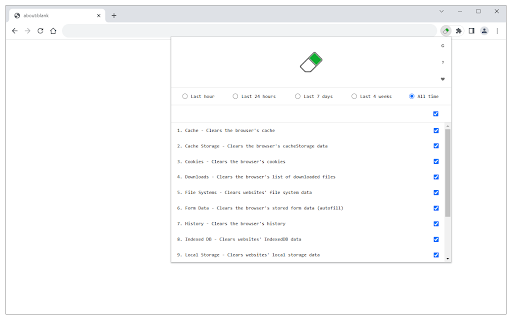
Easily clear your browser's data and speedup browsing via toolbar popup. Browser Cleaner is an extension that help you easily clear browsing-data via toolbar popup UI. All the available options are listed in toolbar popup, but, the number is dependent on your browser and platform. Simply mark a desired item, and then click on the big - eraser - button at the top. When the cleaning process ends, a desktop notification will notify you that the browser data has been cleared. Note: None of the browsing-data items are selected by default. You need to open toolbar popup and select at least one item to start working with this addon. Moreover, the extension interface supports dark mode. To switch the interface theme to dark, please press the moon icon on the top-left toolbar. To report bugs, please fill out the bug report form on the addon's homepage (https://mybrowseraddon.com/browser-cleaner.html).

Clear History & Web Cache
Clear your browser history, cache and cookies for Google Chrome in just one click! Clear History and Web Cache is a useful plug-in that helps you quickly clear data from Google Chrome. This helps remove all traces of your online activities to protect your privacy. ★ Clear browsing data from your user profile. ★ Make your Google Chrome browser faster and protect your personal data! ★ This extension supports Chrome 19 and later. ★★★ Main Features ★★★ ★ Instant removal of cache, history, cookies and much more with one click ★ Clear Chrome History ★ Clear download history ★ Clear cache ★ Delete cookies and other sites and plugin data ★ Clear saved passwords ★ Clear saved form data ★ Ability to select a period of time to clear the cache ★ This software is 100% free and does not require payment. Enjoy browsing the web faster if you use Clear History & Web Cache

Privacy Guard & Manager
Easily control settings in your browser to improve your privacy. Privacy Guard & Manager is a browser extension that helps you increase your privacy by adjusting a few privacy settings in your browser. Please open the toolbar popup UI to see the list of available settings (around 15 items in total depending on your browser version). Each set has a drop-down list; click on the list to choose the desired value for that item. Once an item is changed, it will be saved to the memory automatically. Moreover, when you hover on any item within the toolbar popup, a description is shown at the bottom of the UI. Please read this description before changing any option. Note: you may see less/more than 15 items in the popup. This is due to the browser or OS version. Some items may become available or be removed in the future updates of your browser. Note: To report bugs, please fill the bug report form on the addon's homepage (https://mybrowseraddon.com/privacy-guard.html).

Security Tweaks
Improve your online security with few tweaks via toolbar popup! Security Tweaks is an extension that helps you improve your security while browsing by using eight different techniques. Simply open toolbar popup UI and mark a desired tweak. Please note that, only few tweaks are selected by default. There are few settings (related to JavaScript, inline-script and cookie) available in toolbar popup to adjust. Currently there are 8 tweaks available for this add-on: 1. Block most common ads. 2. Block third-party JavaScript. 3. Enable safe-browsing. 4. Block cookies. 5. Block inline-script. 6. Block Flash contents. 7. Disable window.eval(). 8. Block most common malware URLs. Note 1: I have made this extension with Yubi's collaboration. This add-on is inspired by Speed Tweaks made by Yubi: https://chrome.google.com/webstore/detail/speed-tweaks/afebilemcaepdkmhmibgmnpfppnjimjf Note 2: to report bugs, please fill the bug report form in the addon's homepage (https://mybrowseraddon.com/security-tweaks.html).

History Cleaner
A single-click browser history cleaner. You can wipe your browser history for a configurable period. This extension is the simplest method to clear your browser history for a specific time frame. You have the flexibility to set a custom period through the options page, as well as define the zone for which you wish to delete the history data. For a more thorough cleaning experience, try out my eCleaner: https://chrome.google.com/webstore/detail/ecleaner-forget-button/ejhlpopncnfaaeicmbdnddebccnkfenn With this extension, you can delete the history from three distinct contexts: 1. Regular websites 2. Protected websites (Websites installed as hosted applications) 3. Extensions zone (Installed extensions and packaged applications) Modes of Operation: 1. Using the User Interface (UI): Click on the browser action, choose the desired cleaning period, and press the "Run Cleaning" button. 2. Headless Mode (Single Click): Select the "Do not show this window" option after opening the interface. From then on, when you click on the browser action, the extension will automatically run the cleaning job in headless mode. Frequently Asked Questions (FAQs): - How can I restore the interface in headless mode? Open the options page and uncheck the "Do not show this window" option.
