
ginpbkfigcoaokgflihfhhmglmbchinc
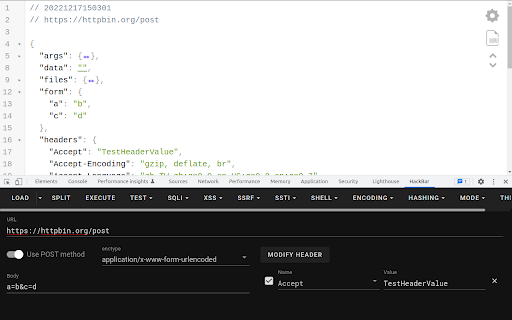
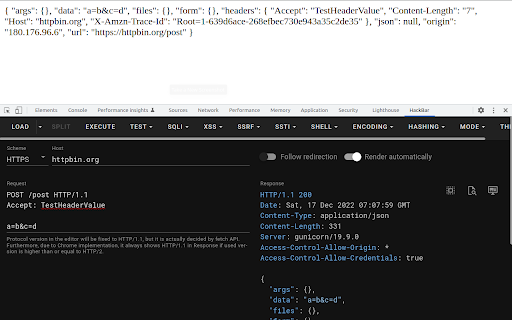
A browser extension for Penetration Testing * Supported * HTTP methods * GET * POST * application/x-www-form-urlencoded * multipart/form-data * application/json * Request editing mode * Basic * Raw * Custom payload * For more information, please visit https://github.com/0140454/hackbar/blob/master/README.md * XSS * Vue.js XSS payloads * Angular.js XSS payloads for strict CSP * Some snippets for CTF * Html encode/decode with hex/dec/entity name * String.fromCharCode encode/decode * Helper function for converting payload with `atob` For more information, please visit https://github.com/0140454/hackbar#third-party-libraries

Shodan
The Shodan plugin tells you where the website is hosted (country, city), who owns the IP and what other services/ ports are open. The Shodan plugin for Chrome automatically checks whether Shodan has any information for the current website. Is the website also running FTP, DNS, SSH or some unusual service? With this plugin you can see all the info that Shodan has collected on a given website/ domain.

Pulsedive Threat Intelligence
Highlight IPs, domains, and URLs on any website to enrich them using Pulsedive's threat intelligence. Streamline real-time threat research and analysis on any website you visit with Pulsedive’s threat intelligence browser add-on. Highlight IPs, domains, URLs, or threat names in any website text to enrich them using Pulsedive's free Community dataset. Get immediate, up-to-date context when reading cybersecurity news and threat advisories, or exploring threat intelligence collections and research. Create a free account at pulsedive.com for increased limits and additional capabilities. – FEATURES: • Indicator Lookup - highlight text around an IP, URL, or domain to enrich with contextual data from Pulsedive, including associated threats, screenshots, ports, protocols, web technologies, HTTP headers, meta tags, WHOIS data, and much more • On-Demand Scans - perform real-time passive or active scans on IPs, domains, and URLs to fetch live data • Bulk Processing - highlight text containing hundreds or thousands of indicators to parse and refang in bulk, download them as a CSV, and submit to Pulsedive Analyze for bulk enrichment • Threat Research - look up threat names and aliases to retrieve threat summaries, associated indicators, TTPs, latest news, and additional context • Website Enrichment - click the add-on button without highlighting text to retrieve domain information for the website you're visiting • Mute Options - reduce noise by easily muting the auto-popup temporarily or on specific sites • Flexible Controls - adjust the add-on settings to control when, where, and how Pulsedive parses threat intelligence information • Quick Pivoting - convenient one-click pivot to the Pulsedive Community platform at pulsedive.com for further analysis – WHAT'S NEW - VERSION 3: The latest update introduces bulk indicator processing, advanced settings & controls, and an improved user experience and interface. • Dark mode • Free-text parsing for IPs, URLs, and domains • Bulk indicator processing • Muting/unmuting and website exclusions • Usage guide in Settings page • Fixed punycode domain support • Fixed various CSS conflicts with injected popup – Pulsedive offers frictionless threat intelligence solutions for growing teams. The Pulsedive Community platform at pulsedive.com aggregates, enriches, and correlates community threat data to support analyst workflows and time to action. With 50M+ searchable indicators and threats collected from user submissions and feeds, the Pulsedive add-on delivers invaluable context wherever you work.

DotGit
An extension for checking if .git is exposed in visited websites An extension for checking if .git is exposed in visited websites - Check if a .git/.svn/.hg folder exists for each site you visit - Check if a .env file exists for each site you visit - Check if a .DS_Store file exists for each site you visit - Check if the site is open source (github/gitlab) - Check if the site has security.txt - You will be notified when a folder is found - List of exposed sites found - Download the entire .git folder in zip format, even if the files are not listed on the site - View .git/config with one click - Options for: colors, notifications and downloads Some checks are turned off by default, open the settings to turn them on Source code: https://github.com/davtur19/DotGit

Ctool Commonly Used Software Development Tools
Commonly Used Software Development Tools: Hash/Encrypt/Decrypt/Code Convert/Timestamp/Qrcode/IP Query/Code… ## 功能列表 |功能|说明|离线使用 | |--------------|-------------------------------------------------------------------------------------------------------------------------------|------| |哈希|`md5`, `sha1`, `sha256`, `sha512`,`sm3`,`批量处理`,`支持文件` |√| |加密/解密|`AES`,`DES`,`RC4`,`Rabbit`,`TripleDes`,`sm2`,`sm4`|√| |BASE64编码 |`加密`,`解密`,`支持文件`|√| |URL编码|`编码`,`解码` |√| |时间|`时间戳双向转换`,`毫秒` ,`时区`,`时间计算器`|√| |二维码|`生成`,`解析` |√| |条形码|`生成` |√| |汉字转拼音|`声调`,`首字母`,`分隔符`|√| |IP地址查询 |`运营商`,`城市`|×| |代码格式化|`js`, `ts`, `html`, `css`, `less`, `scss`, `graphql`, `vue`, `angular`, `markdown`, `json5`, `xml`, `yaml`, `sql`, `压缩` |√| |Unicode|`双向转换`,`emoji`,`html 实体`,`css 实体` |√| |进制转换 |`2-64进制`|√| |正则表达式|`匹配`,`查找`,`替换` |√| |随机字符生成器|`批量`,`特殊字符` |√| |序列化转换|`json`, `xml`, `yaml`, `phpArray`, `phpSerialize`, `properties`|√| |文本差异化对比|`行`,`单词`,`css` |√| |crontab校验|`Crontab`,`规则`,`校验`,`例子` |√| |websocket调试 |`websocket`,`在线调试` |×| |单位换算 |`长度`,`面积`,`体积`,`质量`,`温度`,`压力`,`功率`,`功`,`密度`,`力`,`时间`,`速度`,`数据存储`,`角度` |√| |时间计算器|-|√| |JSON工具 |`格式化`,`校验`,`压缩`,`转义`,`去除转义`,`Unicode转中文`,`中文转Unicode`,`转GET参数`,`Java`, `C#`, `Go`, `Dart`,`csv`,`table`,`Protobuf`,`jsonpath` |√| |UUID |`在线生成uuid`|√| |ascii编码转换|`十进制`, `十六进制`, `八进制`, `二进制`, `字符串`|√| |变量名格式转换|`Var Name`, `var-name`, `VAR_NAME`, `VarName`, `varName`, `var_name`, `var name` |√| |jwt解码|`header`, `payload`|√| |Hex/String转换 |`hex to string`, `string to hex`, `十六进制转字符串`, `字符串转十六进制`|√| |Hex/Base64转换 |`hex to Base64`, `Base64 to hex`|√| |文本处理 |`大小写转换`, `中英文标点转换`, `简繁转换`, `替换`, `字符统计`, `行去重`, `添加行号`, `行排序`, `过滤行首尾不可见字符`,`过滤空行`|√| |html编码 |-|√| |原码/反码/补码 |`生成` |√| |ARM/HEX|`互转` |×| |Bcrypt |`加密`,`验证` |√| |IP网络计算器|`子网掩码各个进制表示换算,IP地址进制表示换算` |√| |SQL参数填充|`Mybatis打印SQL的参数填充`|√| 问题反馈: 使用过程中的任何问题或者需要新的工具欢迎反馈,新工具如果可以提供实现代码就完美了O(∩_∩)O 反馈途径:https://github.com/baiy/Ctool
