
giihfpdmeapboodfloplndjkegmlfdma


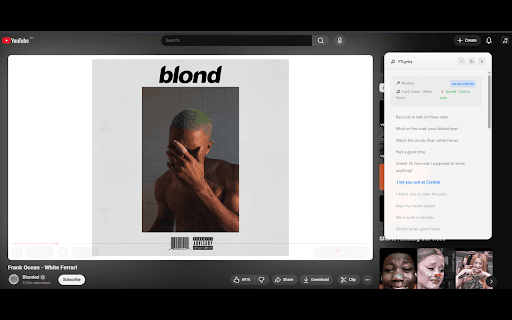
✨ Shows real-time synced lyrics on YouTube. A simple YouTube lyrics extension for music videos and songs. Transform your YouTube experience with instantly-detected, beautifully displayed, time-synced lyrics. You watch. We detect. Lyrics appear. Just like magic. 🌟 FEATURES (Everything You Want, Instantly) 🎵 AI-Powered Song Detection (Detects ANY song on YouTube) ⏱️ Real-Time, Auto-Synced Lyrics (Lyrics stay perfectly synced) 🌍Multilingual Lyrics Support (English, Korean, Japanese, Chinese, Malay and more) 🎤 Karaoke Mode (Follow along as each line highlights during playback.) 📌 Draggable Floating Popup (Move, resize, or dock the lyrics box anywhere on the screen.) 🪶 Lightweight & Zero Setup (Install → open YouTube → lyrics appear.) No login. No configuration. No extra dependencies. 🖥️ Fullscreen Compatible (Enjoy immersive lyrics while watching videos in fullscreen.) Install YT Lyrics Play ANY YouTube or YouTube Music video Lyrics instantly appear in a clean, floating window Skip or rewind — lyrics stay perfectly synced Drag or reposition the popup anywhere you like That’s it. Zero effort. Maximum convenience. 🔒 PRIVACY FIRST YTLyrics runs fully in your browser. No accounts required No accounts. No personal data collected 🚀 WHY USERS LOVE YTLYRICS ✔ Finally get lyrics for videos without finding in the comment section or description ✔ Handles underrated and niche songs that other tools miss ✔ Perfect for singing along, studying, or learning languages ✔ Makes YouTube feel like a premium music app Once you try YTLyrics, YouTube without lyrics will feel incomplete. ⭐ FEEDBACK & RATINGS If you enjoy YT Lyrics, your feedback means everything. It helps the extension grow and reach more people. ✨ Please consider leaving a rating or review on the Chrome Web Store. It takes a few seconds and helps support future updates. If you spot bugs or want features, feel free to leave a note in the reviews — we actually read every single one.

LyricYT
Sing along to YouTube videos with on-screen lyrics. Free, lightweight, and 100% offline. LyricYT is a free and lightweight Chrome Extension that displays synchronized on-screen lyrics for YouTube videos. Perfect for karaoke, language learning, or simply following along with the words as you watch. Manual Lyrics Input - Paste or type lyrics manually for any video - Save lyrics locally for specific videos - Clean and simple editing interface Dual Display Modes - Side Panel: Resizable panel beside the video - Overlay Mode: Floating lyrics displayed directly over the video (karaoke-style) Customization Options - Adjust font size, color, alignment, and spacing - Fine-tune padding, border radius, and line height - Separate preferences for each mode - Drag and reposition overlay freely Smart Auto-Scroll - Optional scrolling synchronized with video playback - Adjustable speed and smooth 60fps animation - Manual scroll always available Offline and Private - 100% local storage — nothing is uploaded or shared - Works entirely offline after installation - No login, no tracking, no data collection Perfect For - Karaoke and sing-along sessions - Learning new languages through music - Following lyrics for better understanding - Content creators reviewing lyric timing - Non-native speakers watching subtitled videos How It Works 1. Install the LyricYT extension 2. Open any YouTube video 3. Click the LyricYT icon in your Chrome toolbar 4. Choose how to load lyrics: - “Load from Captions” to extract from the video - “Manual Input” to paste your own lyrics 5. Choose display mode (Side Panel or Overlay) 6. Customize style and enable auto-scroll if desired Once set up, lyrics will appear automatically when you open the same video again. Privacy and Security - All lyrics and settings are stored locally in your browser - No external servers or tracking scripts - No login required - Fully transparent and privacy-focused Technical Details - Built on Manifest V3 (latest Chrome standard) - Lightweight and fast performance - Uses native Chrome APIs for reliability - Developed with TypeScript, React, and Tailwind CSS Contact Us For questions, feedback, or privacy concerns: LinkedIn: Amri Pangestu Support the Developer Buy Me a Coffee: buymeacoffee.com/amri_ Trakteer Indonesia: trakteer.id/amri_/tip

YouTube Karaoke Mode - Synced Lyrics
Transform YouTube into a Karaoke machine. Features synchronized lyrics, drag-and-drop UI, and instrumental detection. Lyrics Mode brings a native, premium lyric experience to your favorite music videos. Designed to feel like a built-in feature, it automatically finds and displays perfectly timed lyrics without getting in your way. Designed for the music Choose how you want to read. Switch between an immersive, semi-transparent karaoke overlay that previews the next line, or a minimalist classic text view that floats cleanly over the video. You are in complete control of the experience. Freely positionable: Drag and drop the lyrics anywhere on your screen. Precision sync: Audio slightly off? Use the timing slider to nudge the lyrics forward or backward by the millisecond. Custom aesthetics: Adjust the text size and choose from five highly legible, high-contrast colors. The overlay works intelligently with YouTube. It automatically hides itself when an ad plays and seamlessly reappears the moment your music resumes. It even recognizes instrumental tracks automatically. Your data remains yours. Lyrics Mode does not track your browsing history or collect personal information. It operates strictly on your device, only reading the current video title to fetch the appropriate lyrics. The project is completely open-source and verifiable.

Better Lyrics (Lyrics for Youtube Music)
Enhance YouTube Music with beautiful time-synced lyrics, multilingual support, real-time translations and more Better Lyrics upgrades your YouTube Music experience by providing beautiful time-synced lyrics for your favorite songs ✨ 🌟 Join our Discord for Priority Feature Requests, DevLogs & Suggestions 🌟 🎵 Displays beautiful time-synced lyrics on YouTube Music 📦 Requires no external dependencies or configurations ⏩ Lets you seek by clicking on any line 🌏 Supports multiple languages 🪶 Runs lightweight and fast 🖥️ Includes full-screen mode ✨ And much more! Open YouTube Music and start playing a song. Click on the lyrics tab to view time-synced lyrics. (This might take a few seconds to load) Click on a specific line to seek to that part of the song. For more details, check out our Github README (https://github.com/boidushya/better-lyrics/blob/master/README.md)

YouTube Lyrics
Get lyrics for any music video on YouTube. Tired of looking for lyrics on the comment section? Get synced lyrics right next to the video player on YouTube. ⚠️ THE EXTENSION NO LONGER WORKS FOR FREE SPOTIFY USERS!!! ⚠️ You must be logged into a Spotify Premium account for the extension to work; ⚠️ After installing and making sure you are logged into Spotify, you must refresh any YouTube video page before using the extension. 🧰 Features: • Fixed button on the top right corner of the page to bring up the lyrics overlay; • Hide the overlay at any point by clicking the close button (X), the lyrics will stay in sync if you bring them up again; • Resize the overlay from handle at the bottom right corner; • Move the overlay by dragging its header; • Advance or delay the lyrics if they are out of sync by setting their offset; • Enable or disable the auto-scrolling feature with a single click; • Click on a line to jump to it on the video; • Search for the correct track in a matter of seconds if the extension chose the wrong one; • Lyrics and offset for a video are saved and persist refreshes. 💭 If you have any suggestions on how to improve the extension, leave a review. 🔄 Changelog: • 0.3.3: • Fixed readability issues. • Fixed pill not showing up when the user navigates directly to a video page.
