
kpmiacnpajcnngpppplijmakhjjgeimi
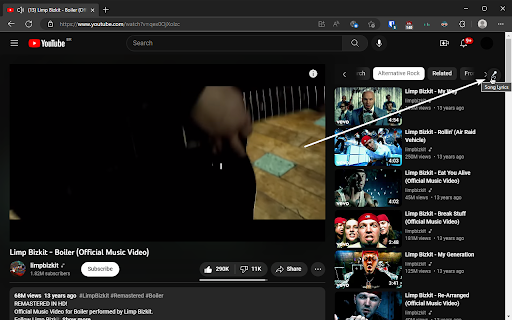
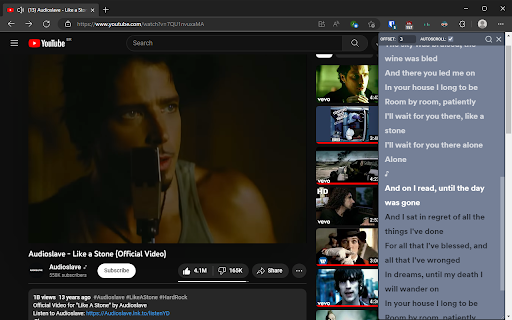
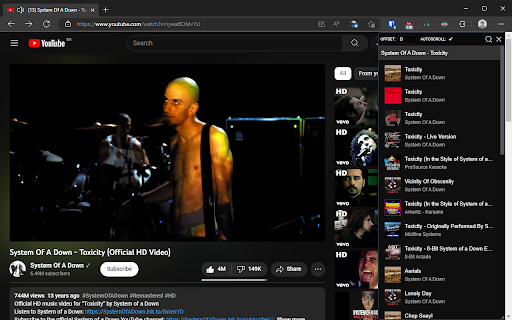
Get lyrics for any music video on YouTube. Tired of looking for lyrics on the comment section? Get synced lyrics right next to the video player on YouTube. ⚠️ THE EXTENSION NO LONGER WORKS FOR FREE SPOTIFY USERS!!! ⚠️ You must be logged into a Spotify Premium account for the extension to work; ⚠️ After installing and making sure you are logged into Spotify, you must refresh any YouTube video page before using the extension. 🧰 Features: • Fixed button on the top right corner of the page to bring up the lyrics overlay; • Hide the overlay at any point by clicking the close button (X), the lyrics will stay in sync if you bring them up again; • Resize the overlay from handle at the bottom right corner; • Move the overlay by dragging its header; • Advance or delay the lyrics if they are out of sync by setting their offset; • Enable or disable the auto-scrolling feature with a single click; • Click on a line to jump to it on the video; • Search for the correct track in a matter of seconds if the extension chose the wrong one; • Lyrics and offset for a video are saved and persist refreshes. 💭 If you have any suggestions on how to improve the extension, leave a review. 🔄 Changelog: • 0.3.3: • Fixed readability issues. • Fixed pill not showing up when the user navigates directly to a video page.

Video to MP3
Convert any video to MP3 audio. Extract high-quality music and audio tracks with one click. Fast, free, and easy to use. Video to MP3 is the easiest way to extract audio from online videos and save it as high-quality MP3 files. Whether you want to save music, podcasts, lectures, or any other audio content, Video to MP3 handles it all with a single click. Video to MP3 lets you extract the audio track from any supported video and convert it to MP3 format. Instead of keeping large video files when you only need the audio, use Video to MP3 to get just the sound. Perfect for building your music library, saving podcast episodes, archiving lectures, or capturing any audio you want to listen to offline. With Video to MP3, the original audio quality is preserved during extraction. You get clean, high-fidelity MP3 files ready for any music player, phone, or device. No re-encoding losses, no quality degradation — just pure audio extracted directly from the source. Video to MP3 supports all popular video platforms, making it your universal audio extraction tool. 🔘 One-Click MP3 Extraction — Video to MP3 adds a convenient button right on the page. Click it, and the audio extraction begins immediately. No complicated menus or settings to configure. 🎶 High-Quality Audio Output — Get MP3 files with the best available bitrate. Video to MP3 preserves the original audio quality so your music and recordings sound exactly as intended. ⚡ Fast Conversion Speed — Our powerful backend processes your MP3 conversion quickly. Video to MP3 uses optimized servers to extract audio in seconds, not minutes. Even long recordings are processed efficiently. 💻 No Software Installation Required — Video to MP3 works entirely in your browser. No desktop applications to download, no plugins to install, no system resources consumed. Just add the extension and start extracting MP3 audio. 📊 Real-Time Progress Tracking — Watch your MP3 conversion in real time. Video to MP3 shows you exactly how far along the extraction is, with progress percentage and estimated time remaining. 🌐 Multi-Language Support — Video to MP3 is available in 10 languages including English, Spanish, French, German, Portuguese, Chinese, Japanese, Korean, Turkish, and Russian. Use it in your preferred language. 📁 Smart File Naming — Every MP3 file is automatically named after the original video title. Video to MP3 keeps your audio library organized without manual renaming. 🔒 Secure Processing — All audio extraction through Video to MP3 happens over encrypted connections. Your data stays private and secure throughout the entire MP3 conversion process. 1️⃣ Navigate to any supported video page in your browser. 2️⃣ Click the Video to MP3 icon in your toolbar. The extension will detect the available audio tracks. 3️⃣ Press the "Convert to MP3" button. Video to MP3 will begin extracting the audio and show you the conversion progress. 4️⃣ Once complete, your MP3 file downloads automatically. Open it in any music player and enjoy your audio offline. Video to MP3 respects your privacy. We do not collect personal data, browsing history, or track your activity. The extension only activates when you choose to extract audio from a video. No background processes, no analytics, no data harvesting. Your MP3 conversions are processed through secure, encrypted connections and files are automatically deleted from our servers shortly after download. Video to MP3 does not require unnecessary permissions. We only request the minimum access needed to detect videos and perform audio extraction. Video to MP3 is built for speed and reliability. Our dedicated processing servers ensure your MP3 extractions complete quickly, even during peak usage. The extension is lightweight and does not slow down your browser or consume excess memory. Automatic retry logic means that if a conversion encounters a temporary issue, Video to MP3 will handle it gracefully. You get your MP3 file without manual intervention. Video to MP3 ensures a smooth experience from start to finish. ✅ Truly one-click operation — no complicated setup ✅ Best available audio quality preserved in every MP3 ✅ Fast cloud-based conversion — no load on your computer ✅ Clean, intuitive interface anyone can use ✅ Works on all Chromium-based browsers (Chrome, Edge, Brave, Opera) ✅ Regular updates to ensure compatibility ✅ Completely free with no hidden fees ✅ Lightweight — no impact on browsing speed ✅ Automatic file cleanup for your privacy ✅ Active development and support ✅ Trusted by thousands of users worldwide Video to MP3 is the smart choice for anyone who wants to extract audio from videos without hassle. Try it today and build your MP3 collection effortlessly. Install Video to MP3 now and start saving audio from your favorite videos!

Copy Youtube Transcript
Copy YouTube video transcripts with one click. Copy Youtube Transcript lets you instantly copy or download video transcripts with a single click. 🎯 MAIN FEATURES: • One-click transcript copying • Clean, formatted output • Works with regular YouTube videos and Shorts • Customisable formatting options • Dark mode support • Optional AI summary prompt for easy content analysis 🔍 PERFECT FOR: • Students taking notes • Researchers analysing content • Content creators repurposing videos • Anyone who needs quick access to video transcripts • AI/LLM users seeking structured input 💡 HOW TO USE: 1. Open any YouTube video with captions 2. Click the extension icon 3. Click "Copy to Clipboard" 4. Paste anywhere you need! ✨ SIMPLE, FAST, AND RELIABLE: • Clean, modern interface • No ads or tracking • Works offline once loaded • Respects your privacy • Lightweight and fast Note: This extension requires videos to have captions/transcripts available on YouTube.

YouTube Lyrics Extension – Real-Time Synced Lyrics | YT Lyrics
✨ Shows real-time synced lyrics on YouTube. A simple YouTube lyrics extension for music videos and songs. Transform your YouTube experience with instantly-detected, beautifully displayed, time-synced lyrics. You watch. We detect. Lyrics appear. Just like magic. 🌟 FEATURES (Everything You Want, Instantly) 🎵 AI-Powered Song Detection (Detects ANY song on YouTube) ⏱️ Real-Time, Auto-Synced Lyrics (Lyrics stay perfectly synced) 🌍Multilingual Lyrics Support (English, Korean, Japanese, Chinese, Malay and more) 🎤 Karaoke Mode (Follow along as each line highlights during playback.) 📌 Draggable Floating Popup (Move, resize, or dock the lyrics box anywhere on the screen.) 🪶 Lightweight & Zero Setup (Install → open YouTube → lyrics appear.) No login. No configuration. No extra dependencies. 🖥️ Fullscreen Compatible (Enjoy immersive lyrics while watching videos in fullscreen.) Install YT Lyrics Play ANY YouTube or YouTube Music video Lyrics instantly appear in a clean, floating window Skip or rewind — lyrics stay perfectly synced Drag or reposition the popup anywhere you like That’s it. Zero effort. Maximum convenience. 🔒 PRIVACY FIRST YTLyrics runs fully in your browser. No accounts required No accounts. No personal data collected 🚀 WHY USERS LOVE YTLYRICS ✔ Finally get lyrics for videos without finding in the comment section or description ✔ Handles underrated and niche songs that other tools miss ✔ Perfect for singing along, studying, or learning languages ✔ Makes YouTube feel like a premium music app Once you try YTLyrics, YouTube without lyrics will feel incomplete. ⭐ FEEDBACK & RATINGS If you enjoy YT Lyrics, your feedback means everything. It helps the extension grow and reach more people. ✨ Please consider leaving a rating or review on the Chrome Web Store. It takes a few seconds and helps support future updates. If you spot bugs or want features, feel free to leave a note in the reviews — we actually read every single one.

YouTube To Text
🚀 Quick Start Tips 1. Install extension by button “Add to Chrome” 2. Open any youtube video 3. Click button “Transcribe video” 4. Get youtube transcript with time codes! Here are 🔟 reasons to choose Youtube to Text 1️⃣ Transcribe and convert YouTube videos to text format 2️⃣ Explore and search through the textual content to quickly find the information you need 3️⃣ Supporting multiple languages, you can even transcribe videos with captions or automatically generated subtitles 4️⃣ Save transcriptions, create playlists, and organize your textual content for easy access 5️⃣ Create сlosed сaptions for improved accessibility 6️⃣ For language learners, youtube to text is an excellent tool for practicing listening and reading skills. 7️⃣ No ads and respect your privacy 8️⃣ Easy to use 9️⃣ Find the right moment in the video through text search 🔟 Powerful features special designed for work and educational scenarios 📝Save Your Time ➤ As a content creator, time is precious. The extension streamlines your workflow by providing an accurate transcription of your YouTube videos. Use the transcript as a foundation for editing or repurposing content, saving you hours of manual transcribing and ensuring your messaging is on point. ➤ The youtube to text is perfect for anyone who needs to transcribe YouTube videos on a regular basis. Whether you're researcher, or student, this extension will save you time and effort by automatically converting your videos into text format. ➤ The process of transcribing a YouTube video to text is simple with this extension. Once installed, all you need to do is open the YouTube video you want to transcribe and click on the Youtube to text icon in your browser. The extension will then automatically start transcribing the video into text format 📈 Boost Accessibility and Reach ➤ Captions and transcripts are crucial for enhancing accessibility and catering to a diverse audience. By converting YouTube videos into accurate text transcripts, the Youtube to Text enables you to add subtitles or captions to your videos with ease. Reach a wider audience and make your content available to individuals who are deaf, hard of hearing, or prefer to consume content in a text-based format. 📖 Learn from the Best ➤ With the Youtube to Text, you can gain valuable insights from industry experts, thought leaders, and influencers. Transcribe their captivating talks, interviews, and presentations to capture their wisdom and knowledge in a textual format. Get inspired, learn new skills, and emerge as a motivated and informed individual. ➤ Converting YouTube videos to text transcripts opens up a whole new world of possibilities. With the ability to search for specific keywords, phrases, or quotes within the transcript, you can quickly locate and extract valuable information. Uncover new insights, gather research data, or spark creativity by analyzing and referencing the content within the transcript. 🖥️ Enhance Video SEO ➤ Did you know that transcribed content can significantly improve the search engine optimization (SEO) of your YouTube videos? With the Youtube to Text, you can convert your videos to text, generate keyword-rich transcripts, and maximize your visibility in search results. Drive more organic traffic to your channel and expand your online presence. 📂 Organize and Archive with Ease ➤ Text transcripts act as valuable reference materials, helping you organize and archive content effectively. Use the Youtube to Text to convert YouTube videos into text, and seamlessly integrate them into your personal knowledge base or external note-taking platforms. Access important information with a simple search, making knowledge retrieval a breeze. ❓ Frequently Asked Questions: 📌 How does is it work? 💡 YouTube to text is a Chrome extension that allows you to convert youtube videos to text format. By transcribing youtube video, it provides you with a textual representation of the video's content, making it easier to read and search for specific information. 📌 Can I use it for free? 💡 Yes, extension is available as a free Chrome extension 📌 How do I install? 💡 To install YouTube to Text, go to the Chrome Web Store and select "Add to Chrome". It will be added to your browser, and you can start using it. 📌 Can extension transcribe any YouTube video? 💡 Yes, It can transcribe and convert any YouTube video to text format. It supports multiple languages 📌 Is my privacy protected when using extension? 💡 Absolutely! Extension operates locally within your browser, ensuring the privacy and security of your personal information. It does not collect or store any user data. 📌 Are there any limitations to the length or number of videos I can transcribe? 💡 There are no specific limitations imposed by the extension on the length or number of videos you can transcribe. You can convert multiple videos, regardless of their duration. 🚀 The Youtube to Text may come with additional features and capabilities, so be sure to explore all the exciting possibilities available to you. If you have any questions or need assistance, reach out to us. Embrace extension, and let your transcription adventures begin!
