
pnhednfecbeledmccknejiahlmfbccfa

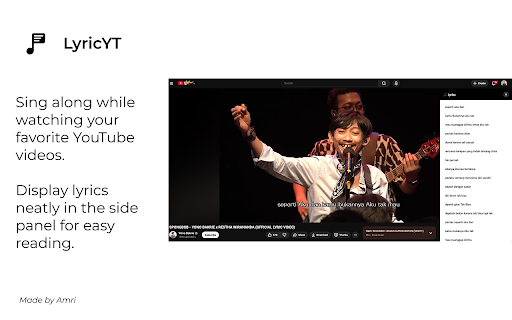


Sing along to YouTube videos with on-screen lyrics. Free, lightweight, and 100% offline. LyricYT is a free and lightweight Chrome Extension that displays synchronized on-screen lyrics for YouTube videos. Perfect for karaoke, language learning, or simply following along with the words as you watch. Manual Lyrics Input - Paste or type lyrics manually for any video - Save lyrics locally for specific videos - Clean and simple editing interface Dual Display Modes - Side Panel: Resizable panel beside the video - Overlay Mode: Floating lyrics displayed directly over the video (karaoke-style) Customization Options - Adjust font size, color, alignment, and spacing - Fine-tune padding, border radius, and line height - Separate preferences for each mode - Drag and reposition overlay freely Smart Auto-Scroll - Optional scrolling synchronized with video playback - Adjustable speed and smooth 60fps animation - Manual scroll always available Offline and Private - 100% local storage — nothing is uploaded or shared - Works entirely offline after installation - No login, no tracking, no data collection Perfect For - Karaoke and sing-along sessions - Learning new languages through music - Following lyrics for better understanding - Content creators reviewing lyric timing - Non-native speakers watching subtitled videos How It Works 1. Install the LyricYT extension 2. Open any YouTube video 3. Click the LyricYT icon in your Chrome toolbar 4. Choose how to load lyrics: - “Load from Captions” to extract from the video - “Manual Input” to paste your own lyrics 5. Choose display mode (Side Panel or Overlay) 6. Customize style and enable auto-scroll if desired Once set up, lyrics will appear automatically when you open the same video again. Privacy and Security - All lyrics and settings are stored locally in your browser - No external servers or tracking scripts - No login required - Fully transparent and privacy-focused Technical Details - Built on Manifest V3 (latest Chrome standard) - Lightweight and fast performance - Uses native Chrome APIs for reliability - Developed with TypeScript, React, and Tailwind CSS Contact Us For questions, feedback, or privacy concerns: LinkedIn: Amri Pangestu Support the Developer Buy Me a Coffee: buymeacoffee.com/amri_ Trakteer Indonesia: trakteer.id/amri_/tip

YouTube Video Transcript
Transcribe youtube videos to text with YouTube Video Transcript. Extract, download, and convert online video transcripts easily. 🔎 Looking for an effortless way to get transcript of video content? Our YouTube transcript extractor is here to help! Transform any video into a readable text format in seconds. Generate full transcript from YouTube video with just a click. Our extension simplifies the process, saving you valuable time and effort. ➤ Instant Transcription: Convert YouTube videos to text in seconds. ➤ Accurate Results: Our advanced YouTube transcript extractor ensures precise text conversion. ➤ User-Friendly Interface: Simple and intuitive, even for beginners. ➤ Multi-Language Support: Generate full transcripts from YouTube videos in multiple languages. ➤ Downloadable Texts: Get youtube video transcript for offline use or future reference. Whether you're a researcher, content creator, or student, this YouTube transcriber is perfect for you. Use it to: 1️⃣ Take Study Notes: Copy text from YouTube videos for study materials. 2️⃣ Create Content: Use YouTube video transcripts to develop blogs or scripts. 3️⃣ Enhance Accessibility: Convert YouTube video dialog to scripts for easy accessibility. 4️⃣ Extract Insights: Use the YouTube video script extractor for research and analysis. 🔹 Save time by getting the key points from lengthy videos. 🔹 Quickly review the main ideas without reading the full transcript. 🔹 Use summaries for research, note-taking, or creating study materials. 🔹 Improve productivity by focusing only on the most important information. With just a few clicks, you can extract transcripts. Here's how to get started: 1. Install the extension and open a YouTube video. 2. Click the extension icon and let it analyze the video. 3. Access the full transcript of the video in seconds. 4. Copy, save, or download the transcription for your needs. ✳️ Save hours of effort with automated YouTube transcripts. ✳️ Get accurate, word-for-word text for any video. ✳️ Convert YouTube video to text for accessibility or study. ✳️ Access a complete transcript of youtube video transcript, even for long content. ✳️ Extract YouTube transcripts without hassle. ❓ Q: How to get a transcript of a YouTube video? 👉 A: Simply install the extension, open your desired video, and let the YouTube transcript extractor do the work for you. ❓ Q: Can I transcribe YouTube video to text in multiple languages? 👉 A: Yes, the tool supports various languages, making it easy to get transcripts for diverse YouTube content. ❓ Q: Is it possible to download YouTube transcripts? 👉 A: Absolutely. You can download the transcript of YouTube videos for offline use. • No more struggling to extract transcript from YouTube. • Easily transcribe YouTube videos for documentation and accessibility. • Convert YouTube video dialog to scripts in real-time. • Generate full transcripts from YouTube videos for content creation. • Seamlessly copy text from YouTube videos for any purpose. 💥 How This Extension Stands Out ▸ Speed: Quickly generate a YouTube video to transcript without delays. ▸ Simplicity: A few clicks are all it takes to get a transcript of a YouTube video. ▸ Versatility: Perfect for students, professionals, researchers, and creators. ▸ Accessibility: Easily transcribe YouTube videos to text, enhancing accessibility for all. 💡 Use Cases for YouTube Video Transcription ☑️ Researchers can extract transcripts from YouTube to analyze data. ☑️ Educators can generate transcripts for YouTube videos to support learning materials. ☑️ Content creators can use YouTube video scripts for new projects. ☑️ Businesses can transcribe YouTube video to text for team collaboration. 💪 Unlock the Power of YouTube Transcripts With this Chrome extension, you can do more than just watch videos. You can transform them into actionable insights, study materials, and creative content. Whether you want to get a transcript for YouTube videos or convert YouTube dialog into text, this tool has got you covered. Don’t miss out on the opportunity to enhance your productivity. Download the extension now and experience the easiest way to transcribe YouTube videos to text. Get started today and discover the difference with this powerful YouTube video transcript generator.

YouTube Lyrics Extension – Real-Time Synced Lyrics | YT Lyrics
✨ Shows real-time synced lyrics on YouTube. A simple YouTube lyrics extension for music videos and songs. Transform your YouTube experience with instantly-detected, beautifully displayed, time-synced lyrics. You watch. We detect. Lyrics appear. Just like magic. 🌟 FEATURES (Everything You Want, Instantly) 🎵 AI-Powered Song Detection (Detects ANY song on YouTube) ⏱️ Real-Time, Auto-Synced Lyrics (Lyrics stay perfectly synced) 🌍Multilingual Lyrics Support (English, Korean, Japanese, Chinese, Malay and more) 🎤 Karaoke Mode (Follow along as each line highlights during playback.) 📌 Draggable Floating Popup (Move, resize, or dock the lyrics box anywhere on the screen.) 🪶 Lightweight & Zero Setup (Install → open YouTube → lyrics appear.) No login. No configuration. No extra dependencies. 🖥️ Fullscreen Compatible (Enjoy immersive lyrics while watching videos in fullscreen.) Install YT Lyrics Play ANY YouTube or YouTube Music video Lyrics instantly appear in a clean, floating window Skip or rewind — lyrics stay perfectly synced Drag or reposition the popup anywhere you like That’s it. Zero effort. Maximum convenience. 🔒 PRIVACY FIRST YTLyrics runs fully in your browser. No accounts required No accounts. No personal data collected 🚀 WHY USERS LOVE YTLYRICS ✔ Finally get lyrics for videos without finding in the comment section or description ✔ Handles underrated and niche songs that other tools miss ✔ Perfect for singing along, studying, or learning languages ✔ Makes YouTube feel like a premium music app Once you try YTLyrics, YouTube without lyrics will feel incomplete. ⭐ FEEDBACK & RATINGS If you enjoy YT Lyrics, your feedback means everything. It helps the extension grow and reach more people. ✨ Please consider leaving a rating or review on the Chrome Web Store. It takes a few seconds and helps support future updates. If you spot bugs or want features, feel free to leave a note in the reviews — we actually read every single one.

LumaLyrics – Real-Time Lyrics for YouTube Music, Karaoke Mode
Real-time synced lyrics for YouTube Music with karaoke mode, animated lyrics, customization, and light & dark themes. Turn your music into a visual experience. LumaLyrics for YouTube Music transforms the way you listen to songs by adding real-time synchronized lyrics directly inside YouTube Music. With smooth animations, karaoke-style timing, and customizable themes, every track becomes something you can see, feel, and follow. Whether you want to sing along, understand lyrics better, or simply enjoy a more immersive music session, LumaLyrics upgrades your entire listening experience. LumaLyrics automatically detects the song playing on YouTube Music and displays perfectly timed lyrics in sync with the track. Each word and line appears exactly when it should, creating a seamless karaoke-style experience. What you get: • Real-time synchronized lyrics • Automatic song detection • Smooth line-by-line and word-by-word timing • Perfect sync with music playback LumaLyrics uses dynamic kinetic typography to animate lyrics in sync with the rhythm of the music. Words move, scale, and transition smoothly, turning each song into a visual performance. This creates a more engaging and expressive way to experience music beyond just listening. Make the experience yours. LumaLyrics gives you full control over how lyrics look and feel, so you can match your personal style or mood. Now you can switch between Light Mode and Dark Mode based on your environment or preference. • Light Mode for bright, clean readability • Dark Mode for immersive, low-light listening • Smooth theme switching anytime • Consistent visuals across all lyric styles Whether you're listening during the day or late at night, LumaLyrics adapts to your vibe. Fast Performance with Smart Caching LumaLyrics is built for speed and efficiency. It uses smart local caching to store lyrics temporarily, allowing faster loading and smoother animations without unnecessary network usage. Enjoy a seamless experience without slowing down your browser. Popup Dashboard for Easy Control Control everything without interrupting your music. The built-in popup dashboard gives you quick access to all essential features and settings. You can: Simple, fast, and always within reach. Responsive Overlay for YouTube Music LumaLyrics integrates smoothly with the YouTube Music interface and adapts in real time. Lyrics stay perfectly synced and visually aligned at all times. Your data stays yours. LumaLyrics runs entirely within your browser and only uses local storage for caching and settings. A clean experience with complete privacy. • Real-time synchronized lyrics for YouTube Music • Karaoke-style lyric timing • Animated kinetic typography • Fully customizable themes and visuals • Light Mode and Dark Mode support • Fullscreen lyric experience • Popup dashboard for quick controls • Smart caching for faster performance • Lightweight and efficient design • Privacy-first with no data tracking Upgrade Your Music Experience See the lyrics. Feel the rhythm. Stay in sync. Install LumaLyrics and turn every song into a visual journey.

YouTube Transcript
Effortlessly get youtube video transcript. Convert youtube video to text and generate transcript from youtube video in 100 languages 📺 Meet YouTube Transcript - a Chrome extension developed by Milext Studio to enhance your video viewing experience. It serves as assistant for obtaining accurate yt transcripts, translating them into over a hundred languages, and navigating the video to text timestamps. 📝 How to get a transcript of youtube video? Just follow these simple steps: 1️⃣ Download youtube transcript from the Chrome Web Store; 2️⃣ Open any video you’d like to convert to text; 3️⃣ Choose the language you need to use; 4️⃣ Enjoy youtube video transcription! 🗨️ Youtube transcript is designed with various distinctive features that work cohesively to improve and simplify your user experience. These functions altogether bring accessibility, convenience, and versatility to your video platform usage. Now, let's explore each feature in detail: 📄 Convert youtube video to text: ➤ This extension provides an advanced feature that creates comprehensive and precise captions of videos. This allows users to follow along the video's dialogue or obtain written records of their favorite content without having to jot it down manually. 🗺️ Auto-Translation: ➤ Youtube transcript goes the extra mile by automatically translating text into over 100 languages. This opens up a world of content for non-English speakers and aids in understanding and learning foreign languages. ⏭️ Video Navigation: ➤ With the integration of timestamps, users can effortlessly navigate through the video. This feature adds to the ease of accessing specific parts of a video within no time, without having to scrub through it manually. 📥 Download Feature: ➤ The extension is designed for user convenience, offering a one-click feature to download video to text. This functionality not only saves time but allows offline access, study, or analysis of the content anytime, anywhere. 🖥️ The versatility of youtube transcript makes it highly beneficial across a variety of real-world scenarios. Here are six ways in which different users might find the extension and its features particularly useful: 🎓 Education: For students, teachers, or researchers, this extension can be a great companion. It allows you to instantly capture all information from a complex educational video by providing a downloadable written transcription that can be reviewed in your own time, reducing missed details. 🖌️ Content Creation: Content creators are not left behind with this tool. It allows you to generate and download transcription from your own yt channel for precise closed captions, helping to increase your video's accessibility and reach a broader audience. 💼 Business Usage: From webinars to virtual meetings, businesses can harness the extension's power to save important discussions. Simply generate a text captions of your meeting video and use the timestamps to quickly navigate to key discussion points, keeping a written record of your meetings, and facilitating communication and productivity. 📌 Frequently Asked Questions: ❓ How do I use youtube transcript extension on my Chrome browser? 💡 After adding to your Chrome browser, you just have to play the video and click on the extension to get a transcript. ❓ Can I view transcripts of yt videos into any language I want? 💡 Yes, youtube transcript can translate the transcripts into over 100 languages. ❓ Does yt video to transcript converter support timestamps for easy navigation? 💡 Yes, yt video to transcript supports timestamps that allow users to navigate through the video easily. ❓ Can I copy transcript for offline use? 💡 Yes, yt transcript extension provides a feature to download yt transcript as text for offline use with just a click. ❓ How accurate is the transcript generated by yt video to transcript? 💡 Youtube transcript uses advanced speech recognition technology to generate accurate transcripts, but the accuracy of the transcripts of videos depends on the clarity of the audio in the video. ❓ Can I use the extension to download yt transcript that are not in English? 💡 Yes, youtube transcript can translate captions in any language supported by the tool into your preferred language. ❓ Will the extension work on videos that are set to private? 💡 Youtube transcript may not work with all files, such as those that are private or have restricted access. ❓ Does youtube transcript access to my personal data? 💡 No, the extension does neither require access to your account nor your personal data, ensuring your privacy. ❓ Do I need to sign up or create an account to use it? 💡 To get youtube video transcript there's no need to sign up or create an account, our extension provides you with instant access. ❓ I have some ideas and feedback for yt transcript. Can I share them with the developers? 💡 Absolutely! Our team is always open to hearing from our users. Don't hesitate to send in your proposals, ideas, or reviews. We value what you have to say. ❓ If I encounter a problem while using yt to transcript, is there a customer support available? 💡 If you have any problem, feel free to contact us directly via email or leave a ticket in the Chrome Web Store. We’ll be glad to be of help ⏫ Download youtube transcript now and elevate your viewing experience to the next level!
