
gibipneadnbflmkebnmcbgjdkngkbklb
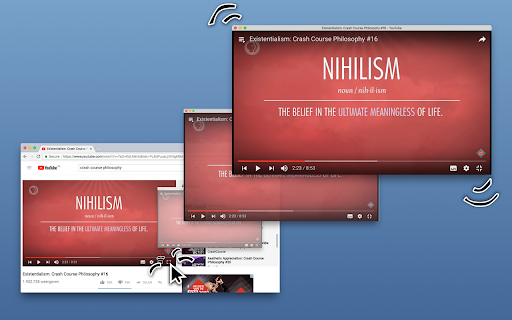


Changes fullscreen buttons to go into a popup. Works for every website that uses fullscreen, including Youtube, Vimeo, Netflix Changes fullscreen buttons so they will put a window around the fullscreen app. This allows you to put a Youtube video about a subject next to the paper you are writing or watch a show on Netflix while chatting. This extension will not reload the video you are watching, nor use some custom controls: it puts the website in its own fullscreen mode. Now also supports Picture-in-Picture mode when fullscreening a video, but this takes away the websites video controls. --- This extension requires "Read sites data" permission to function, but you can right-click the extension icon, click "This Can Read and Change Site Data" and enable it only for websites that you are comfortable with. Also the source is open, so you can read that no data is actually read or changed by this extension :) --- It will present you with a small menu when you click fullscreen, so you can choose to go fullscreen or windowed. Some of the website confirmed to work: - Youtube - Netflix - Twitch - Most other websites... Does not work on - Flash videos (these are outside of the scope of browser extensions, I tried) - Videos with native html controls (as they use native fullscreen, not javascript fullscreen) It is possible there are websites where this does not work, even though they are not flash. If you happen to find one, please let me know! :) Firefox extension: https://addons.mozilla.org/nl/firefox/addon/windowed/ Source code: https://github.com/dralletje/windowed

Video Maximizer - Zoom to Fill
Quickly and securely zoom videos to fill your browser on most sites. Control the size when fullscreen is too big. VIDEO MAXIMIZER: FILL YOUR BROWSER WINDOW, NOT YOUR SCREEN. Video Maximizer is a free, open-source tool that expands videos to fill your entire browser window. It provides a true "Theater Mode" for almost any site, hiding comments and sidebars so only the video, its playback controls, and captions are visible. It is the perfect solution for multitasking in other tabs or for users with large monitors who find standard "full-screen" mode too overwhelming. • Windowed Full-Screen: Hides everything except the video, fitting it perfectly to your browser window. • High Compatibility: Supports video playback controls and Closed Captions (CC) on most websites. • Resizable Viewing: Simply resize your browser window to make the video larger or smaller. • 100% Private: Operates locally on your device with no tracking. It always asks for permission before running on a new site. • Speed Control: Adjust playback speed on many popular streaming platforms. SAFE AND FREE • Open Source: Ad-free and completely free since 2013! If you find a bug, please report it on GitHub.

Picture in Picture - Floating player
Picture-in-Picture mode allows you to watch a video in a floating window with playback video and volume controls. This extension brings a PiP view to all websites with an HTML video element. Press the extension icon to open the active player in the picture in picture mode. This extension automatically tries to use the active player. Now stream movies, series or sports on any tab. Install Picture in Picture chrome extension to enable the floating video. We support this feature on every streaming site. For YouTube, the extension also offers an in-player button next to the settings button to open the YouTube video in the picture-in-picture mode. You can use this extension to watch YouTube videos in a floating window that is on top of all other windows so tabs can be switched and still the player is visible. The floating window has play and pause buttons, and you can exit from the picture-in-picture mode anytime. How Extension works: 1. Find the video and run it. 2. Click the extension icon to reduce the video player on YouTube and other sites. 3. Select the “Floating Picture in Picture” and you're done. A floating video allows the viewer to scroll through your webpage and keep your video in view the whole time. Video Playback Controls Enjoy full control over your video playback with intuitive controls directly within the floating player: - Volume control; - Stop and play video; - Video speed control; - Switch to next video. Just click on the Floating Player and Video Control icon to display the video player on YouTube, Netflix or any other websites on the Web. This window will play the video on all pages of the browser on which there is a video resource. Pic-in-pic mode supports all video formats and works with popular video hubs like Youtube and many others We hope you find our tool useful! We are waiting for your feedback and ratings!

Full Screen for Google Chrome
Enter full screen with one click, including for videos on YouTube, Vimeo, and other sites. Experience seamless full-screen browsing with my browser extension. Whether you are browsing the web or watching HTML5 videos on popular platforms like YouTube™, Vimeo, Dailymotion, and Youku, enjoy an immersive full-screen experience with just a click. The lightweight add-on is designed to enhance your browsing experience effortlessly. Full Screen is a lightweight and useful add-in designed to quickly enable full-screen mode for web pages, images, and videos. It is Full Screen anything on the web. And With this browser extension, you can easily enter full-screen mode with the click of a button. Choose your preferred task: view web or video in full-screen, maximize the window to full-screen, or instantly maximize the current HTML5 video. Browser extension features: ◆ One Click to Full Screen: Easily switch between regular view and full-screen mode for web pages or HTML5 videos with a single click. ◆ Media Full Screen feature: Detects the current playing HTML5 video status and brings it to full screen mode depending on whether it is playing or not. It includes an option to whitelist or blacklist certain websites to use this feature. ◆ Display Options: - Bring the current web page or HTML5 video to complete full screen with no visible toolbar. - Automatically maximize HTML videos to fit your window screen while preserving the original aspect ratio. Such as on YouTube video in windowed full screen. - Open the current tab in a popup window. - Maximize the web browser window for the current window. ◆ Auto Full Screen: Option to automatically enter full-screen mode when opening the web browser. On startup, it updates the current window to set the window state to fullscreen. ◆ Double click menu: A shortcut panel to open the current tab or all tabs in full screen, maximize window, popup window, or arrange all tabs in a side-by-side, 1x2, or 2x2 matrix. ◆ Customizable Browser Button Icon: Option to change the browser icon to a light or dark mode theme. ◆ Custom Full Screen Keyboard Combinations: Shortcut to quick open that page in full-screen mode. ◆ Compatible with the "Turn Off the Lights" browser extension for automatic dimming on YouTube™. ◆ Support for Dark Mode. Project Information: https://www.stefanvd.net/project/full-screen/browser-extension/ Required Permissions: ◆ "contextMenus": Add "Go to full screen" menu item in the web browser context menu. ◆ "tabs": Manage tabs to open them in a new popup panel and detect the currently playing HTML5 video. ◆ "storage": Save settings locally and sync with your web browser account. ◆ "": Control the button on all websites, including http, https, ftp, and file. >> Unlock an option feature to protect your eyes at night and focus on the video player, such as YouTube™, by installing Turn Off the Lights browser extension for YouTube and Beyond. https://chromewebstore.google.com/detail/turn-off-the-lights/bfbmjmiodbnnpllbbbfblcplfjjepjdn

Video Popout
Pop-out and load any video element to a floating window. Video Popout is an extension that lets you easily detach the active video in a tab and load it in a small and floating popup outside of the current window. The floating window remains active even if you change the active tab. Please note that if you close the tab that contains the video, the floating popup window will be closed as well. This addon uses the new JavaScript API called "picture-in-picture". It currently works in all modern browsers. It is important to note that, the floating window will stay on top of other windows. Note: please play the video first and then click on the toolbar button to make it pop out. A paused or stopped video element, will not respond to the pop-out request. To change this behavior, please visit the extension options page and adjust the settings. If you have a feature request or found a bug to report, please fill out the bug report form on the addon's homepage (https://mybrowseraddon.com/video-popout.html).
