
adnielbhikcbmegcfampbclagcacboff
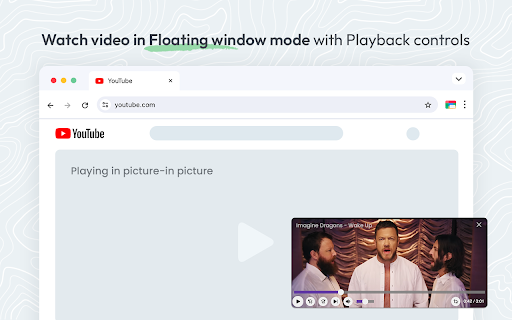


Picture-in-Picture mode allows you to watch a video in a floating window with playback video and volume controls. This extension brings a PiP view to all websites with an HTML video element. Press the extension icon to open the active player in the picture in picture mode. This extension automatically tries to use the active player. Now stream movies, series or sports on any tab. Install Picture in Picture chrome extension to enable the floating video. We support this feature on every streaming site. For YouTube, the extension also offers an in-player button next to the settings button to open the YouTube video in the picture-in-picture mode. You can use this extension to watch YouTube videos in a floating window that is on top of all other windows so tabs can be switched and still the player is visible. The floating window has play and pause buttons, and you can exit from the picture-in-picture mode anytime. How Extension works: 1. Find the video and run it. 2. Click the extension icon to reduce the video player on YouTube and other sites. 3. Select the “Floating Picture in Picture” and you're done. A floating video allows the viewer to scroll through your webpage and keep your video in view the whole time. Video Playback Controls Enjoy full control over your video playback with intuitive controls directly within the floating player: - Volume control; - Stop and play video; - Video speed control; - Switch to next video. Just click on the Floating Player and Video Control icon to display the video player on YouTube, Netflix or any other websites on the Web. This window will play the video on all pages of the browser on which there is a video resource. Pic-in-pic mode supports all video formats and works with popular video hubs like Youtube and many others We hope you find our tool useful! We are waiting for your feedback and ratings!

Picture-in-Picture Shortcut
Switch videos to Picture-in-Picture mode with a keyboard shortcut or toolbar button. Picture-in-Picture Shortcut adds a keyboard shortcut and toolbar button for switching video players to the Picture-in-Picture mode in web browsers. The default keyboard shortcut is Ctrl+Period (Command+Period on Mac), but it can be changed from the browser settings. The Picture-in-Picture Shortcut extension button in the browser's toolbar can be used to toggle PiP mode. Google Chrome and other Chromium browsers have a built-in Picture-in-Picture button in the default media controls, but it isn't always available and requires multiple mouse clicks. Picture-in-Picture Shortcut also overrides sites that don't normally allow Picture-in-Picture mode, and attempts to add a play/pause button to the PiP popup. However, this may not always work for sites and players not originally built for PiP mode. This extension is open-source under the GPLv3 license, the code is available on GitHub: https://github.com/corbindavenport/pip-shortcut

Picture-in-Picture any site
This extension allows you to open any site as Picture-in-Picture mode via chrome.tabCapture API

Clear Pip View
Enhance Your Viewing Experience with Clear Pip View: Picture-in-Picture (PiP) Made Crystal Clear! Are you tired of constantly switching between tabs to watch videos while browsing? Clear Pip View is here to revolutionize your online video experience. With our browser extension, you can seamlessly activate Picture-in-Picture (PiP) mode and enjoy your favorite videos without sacrificing screen space or efficiency. Activate PiP mode via toolbar icon: Smart Pip View offers a user-friendly toolbar icon that allows you to instantly activate PiP mode with a single click. Say goodbye to manual resizing and struggling to fit videos on your screen. Icons in video player on major platforms: We understand that you have your preferred video platforms. That's why Clear Pip View ensures compatibility with major platforms such as YouTube and more. Our extension seamlessly integrates with their video players, making it incredibly convenient to activate PiP mode. Note: Please ensure that the tab containing the video remains open for PiP to function properly. Say goodbye to the days of minimizing or losing sight of your videos while multitasking. Clear Pip View empowers you to multitask efficiently, allowing you to enjoy your videos in a compact, resizable PiP window while continuing to browse the web or work on other tasks. Don't miss out on this opportunity to optimize your screen space and enhance your productivity. Experience the future of online video with Clear Pip View. Install our browser extension today and embrace a smarter way to enjoy Picture-in-Picture technology!

Picture-in-Picture Extension (by Google)
Picture-in-Picture (PiP) allows you to watch videos in a floating window (always on top of other windows) so you can keep an eye on what you’re watching while interacting with other sites, or applications. Source code: https://github.com/GoogleChromeLabs/picture-in-picture-chrome-extension By installing this item, you agree to the Google Terms of Service and Privacy Policy at https://www.google.com/intl/en/policies/.
