
cdnlfphfngnfhjcnoikfhaomaaflaiie


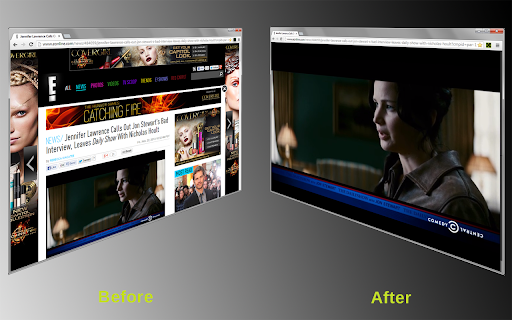
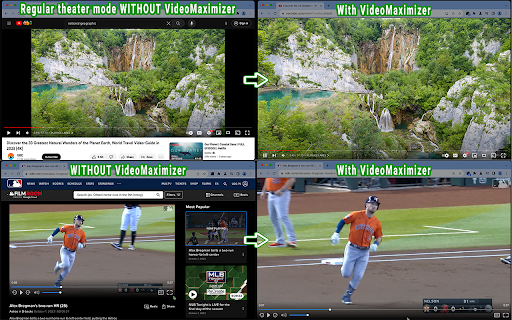
Quickly and securely zoom videos to fill your browser on most sites. Control the size when fullscreen is too big. VIDEO MAXIMIZER: FILL YOUR BROWSER WINDOW, NOT YOUR SCREEN. Video Maximizer is a free, open-source tool that expands videos to fill your entire browser window. It provides a true "Theater Mode" for almost any site, hiding comments and sidebars so only the video, its playback controls, and captions are visible. It is the perfect solution for multitasking in other tabs or for users with large monitors who find standard "full-screen" mode too overwhelming. • Windowed Full-Screen: Hides everything except the video, fitting it perfectly to your browser window. • High Compatibility: Supports video playback controls and Closed Captions (CC) on most websites. • Resizable Viewing: Simply resize your browser window to make the video larger or smaller. • 100% Private: Operates locally on your device with no tracking. It always asks for permission before running on a new site. • Speed Control: Adjust playback speed on many popular streaming platforms. SAFE AND FREE • Open Source: Ad-free and completely free since 2013! If you find a bug, please report it on GitHub.

Zoom To Fill
Remove black bars from videos on Netflix, Prime, YouTube & more. Aspect ratio presets, keyboard shortcuts, and more. Zoom To Fill removes black bars from videos and helps content fill your screen more naturally. It is especially useful on ultrawide displays and also works well when older aspect ratios leave unused space on standard screens. No more distracting black bars. The extension works with most modern video players on the web and is designed to be simple, fast, and easy to use. Go to any page with a video Click the Z button that appears on the player, or open the extension popup Press Alt+Z at any time to toggle zoom on or off 🎬 Aspect ratio presets — Quickly switch between common display ratios such as 16:9, 18:9, 21:9, and 32:9 for a better fit on different screens. 💾 Per-site zoom memory — Save your preferred zoom setting for a site and restore it automatically the next time you visit. 🖱️ Floating overlay button — A small Z button appears directly on the video player so you can adjust zoom without reopening the extension. ⌨️ Keyboard shortcuts — Use customizable shortcut keys for zoom in, zoom out, and reset. Alt+Z is available for fast toggling. ↔️ Position control — Move the video up, down, left, or right to choose the best crop and keep important parts of the frame visible. 🔢 Manual zoom slider — Fine-tune zoom from 1.00× up to 15.00× with smooth transitions. ⚙️ Settings — Adjust zoom behavior, transition speed, zoom step size, default overlay action, and clear saved site preferences whenever needed.

Video Dominator
Hover over any video, hold the right mouse button down, and use mouse wheels or buttons to seek, adjust volume, speed, and more. Hover over different areas of any video, hold the activation key down (right mouse button by default), and use mouse wheels or buttons to perform an unlimited number of custom actions such as: - play/pause the video - seek by, seek to (units available: second, frame, %) - adjust or set playback rate (0x to 16x) - adjust or set volume - toggle mute - toggle picture-in-picture mode - toggle custom player On some websites, you can also: Overlay Element - hover over a video, hold the activation key down and use mouse wheels or buttons - activation key can be the Right Mouse Button, Ctrl, Alt, or Shift - available on almost any website Video Element - hover over a video and use mouse wheels or buttons - works only when the video is a top-most element (on websites such as YouTube, Odysee, Nebula, CuriosityStream) - customizable overlay temporarily shows you info depending on the last action, such as: - volume - playback rate - current time, current time / duration, remaining time - time can be based on the current playback rate - a full window or full screen player with minimalist UI and no popups or any other distractions - you don't need to hold the activation key down while using mouse controls - unlimited number of custom keyboard shortcuts - customizable progress bar - none - the extension will run on all domains - blacklist - the extension will not run on listed domains - whitelist - the extension will run only on listed domains Storage - for storing extension settings Downloads (optional) - for downloading media files This extension does not collect personal data from users, and it does not send any user data to a remote server. The only data it collects are extension settings, and this is stored locally on your PC.

Full browser screen Video Player
This extension is not a video player, instead this extension makes the SonyLiv, YouTube and Hotstar Video player to cover the entire screen of the browser without making the browser to go into the fullscreen mode.

BigTube - Better Youtube Theater Mode & More
Full-sized theater mode, miniplayer on scroll, Popout player for all video sites. Maximise your browser real estate by fully expanding your youtube video player (without going fullscreen). True BigTube (Nov' 25) ----------------------------------- - Now auto-hides top nav bar for true bigtube experience - Fixes css issues New Features (Jul '23) ----------------------------------- - Miniplayer on scroll - now you can read comments while still watching the video Features (Oct '22) ----------------------------------- - Improve performance of bigtube - Shortcut for Picture-in-Picture now set to Alt+P (Windows) or Option+P (Mac) - Migration to manifest v3 for extensions
