
npmegcnbapicebebajligpkjdjjbempo


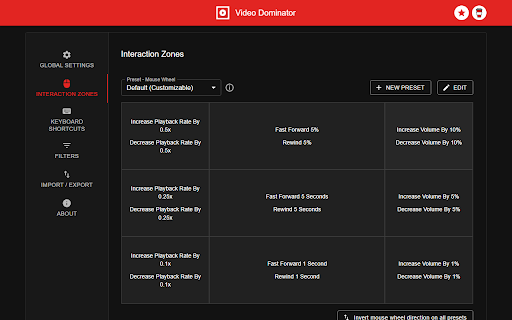
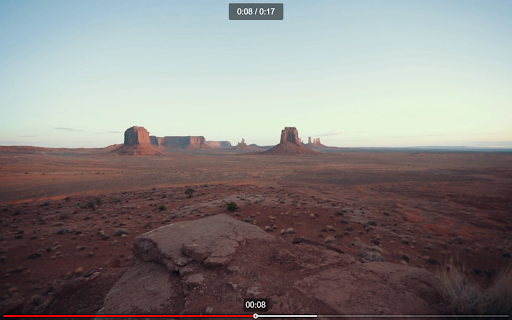
Hover over any video, hold the right mouse button down, and use mouse wheels or buttons to seek, adjust volume, speed, and more. Hover over different areas of any video, hold the activation key down (right mouse button by default), and use mouse wheels or buttons to perform an unlimited number of custom actions such as: - play/pause the video - seek by, seek to (units available: second, frame, %) - adjust or set playback rate (0x to 16x) - adjust or set volume - toggle mute - toggle picture-in-picture mode - toggle custom player On some websites, you can also: Overlay Element - hover over a video, hold the activation key down and use mouse wheels or buttons - activation key can be the Right Mouse Button, Ctrl, Alt, or Shift - available on almost any website Video Element - hover over a video and use mouse wheels or buttons - works only when the video is a top-most element (on websites such as YouTube, Odysee, Nebula, CuriosityStream) - customizable overlay temporarily shows you info depending on the last action, such as: - volume - playback rate - current time, current time / duration, remaining time - time can be based on the current playback rate - a full window or full screen player with minimalist UI and no popups or any other distractions - you don't need to hold the activation key down while using mouse controls - unlimited number of custom keyboard shortcuts - customizable progress bar - none - the extension will run on all domains - blacklist - the extension will not run on listed domains - whitelist - the extension will run only on listed domains Storage - for storing extension settings Downloads (optional) - for downloading media files This extension does not collect personal data from users, and it does not send any user data to a remote server. The only data it collects are extension settings, and this is stored locally on your PC.

Highlights for YouTube
View highlights on the video player, that are generated from timestamps found in the description and top comments. ✨ UPDATE: Added controls for navigating between highlights. 🎬 See chapters or interesting moments without the need to scroll to the comment/description section. You can toggle the highlights directly from the video player options. ⚠️ Not all videos will have highlights on them since they are generated from timestamps. 🔗 Open Source: View code and report issues on GitHub: https://github.com/Ermag/yt-highlights-chrome 💭 Feedback is greatly appreciated!

Simple Auto HD (Open Source)
Simple Auto HD quality selector for YouTube. Up to 8k/4k (60fps/50fps/48fps/30fps) supported. Theater mode. ✔ Lightweight and efficient ✔ Supports up to 8k quality and (60fps/50fps/48fps/30fps) modes

Video Image Control ( new gamma )
The extension regulate sharpness, contrast, brightness, saturation and other settings for video and images on the all websites. The settings can be applied to video, pictures, flash players, as well as to any items you select. Opens the video in a separate window (picture in picture mode) Used Picture-in-Picture Web API Extension works in YANDEX BROWSER It supports GOOGLE MAPS, and YANDEX MAPS, 2D and 3D games, and many other other applications built on HTML5. Just press the FLASH button ;) ALLOWS YOU TO SHARE VIEWED PAGES IN SOCIAL NETWORKS!!! ADJUST VIDEO SETTINGS ✫ Sharpness ✫ Brightness ✫ Contrast ✫ Color Balance ✫ Saturate ✫ Gamma ✫ Grayscale ✫ Sepia ✫ Crazy mirror ✫ Decrease or increase the video speed (from 0.1x up to 4x) ✫ The ability to rotate or flip video, pictures, flash players, and any other content ✫ Connected smart sharpening allows more flexible editing of video and other graphics You can control the extension from both the extension panel and the player (the button is located in the upper left corner) The extension supports players based on both HTML5 and Flash. You improve video in this video editor. Enhance video will make clean and bright video color the picture. Correct video image in real time. Video correction settings are saved, all the parameters of the video effect stored. Edit quality sharpen video can in the range from 0 to 3 Speed control works in the range from 0.1x to 4x in increments of 0.1 You can control the speed by holding down the CTRL + ALT keys and pressing the ↑ ↓ arrows on the keyboard

Video Player
Video and audio player with speed control, playlist, shuffle, and volume-boosting This is a simple, yet powerful media player that supports audio boosting to 300% and playback rate speed up to 8 times. It has a minimal interface and only appends controls that are not provided by default by the VIDEO element. This extension offers to play media files from a local disk or a remote resource. It uses the standard caching method to play remote sources with minimal interruption. Features: 1. This player can increase volume up to 300% similar to the VLC media player 2. This player can increase the video playback rate up to 8 times 3. It supports repeating one song or an entire album 4. Can extract media sources from a destination directory and all its children's directories. 5. You can take screenshots of the video with a button or with a keyboard command. 6. Can play video formats that your browser does not support (using FFmpeg transcoding) (FLV, AVI, WMV, ...) Usage Sample 1: 1. Open "https://www.w3schools.com/html/html5_video.asp" in a browser tab 2. Right-click on the player 3. Use "Play with Video Player" Usage Sample 2: 1. Open "https://www.w3schools.com/html/html5_video.asp" in a browser tab 3. Right-click and save the video to the disk 4. Open the player and drop the video to the player's interface
