
ghklbglohploihmahcjmklmmilmlhaeg
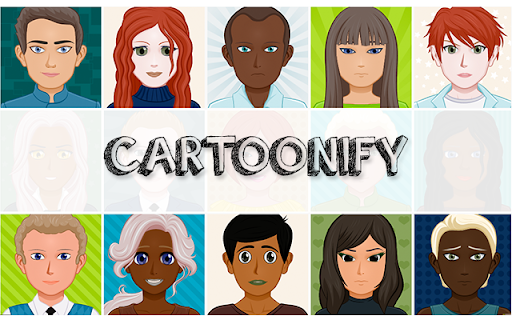

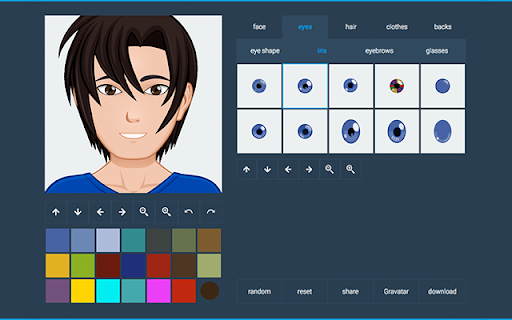
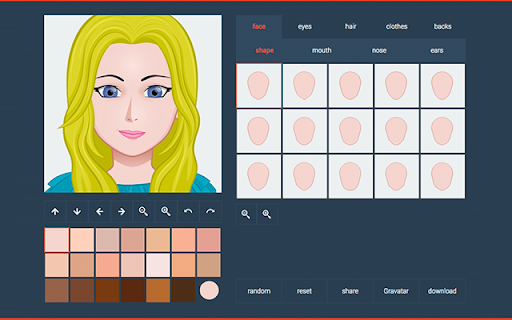
With our service you can quickly create Avatars or a Cartoon of Yourself directly online without any software installs and for free! With our service you can quickly create a cartoon of yourself directly online without any software installs and for free! With Cartoonify you can cartoonize yourself. We have more than 300 graphic parts so you can create your avatar as special as you are. This is one of the easiest and fastest way to convert your photo to a cartoon. You only have to choose between its face, eyes, hair, clothes and even a background! As a result you can download your Cartoon Picture as SVG (vector) or as PNG file which is converted from vector graphic parts and also upload to Gravatar. Additionally you can create your avatar as Gravatars (with an existing account only). This is perfect for sharing to all social networks like Facebook, Twitter, Tumblr and more! As a premium service it is possible to order a caricature of yourself or a special comic style of yourself, it is up to you! This tool is also known as an avatar maker! Try it now for free! +++Version 2.6+++ Contains our brand new context menu feature for our Cartoonify users. Every selected text in your browser, you can immediately search for content on our website (right click menu "Search on Cartoonify for ...")

Emoji Keyboard by JoyPixels®
The world's leading emoji keyboard for Chrome. Now Unicode 16 compatible! Spread the Joy™ with the Emoji Keyboard by JoyPixels™. We think you'll love our: - Beautiful Emoji - Fast and Extensive Search Results - Handy Features Let us know what you think! - updated with new JoyPixels 10.0 emoji - unicode 16.0 compatibility - general bug fixes and improvements - general bug fixes and improvements - combine emoji and text to compose messages using the new multi-line copy bar - sharper images using vector based web font for all emoji - improvements to overall size and performance - update emoji assets to JoyPixels version 9.0, with Unicode 15.1 compatibility - upgraded build framework with improvements to speed and memory usage - improved search results - improvements to general usability including new search shortcuts (press S to search, CMD+F to search, tab to exit search and begin arrow nav) - updated emoji assets to JoyPixels version 8.0, with Unicode 15.0 compatibility - new emoji include shaking face, new shades of hearts, moose, jellyfish, flute, and more - hint: interested in the evolution of emoji? use the search term "uc15" to see all unicode 15.0, "uc14" for 14.0 and so on! - updated emoji assets to JoyPixels version 7.0, with Unicode 14.0 compatibility - maintenance update - minor bug fixes and improvements - updated to JoyPixels 6.5, with Unicode 13.1 compatibility - removal of unused permissions - addition of copy/paste permissions for improved overall performance - improvements to scroll functionality - auto input improvements for Facebook, Twitter, and standard text fields - emoji search improvements - Auto-Input emoji by simply clicking the emoji from the panel (works with most web-sites). - Auto-Copy to clipboard feature for all other sites. - Navigate the emoji panel mouse free, by using arrows and page up/down. - Search returns smart results from our expanding keyboard database. - Saves your most recently used emoji at the top, for easier access. - Diversity selector makes it easy to browse and insert skin tone emoji. Settings: - Turn On/Off Auto-Copy (copies/pastes emoji string to clipboard). - Adjust number of recent emoji to display in panel. - Emoji Icon Size (adjust size of icons in the extension panel). - Panel state docked/undocked (undocking allows for persistent window). - Launch Shortcut (set your keyboard shortcut to launch panel). Other: - 100% Unicode compliant. - Start using new emojis on the first day they become available to the public. - Artwork is updated yearly. - Tweetdeck auto insert is currently disabled as of 9/28/16. Recent changes to Tweetdeck sites pose challenges in performing accurate auto insert and using auto insert as it was caused breaking changes to certain functions within the Tweetdeck interface. Help report any issues you run into at https://www.joypixels.com/contact. Your love, feedback, ratings and reviews keep this software going and help us to Spread the Joy™.

Bitmoji
- Directly insert Bitmojis into Gmail - Click and drag to resize them - Copy and paste them almost anywhere If you don’t have a Bitmoji account, download the mobile app from bitmoji.com and create an avatar now!

BeFunky Extension
Instantly edit web page images and screenshots with BeFunky Photo Editor With the BeFunky Chrome Extension you can grab images off the web and open them in BeFunky with a single click. It's super easy to use, from any webpage just click the BeFunky icon in your browser toolbar. Then a window will open with thumbnails of every image on the page, select the one you want to edit and it'll immediately open in BeFunky. TURN YOUR PHOTOS INTO PAINTINGS, CARTOONS, SKETCHES, AND MORE Our Artsy effects are the most unique feature of our Photo Editor. With one tap, your photos will take on stunning, artistic characteristics. From realistic textures to natural-looking brush strokes and saturated color palettes, our artsy effects will instantly turn your photo into a work of art! REMOVE BACKGROUNDS FROM PHOTOS IN ONE TAP Our A.I.-powered Background Remover intelligently detects the subject of your image and precisely removes the surrounding background. Perfect for changing backgrounds on product photography, portraits, and more! ENHANCE IMAGE APPEARANCE WITH A.I. There's a lot of trial and error and fine-tuning involved in enhancing a photo. Our A.I. Image Enhancer takes the guesswork out of photo editing. With a single tap, it'll make colors more vibrant and add a touch of contrast to enhance details, giving your photos what they need to really pop. POWERFUL A.I. MADE FOR EDITING FACES Our A.I. Portrait Enhancer gives you professional portrait retouching results, all in a single tap. Quickly enhance exposure, soften the appearance of fine lines and blemishes on all skin tones, whiten teeth and brighten eyes without eliminating freckles and beauty marks! GIVE YOUR PHOTOS A UNIQUE LOOK There's truly no limit to what you can create! Everything from Vintage and Chromatic effects to filters that make your photo resemble a Van Gogh painting is right at your fingertips. Are you looking to add a texture, bokeh, or a design overlay? You'll find all that and more in BeFunky.

GIPHY for Chrome
All the GIFs and Stickers from GIPHY.com in a compact extension. Just search, then drag and drop! GIPHY's search engine at your fingertips. Search for the coolest GIFs and Stickers, and then drag and drop to your target. * Drag and drop support depends on the website you are dropping on, they may correctly display the GIF, or they may insert a link. * If dragging outside the browser, first "click" on a GIF to see the large view and then drag the high res image. In the browser, dragging the small images is okay, it will still insert the large image, but outside the browser you'll need to drag the large image as what is dropped is beyond our control. Using Gmail? We have an extension for that as well! Search for "GIPHY for Gmail". Please contact our support if you have any issues: support@giphy.com
