
ipdjnhgkpapgippgcgkfcbpdpcgifncb

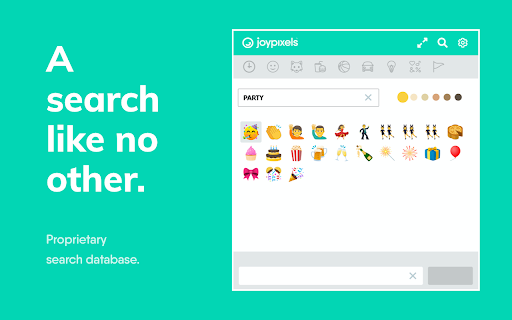

The world's leading emoji keyboard for Chrome. Now Unicode 16 compatible! Spread the Joy™ with the Emoji Keyboard by JoyPixels™. We think you'll love our: - Beautiful Emoji - Fast and Extensive Search Results - Handy Features Let us know what you think! - updated with new JoyPixels 10.0 emoji - unicode 16.0 compatibility - general bug fixes and improvements - general bug fixes and improvements - combine emoji and text to compose messages using the new multi-line copy bar - sharper images using vector based web font for all emoji - improvements to overall size and performance - update emoji assets to JoyPixels version 9.0, with Unicode 15.1 compatibility - upgraded build framework with improvements to speed and memory usage - improved search results - improvements to general usability including new search shortcuts (press S to search, CMD+F to search, tab to exit search and begin arrow nav) - updated emoji assets to JoyPixels version 8.0, with Unicode 15.0 compatibility - new emoji include shaking face, new shades of hearts, moose, jellyfish, flute, and more - hint: interested in the evolution of emoji? use the search term "uc15" to see all unicode 15.0, "uc14" for 14.0 and so on! - updated emoji assets to JoyPixels version 7.0, with Unicode 14.0 compatibility - maintenance update - minor bug fixes and improvements - updated to JoyPixels 6.5, with Unicode 13.1 compatibility - removal of unused permissions - addition of copy/paste permissions for improved overall performance - improvements to scroll functionality - auto input improvements for Facebook, Twitter, and standard text fields - emoji search improvements - Auto-Input emoji by simply clicking the emoji from the panel (works with most web-sites). - Auto-Copy to clipboard feature for all other sites. - Navigate the emoji panel mouse free, by using arrows and page up/down. - Search returns smart results from our expanding keyboard database. - Saves your most recently used emoji at the top, for easier access. - Diversity selector makes it easy to browse and insert skin tone emoji. Settings: - Turn On/Off Auto-Copy (copies/pastes emoji string to clipboard). - Adjust number of recent emoji to display in panel. - Emoji Icon Size (adjust size of icons in the extension panel). - Panel state docked/undocked (undocking allows for persistent window). - Launch Shortcut (set your keyboard shortcut to launch panel). Other: - 100% Unicode compliant. - Start using new emojis on the first day they become available to the public. - Artwork is updated yearly. - Tweetdeck auto insert is currently disabled as of 9/28/16. Recent changes to Tweetdeck sites pose challenges in performing accurate auto insert and using auto insert as it was caused breaking changes to certain functions within the Tweetdeck interface. Help report any issues you run into at https://www.joypixels.com/contact. Your love, feedback, ratings and reviews keep this software going and help us to Spread the Joy™.

Tabby Cat
A new friend in every tab. Tabby Cat is the extension that brightens your day with a new animal in every new tab. Tabby Cats blink, sleep, and even let you pet them – just like real cats! If you're really lucky, your Tabby Cats might leave goodies for you... but what will they bring? Take snapshots of your favorite ones to save them forever and ever. Some toys attract combo kitties, which are cute little baby cats that only come out for special combinations of goodies. Find them all! Don't like cats? No problem! Now you can have other pets like Doggos, Penguins, Bunnies, Pigs, and more! For free! Meow.

Colorful Tic-Tac-Toe
Play tic tac toe (a.k.a Noughts and Crosses, Three in a row, tres en raya) in single player mode against an AI player or in two player mode against your friends and family. You will be sure to love the attractively colored boards and fun Mario sounds :) Oh, did we mention it's developed by tCubed, the leading indie dev studio for putting strategic twists on classic game? V3.0.0 - Mainly architectural updates using webpack as well as small theme styling tweaks. V2.1.0 - Big update friends!!! Close to adding 5x5 and 7x7, the framework is in place :) Just finishing the AI :) - Language Support V1.0.3 -Sorry, somehow added Rubik's Cube Chrome app...now it's TTT again ;P - Add multiple levels for computer difficulty V1.0.2 - Add multiple levels for computer difficulty

Colorful Rubik's Cube
Colorful Rubik's Cube in your browser from tCubed! Play the most beautiful Rubik's Cube Chrome extension now! Very Quick launch into a popup without redirecting to a website. Rotate the cube, rows, and columns by clicking or draging! Can't solve it in one sitting? No worries! Automatic Save and Restore :) You will be sure to love the attractively colored Rubik's Cube and fun sounds :) Or, mute the effects if you prefer. One-click to show the computer solving the puzzle. Automatically tracks your total moves and solved puzzles. 3.0.0 - Architecture and small theme updates for better maintainability 2.0.0 - You spoke! We listened! The cube is now bigger and the controls have been simplified.

Chromoji - Emojis for Google Chrome
Show emojis in your browser. Currently supports Twitter, EmojiOne, Apple and Google emojis. Create post facebook and twitter with your emojis
