
ghfcnokfiggoglnikomdhhbhhlkmoelb
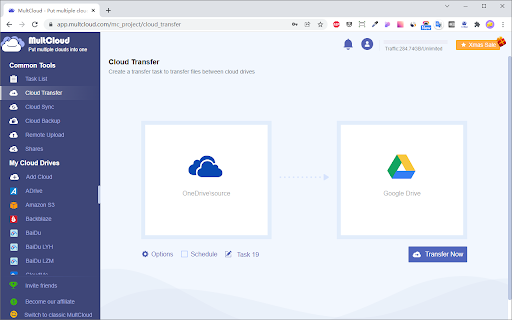


Transfer files from one Google Drive account to another, or to Dropbox, OneDrive, Box and other cloud drives, vice versa. MultCloud is a free web-based tool to help transfer, migrate, backup, or sync files from one cloud to another and access all your online files on different clouds with a single login. Over 40 cloud services supported, including: Google Drive, Dropbox, OneDrive, SharePoint, etc. Some use cases: * Transfer files from Dropbox to Google Drive * Migrate or move data between two Google Drives * Backup FTP, WebDav to Google Drive * Sync OneDrive with Google Drive Key Features: * Directly transfer files from one cloud to another. * File transfer in background, allowing you to close browser. *Transfer cloud data offline without going through compyuter. * Schedule automatic data transfer between two cloud services. * Free for cloud-to-cloud transfer and sync.

Ultra Button
A button for everything. You can now access most of chrome features in one Ultra Button. Functions Including: Bookmarks, Extensions, Downloads, History and Tabs. Mouse Middle Button Behaviors Bookmarks: Open bookmark in background Extensions: Remove extension Downloads: Remove download record History: Open history in background Tabs: Close tab or window ~~~~~~~~~~~~~~~~~~~~~~~~~~~~~~~~~ The icons in this extension were downloaded from Noun Project. https://thenounproject.com/ v 0.9.0 add download notification You can enable it in the options v 0.4.1 add session control You can now restore closed tab or windows

Drive File List Printer
Drive File List creator >>> DONATE!

Shortcuts for Chrome
Navigation menu of Chrome URLs: internal pages of the Google Chrome browser. Chrome browser navigation is optimized for non-technical users. For users who want to inspect what is happening with indexedDB, service workers, or Bluetooth devices etc., this menu brings shortcuts to those hard-to-find, internal browser pages. This menu lists all Chrome URLs in a single, flat list, configurable menu. This application is free and open-source software, built by Chrome users for Chrome users. ✔️ Pin your favorites on top for fast access ✔️ Drag and drop pinned links to change their order ✔️ Discover hidden browser features you never knew existed ✔️ Automatically matches dark/light mode based on browser setting

Awesome Window & Tab Manager
Displays a list of all windows and tabs open in Google Chrome. Allows filtering, sorting, refreshing, bookmarking, and saving. Awesome Window & Tab Manager does the following: (1) - Tells you how many Chrome windows and tabs are open. (2) - Displays all the windows and tabs. (3) - Allows text filtering (searching) on the windows and tabs. (4) - Allows alphabetic sorting of tabs. (5) - Categorizes tabs by window, domain, or category. (6) - Categories are determined by your own bookmark structure. (7) - Window, domain, or category groups can be refreshed or closed. (8) - All windows and tabs can be saved and restored later. (9) - Window, domain, or category groups can be saved and restored later. (10) - Unbookmarked tabs can be bookmarked. Note: Google Chrome version 16 or higher is required for tab refreshing functionality.
