
ggolclomgodalkdmpgllmhicgbchickl
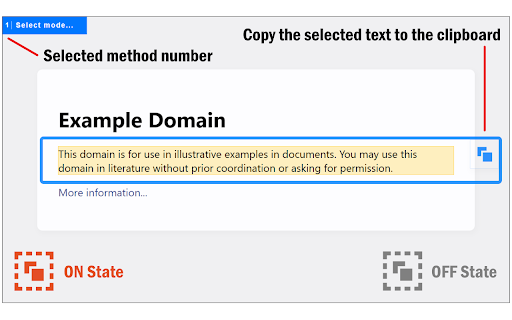
Select part of an HTML document and copy the underlying text to the clipboard! This extension allows you to select and copy part of the rendered HTML document's text to the clipboard. In general, selecting and copying text on a webpage is hard because it is structured in an HTML format with nested elements. This addon lets you overcome this issue by capturing the underlying text behind the HTML document. When the addon is active, you can select any section of the page and copy the resulting text to the clipboard via the copy button at the top-right corner of the page popup. The toolbar button has a red color when the addon is active and a grey color in the inactive state. If you right-click on the toolbar button, there are two select methods to choose from. Try to see which one works best for you. Note: reloading or scrolling the page inactivates the addon. Please press the toolbar button again to activate it. If you have a feature request or found a bug to report, please fill out the bug report form on the add-on's homepage (https://mybrowseraddon.com/select-copy-html-text.html).

Copy Text from HTML Extension
Copy text content of an HTML element with Shift + Alt + C "Copy Text from HTML" allows users to copy the text content of an HTML element with ease. When activated with the hotkey Shift + Alt + C, it removes all HTML tags and attributes, JavaScript code, CSS styles, empty and blank lines, special characters, and commented code, leaving only the plain text content. It also handles special cases, such as select elements, lists, and anchor tags within lists, to provide the user with the most accurate and useful text content possible. With this extension, copying text from HTML has never been easier or more reliable. If you find any trouble, try to right click the desired element and then press Shift + Alt + C.

Copy on Select
Select some text and it will be instantly copied to the clipboard! Paste it with one click! 🟢Select any text in a web page and it will be automatically copied to the clipboard (hold Ctrl to bypass, ⌘ on Mac). 🟢You can also quickly paste the copied text by clicking on the mouse wheel, or by double clicking the left mouse button while keeping the Ctrl key pressed (⌘ on Mac). 🟢If you keep the Shift key ⬆ pressed while pasting, the field into which you are pasting will be emptied of all already existing text before pasting. 🟢Bypass the auto copy functionality in input fields (needs to be activated in the options page) 🟢Automatically add text before or after the copied text (needs to be activated in the options page) 🟢Automatically add the webpage URL to the copied text (needs to be activated in the options page) 🚨IMPORTANT🚨: please reload Chrome after installing the extension, in order to activate it. - Click on the extension button to turn the extension on/off. - Right click on the button to open the options page or the user guide. 🔎NOTE: - The extension does not work on the New Tab page (the page that opens when you click on the + sign in Chrome). This is standard behaviour for all extensions. - The extension does not work on pages whose URL starts with the word "chrome", for example chrome://extensions/ or chrome://settings/.

Copy Selected HTML
Copies the HTML of the currently selected elements when you right-click and select the option. Easily copy the HTML of selected elements with this handy extension. Right-click to choose between copying HTML with or without class attributes, perfect for web developers and designers looking to streamline their workflow.

HTML Copy
Copy or Export to file the HTML of a page with options to ignore certain elements. Effortlessly Capture Web Page Structures with "HTML Copy" Ever found yourself wanting a clean snapshot of a webpage's structure without all the extra elements? Dive into "HTML Copy" – your ultimate tool for isolating the essence of any website. Tailored for developers, designers, and web enthusiasts, this extension offers a streamlined approach to capturing web page content. Selective Cloning: Customize what you capture! Choose to ignore common elements like nav, header, footer, aside, or even img tags. Focus solely on the content that matters to you. Custom Element Ignoring: Every website is unique, and so are your preferences. Got specific elements you'd rather not see? Fine-tune your ignore list directly from the user-friendly popup. Enhanced Export Options: Once you've got the cleaned HTML, decide how you want it. Copy directly to your clipboard for instant access or export as a neatly named text file based on the webpage's URL. Experience the web in a new light, free from unnecessary distractions. Install "HTML Copy" today and elevate your web browsing and development journey!
