
kdfngfkkopeoejecmfejlcpblohnbael

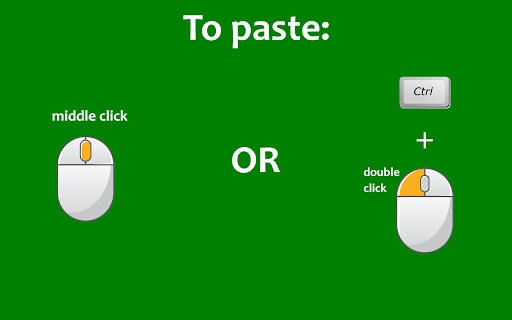


Select some text and it will be instantly copied to the clipboard! Paste it with one click! 🟢Select any text in a web page and it will be automatically copied to the clipboard (hold Ctrl to bypass, ⌘ on Mac). 🟢You can also quickly paste the copied text by clicking on the mouse wheel, or by double clicking the left mouse button while keeping the Ctrl key pressed (⌘ on Mac). 🟢If you keep the Shift key ⬆ pressed while pasting, the field into which you are pasting will be emptied of all already existing text before pasting. 🟢Bypass the auto copy functionality in input fields (needs to be activated in the options page) 🟢Automatically add text before or after the copied text (needs to be activated in the options page) 🟢Automatically add the webpage URL to the copied text (needs to be activated in the options page) 🚨IMPORTANT🚨: please reload Chrome after installing the extension, in order to activate it. - Click on the extension button to turn the extension on/off. - Right click on the button to open the options page or the user guide. 🔎NOTE: - The extension does not work on the New Tab page (the page that opens when you click on the + sign in Chrome). This is standard behaviour for all extensions. - The extension does not work on pages whose URL starts with the word "chrome", for example chrome://extensions/ or chrome://settings/.

AutoCopy Plus
AutoCopy Plus is a smart and lightweight Chrome extension that makes copying and pasting text faster and easier across all websites. 🔹 Auto-Copy on Selection Automatically copies any text you highlight — no need to right-click or press Ctrl+C. 🔹 Paste Button in Text Fields Adds a small 📋 paste button inside every input and textarea so you can paste text directly with one click — perfect for forms, content fields, and messages. 🔹 Enable/Disable Anytime Easily toggle AutoCopy and Paste Button features from the extension popup. 🔹 Works Even on Non-Copyable Sites Bypasses most site restrictions and lets you copy text even from protected content areas. 🔹 Clean & Lightweight No clutter, no tracking, and minimal UI. Built for speed and privacy.

Clipboard Auto Copy
Automatically copy stored text with a customizable delay. 📋 Clipboard Auto Copy is a simple yet powerful extension that lets you store, edit, and automatically copy text to your clipboard with a customizable delay. Whether you frequently copy text snippets, emails, or crypto addresses, this tool helps boost your productivity with one-click automation. ✅ Auto Copy Sentences – Store multiple sentences and copy them in sequence automatically. ✅ Custom Copy Delay – Set your own time delay (default: 350ms) for smooth copying. ✅ Edit & Manage Sentences – Easily edit and save frequently used text snippets. ✅ Silent Clipboard Copying – Works without browser notifications for a seamless experience. ✅ One-Click Donation Copying – Quickly copy crypto donation addresses (EVM, Bitcoin, Binance). ✅ No Data Collection – Your data stays private! The extension does not track or store any user information. 1️⃣ Click the extension icon to open the popup. 2️⃣ Add your text snippets using the "Edit Sentences" option. 3️⃣ Set a custom delay (optional) via the "Set Time" button. 4️⃣ Click "Copy Sentences" – The extension will copy each sentence automatically! ✔ No tracking, no ads, no data collection. ✔ All clipboard actions are handled locally on your device. ✔ Open-source logic ensures transparency.

Auto Copy Paste
Automatically copies selected text and pastes it on double-click. Automatically copies selected text and pastes it on double-click.

Auto Copy
Automatically copy selected text to the clipboard. Has many configurable options for controlling the behavior. When text is selected using the mouse it will automatically be copied to the clipboard. *** With Version 5 you may have to update your settings. Please check them to make sure things are working as expected. *** *** Once this extension is installed you must reload any open tabs in order for it to work *** Features: - Notification on copy - Options are sync'd across browsers - Remove selection on copy - Enable / disable in text boxes - Enable / disable in content editable elements - Paste on middle click - Use modifier key(s) to enable / disable auto copy - Use modifier key(s) to copy as a link - Always copy as a link - Copy without formatting - Trim whitespace - Copy delay - Clear clipboard - Include informational comment with optional formatting items - Use modifier key(s) to enable / disable informational comment - Blacklist websites to automatically disable the extension - Works with all URL types Go to the options screen to configure the features you'd like to use. Note: - This extension now works all URL types. In order for it to work with file:/// URLs you must check 'Allow access to file URLs' on the Extensions page. Content-scripts are automatically disabled in the Extension Gallery. Therefore, the extension will not work on this page or any page in the Gallery, so please test it on another page. See website for release notes.
