
lidcepffhffngghmeiooaeefcicggcpg

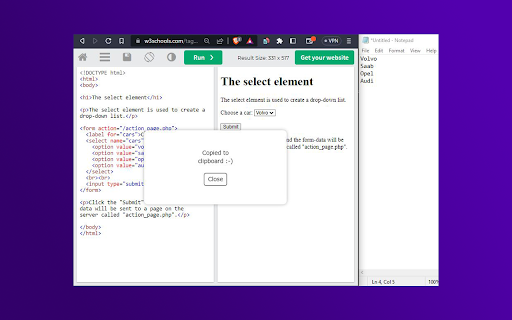
Copy text content of an HTML element with Shift + Alt + C "Copy Text from HTML" allows users to copy the text content of an HTML element with ease. When activated with the hotkey Shift + Alt + C, it removes all HTML tags and attributes, JavaScript code, CSS styles, empty and blank lines, special characters, and commented code, leaving only the plain text content. It also handles special cases, such as select elements, lists, and anchor tags within lists, to provide the user with the most accurate and useful text content possible. With this extension, copying text from HTML has never been easier or more reliable. If you find any trouble, try to right click the desired element and then press Shift + Alt + C.

Html Duplicator
Allows you to automatically generate HTML/CSS code for any element on any website so you can modify and integrate the element in your own projects easily! Instructions :- 1) Visit any web page on the internet. 2) Hold down the Alt key on your keyboard and move your mouse cursor over any HTML element on the page to highlight it. 3) Release Alt key 4) Click the "Generate Code" button to generate the HTML/CSS code of the highlighted element. 5) Copy-Paste the code into your own projects!

PromptEasily ChatGPT - HDTeam
PromptEasily ChatGPT - HDTeam adds a list of curated prompt templates for SEO, SaaS and more to ChatGPT. Try today. PromptEasily ChatGPT - HDTeam adds a list of curated prompt templates for SEO, SaaS and more to ChatGPT. Try today.

Copy Selected HTML
Copies the HTML of the currently selected elements when you right-click and select the option. Easily copy the HTML of selected elements with this handy extension. Right-click to choose between copying HTML with or without class attributes, perfect for web developers and designers looking to streamline their workflow.

Select & Copy HTML Text
Select part of an HTML document and copy the underlying text to the clipboard! This extension allows you to select and copy part of the rendered HTML document's text to the clipboard. In general, selecting and copying text on a webpage is hard because it is structured in an HTML format with nested elements. This addon lets you overcome this issue by capturing the underlying text behind the HTML document. When the addon is active, you can select any section of the page and copy the resulting text to the clipboard via the copy button at the top-right corner of the page popup. The toolbar button has a red color when the addon is active and a grey color in the inactive state. If you right-click on the toolbar button, there are two select methods to choose from. Try to see which one works best for you. Note: reloading or scrolling the page inactivates the addon. Please press the toolbar button again to activate it. If you have a feature request or found a bug to report, please fill out the bug report form on the add-on's homepage (https://mybrowseraddon.com/select-copy-html-text.html).
