
ggechanggabikifkbedcofcodnjacmpn
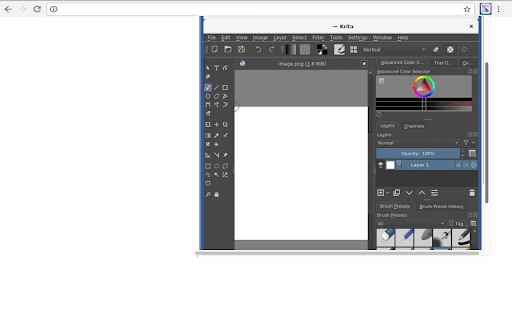


Create and edit graphics for digital art & 2D animation for artists, illustrators and VFX industry. This extension allows users to run the Krita graphics editor. Krita is a program designed for digital art and 2D animation. Its main features are: • Beautiful Brushes Multiple professionally made brushes are preloaded. These brushes provides a lot of effects so you can see the variety of brushes that Krita has to offer. • Brush Stabilizers Krita provides 3 different ways to smooth and stabilize your brush strokes. It also includes a Dynamic Brush tool where you can add drag and mass. • Vector & Text Krita allows to select a word bubble template from the vector library and drag it on your canvas. Add text to your artwork as well with the text tool. Krita uses SVG to manage its vector format. • Brush Engines Customize your brushes with over 9 unique brush engines. Each brush engine is made to satisfy a specific need such as the Color Smudge engine, Shape engine, Particle engine, and even a filter engine. • Textures mode It is easy to create seamless textures and patterns now. • Drawing Assistants Use a drawing aid to assist you with vanishing points and straight lines. The Assistant Tool comes with unique assistants to help you make that perfect shape. • Layer Management In addition to painting, Krita comes with vector, filter, group, and file layers. Combine, order, and flatten layers to help your artwork stay organized. • Select & Transform Highlight a portion of your drawing to work on. There are additional features that allow you to add and remove from the selection. You can further modify your selection by feathering and inverting it. • Filters Krita has a collection of built-in filters and supports G'MIC filters. It has real-time filter preview support. Filters included in a default installation: levels, colour adjustment curves, brightness/contrast curve, desaturate, invert, auto contrast, HSV adjustment, This extension also includes access to a file manager to upload and download the graphics created. This extension is the Krita online distribution so it is compliance with the Krita GPL.

Clip Studio Paint - Draw and Paint Anywhere
A Chrome extension advanced app Clip Studio Paint. Your go-to art studio for illustration, animation, manga, & webtoons. Fully packed with customizable brushes & tools. Draw on your smartphone, tablet..... Clip Studio Paint - Draw and Paint Anywhere is a fun and creative Chrome extension that lets you draw, paint, and edit images directly in your browser. With a user-friendly interface, you can easily create artwork, upload your own images, and download your finished pieces. Plus, you can explore extra creative resources with just one click. Enjoy a world of creativity at your fingertips!

Blender 3D creation suite
This extension allows users to use the Blender software program. Blender is a program for 3D computer graphics to create animated films, visual effects, art, 3D-printed models, motion graphics, interactive 3D applications, virtual reality, and video games. • Modeling - The creation of a 3D scene needs at least three key components: Models, materials and lights. In this part, the first of these is covered, that being modeling. Modeling is simply the art and science of creating a surface that either mimics the shape of a real-world object or expresses your imagination of abstract objects. • Rendering - Rendering is the process of turning a 3D scene into a 2D image. Blender includes three render engines with different strengths: - EEVEE is a physically based realtime renderer. - Cycles is a physically based path tracer. - Workbench is designed for layout, modeling and previews. • Video Editing - Blender can be used to edit videos. There are two possible methods for this, one being the Compositor and the other, described in this chapter, being the Video Sequencer. The Video Sequencer within Blender is a complete video editing system that allows you to combine multiple video channels and add effects to them. You can use these effects to create powerful video edits, especially when you combine it with the animation power of Blender! • VFX - Motion Tracking is used to track the motion of objects and/or a camera and, through the constraints, to apply this tracking data to 3D objects (or just one), which have either been created in Blender or imported into the application. • Compositing - Compositing Nodes allow you to assemble and enhance an image (or movie). Using composition nodes, you can glue two pieces of footage together and colorize the whole sequence all at once. • Texturing - Image textures are typically needed when the desired look is hard to achieve with procedural textures, or if the texture is not uniform. For example, a car would only have scratches in a few places where they make sense, not in random places all over its body. • Many types of Simulations. Blender’s physics system allows you to simulate a number of different real-world physical phenomena. You can use these systems to create a variety of static and dynamic effects such as: Hair, grass, and flocks, Rain, Smoke and dust, water. This extension also includes access to a file manager to upload and download the files, animations and videos created. This extension is the Blender online distribution so it is compliant with the Blender GPL

PaintCloud image editor for photos & graphics, and image converter
The PaintCloud Image Editor extension is a powerful and easy-to-use image editing tool that offers a wide range of features to enhance and manipulate images, photos and graphics on-the-go. With this extension, users can crop, resize, rotate, flip, draw, add shapes and text, apply filters, adjust brightness, contrast, saturation, and more. Key features of the extension include: • Easy-to-use interface: The extension provides a user-friendly interface that allows users to easily navigate through various editing tools and options. • Crop and resize: Users can crop and resize images to meet their specific requirements and dimensions. • Option to support various display sizes. (allows you to use the editor features on your web pages at least over 550 * 450 sizes • Drawing and shapes: Users have the option to draw freehand on images or add predefined shapes like squares, circles, and arrows. • Text overlay: Users can add text overlays to images, choosing from a variety of fonts, sizes, and colors. • Filters and adjustments: The extension offers a range of filters and adjustments to enhance the appearance of images, such as brightness, contrast, saturation, hue, and more. • Undo and redo: Users can easily undo or redo any changes made to the image, providing flexibility and control over the editing process. • Other multiple functions: Load image to canvas, flip, rotation, free drawing, line drawing, shape, icon and mask filter. • Has a white and black theme, and you can modify the theme file to customize it. Overall, the PaintCloud Image Editor extension is a versatile and comprehensive tool for editing images, photos and graphics on-the-go, offering a wide array of features to meet the needs of both casual users and professionals alike.

Draw Online
Online draw on page: add text, create shapes, sketch lines and curves, take notes, and draw arrows. Capture, share, or print Draw Online: Transform web pages into Your Canvas Discover the boundless creativity of web paint online tool, the ultimate browser extension that turns any web page into your digital canvas. - Unleash your creativity by drawing on any web page using a range of versatile tools and a spectrum of vibrant colors. - Seamlessly save your artwork directly within your browser, providing easy access to your creations. - Enjoy the convenience of a lightweight and user-friendly interface. - Elevate your browsing experience, adding a new dimension of creativity and personal expression. - Install web paint online tool from your browser's app store. - Visit the web page you wish to transform into your canvas. - Click the web paint tool icon in your browser's toolbar to access the intuitive drawing interface. - Unleash your artistic prowess using the diverse range of tools and colors. - Save your artwork effortlessly with a single click. Draw Online empowers you to redefine web pages and infuse them with your unique touch. Whether you're an artist seeking an outlet, a diligent note-taker, or simply someone who loves to have fun, this browser extension provides the ideal platform for boundless creativity. There's no need to wait—download web paint online tool now and let your digital masterpiece come to life!
