
gfmkiampcljcdhgcalhgjhojfejlkhnn

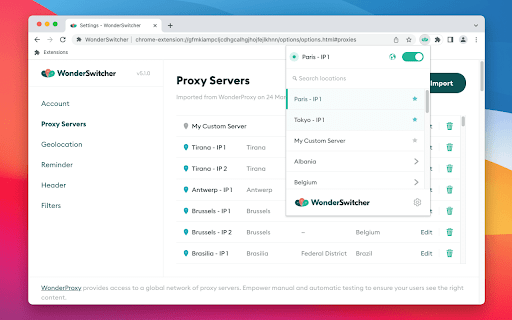
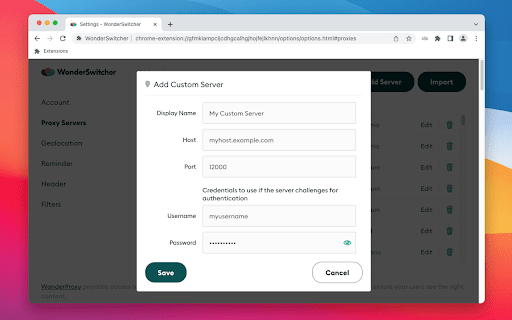
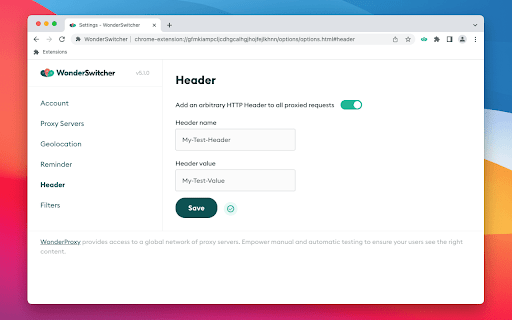

Switch between HTTP proxies quickly and easily The WonderProxy Switcher allows you to switch between HTTP proxy servers quickly and easily to speed up your website testing. Import proxies from your WonderProxy account or add your own custom servers. --- Version 6.6.0 August 20, 2025 - Change the default Encryption scheme to "Encrypted" - Handle a bug where the authentication check did not complete if the extension popup closed Version 6.3.0 March 28, 2025 - Authenticate with proxy servers at the time they are selected by the user. - Improve security by serializing some strings before use. - Remove a dummy entry in the list of domains which bypass proxying. Version 6.2.0 February 21, 2025 - Add support for encrypted connections to proxy servers. Version 6.1.3 February 11, 2025 - Fix a bug where the extension did not authenticate with the proxy server if the Service Worker was suspended Version 6.1.1 December 12, 2024 - Add a list of domains which should never be proxied, to prevent a browser bug where the proxy auth box pops up on the new tab page Version 6.0.0 May 7, 2024 - Support Manifest V3 (MV3) - Change to accepted filters format - Transition users with enabled MV2 filters onto MV3 filters format Version 5.1.0 March 22, 2023 - Introduce account access checking features - Improvements to the account options page design Version 5.0.1 February 28, 2023 - Security improvement in geolocation content script - Fix for bug where browser geolocation did not work in an iframe Version 5.0.0 February 14, 2023 - Remove password authentication for WonderProxy proxies in favour of Proxy Tokens - Change WonderProxy account import format and validation process - Simplify user onboarding process - Replace Credentials page with Account page Version 4.8.0 November 4, 2021 - Added toggle to allow users to enable/disable matching their browser location to the proxy location. Version 4.7.2 August 10, 2021 - Fix warnings generated by automated tooling, to help browser approve us faster - Correct the size of an icon Version 4.7.0 February 17, 2021 - Adding support for Proxy Tokens, a new way of authenticating with proxy servers. Version 4.6.5 January 6, 2021 - Bugfix for websites using Basic Auth, switcher will now allow credential prompt to display - Internal changes to reduce permissions required from browsers - Bugfix for WatchPosition in Firefox for filtered domains Version 4.6.1 Released October 2, 2020 - Servers with a Lat or Long of 0 will no longer appear as custom servers - watchPosition will now correctly return a watchID - Editing a custom server will no longer unstar it Version 4.5.0 Released April 1, 2020 - Add functionality to star favourite proxies for easy access - Fix window focus when launching settings from private browsing mode in Chrome & Edge Version 4.4.0 Released Feb 12, 2020 - Add Switcher version information to WP.com account page - Ensure current proxying proxy stays active when users import their server list Version 4.3.0 Released Jan 13, 2020 - A few fixes for the Edge release Version 4.1.2 Released Dec 12, 2019 - Fix for upgrading to the new React extension: add function to port user data Version 4.0.0 Released Dec 12, 2019 - Rewrote the extension in React/ES6, added build system etc. Version 3.1.0 Released Aug 26, 2019 - Provides latitude and longitude data for all WonderProxy servers. The extension will update your browser location so it reflects the location of the proxy when connected to a WonderProxy server. Version 2.0.0 Released May 2, 2019 - Updated onboarding process - Removed credentials modal for importing servers - Allows users to save their headers, even if disabled - Add version to settings UI - Add new filtering options: now supports IPs - Save the user's preferred reminder time Version 1.0.0 Released Apr 4, 2019 - Allow access to import json via URL (bug fix) - Some invisible changes to improve how the switcher communicates - Some improvements to values being saved when proxy setting is on Version 0.1.2 Released Mar 12, 2019 - Added search/filter functionality to the top of the extension pop-up. Quickly search your list of proxy servers if you have hundreds! Version 0.1.1 Released Mar 5, 2019 - Introduced an icon in the pop up to remind users that they have an active domain filter. - Added a show password option to all of our password fields Version 0.1.0 Released Jan 7, 2019 - Importing your servers from my/account & json import will no longer clear your existing preferences - Exit IPs are now properly sorted numerically, if there are more than 9 ips - Small bug fix to the behaviour for the reminder feature - Small fix to auto refresh the settings page when servers have been imported Version 0.0.9 Released Dec 6, 2018 - The last used proxy is now saved for quick proxy selection - Date of last import is now shown on the settings page for either the WonderProxy or JSON import - Importing servers from WonderProxy or JSON prompts a credentials modal Version 0.0.81 Released Nov 19, 2018 - Brand new look for the pop up and options page - The inclusion/exclusion settings area has been reformatted and renamed "Domain Filters". Note to users, you may need to re-add your domains in this section. Version 0.0.7 Released Oct 10, 2018 New settings: - Arbitrary headers - Ability to exclude or include websites/domains General: - Enable extension in Firefox private browsing - Fix to connection state issues when relaunching browser Version 0.0.5 Released Apr 30, 2018 - Updated settings to appear in a separate tab (to stay consistent with Chrome) - Fix to settings input: Enable time input when reminder is checked when settings are loaded initially Version 0.0.4 Released Feb 8, 2018 - Updated the colour palette & icons to match our website - We're displaying servers by IP index rather than the port number - Added a 'start' screen so that users know what to do when they first install the extension

YPP SwiftProxy Changer
YPP SwiftProxy Changer, the ultimate extension. You can seamlessly switch between multiple proxy servers. Introducing YPP SwiftProxy Changer, the ultimate Chrome extension designed to simplify your proxy management experience! With YPP SwiftProxy Changer, you can seamlessly switch between multiple proxy servers, ensuring optimal privacy, security, and browsing freedom. New in Version 0.0.3 - Changed the Change UserAgent button with Configure Browser Settings button where you can select your User Agent and enabled/disable webRTC and iframes protection. New in Version 0.0.2 - Upgraded privacy with WebRTC protection, now fine-tuned and activated alongside headers for enhanced security. - Minor adjustments made to existing protection features, ensuring they are fully functional and up-to-date. - For added safety, iframes are now disabled on all pages if you activate Headers Faking to prevent websites from gathering your information. - Experience dynamic icon changes in Chrome for an immediate understanding of your privacy level: Red Icon: Alert! The sites have access to your real computer details and might obtain your IP address. Yellow Icon: Safer! The sites are blocked from accessing your real IP address, timezone, or language, but can see real browser user agent. Green Icon: Fully Secure! Congratulations, you are 100% protected with complete privacy assurance. 🌍 Instant Proxy Switching: Change your proxy settings with just a few clicks, enabling you to access geo-restricted content and bypass censorship effortlessly. 🔒 Robust Privacy & Security: Protect your privacy by masking your IP address, modifying headers, and altering the window.navigator object, ensuring that websites and third parties cannot track your online activities. 📍 Spoof Location & Timezone: YPP SwiftProxy Changer can also change your location and timezone, making it even more difficult for trackers to pinpoint your real identity. 🕵️ User-Agent Customization: SwiftProxy Changer also allows you to modify your browser's user-agent string, further enhancing your online anonymity. By changing the user-agent, you can disguise your browser and operating system, making it harder for websites and trackers to identify you based on your browsing fingerprint. ⚡ Lightning-Fast Connection: Our extension is optimized for speed, providing you with a swift browsing experience without compromising on security. 🔧 Custom Proxy Configuration: Add, remove your proxy servers with our user-friendly interface, making it simple to manage your proxy list. 🌟 Compatibility & Easy Integration: Our extension works seamlessly with Google Chrome, allowing you to enjoy a hassle-free browsing experience. YPP SwiftProxy Changer is perfect for users who value their online privacy, need to access geo-blocked content, or simply want a more secure browsing experience. Say goodbye to manual proxy configuration and start enjoying the convenience of YPP SwiftProxy Changer today!

Proxy Switcher and Manager
Manage and switch between multiple proxy types (SOCKS, PAC, and Direct) with profile support "Proxy Switcher and Manager" extension brings the power of proxy management to your browser. Using this extension, you can configure your browser to use a proxy server without altering your operating system's network. The toolbar icon indicates the current type of proxy your browser is using (No Proxy Mode (Direct), Auto-detect Proxy Mode, Manual Mode (SOCKS and HTTPS), and PAC Script Mode). The extension is designed such that no resource is used while the panel is closed. Features: 1. Supports profiles to store multiple proxy servers and switch between them when needed 2. Supports inline PAC script 3. Supports refreshing the PAC script from a remote server 4. Displays failed resources and the reason they failed 5. Supports badge text and toolbar color to differentiate between proxy profiles Notes: 1. The toolbar icon is an indicator of the current proxy type. Place your mouse over the toolbar button to get more info. 2. The badge text displays the number of failed resources. Opening the panel, you can check these resources by pressing the "Error Log" button (this feature is disabled by default). 3. It is possible to search for free transparent or anonymous proxy servers in the manual proxy tab. Why do I need this extension to alter my proxy? By using a proxy server that sits intermediary between your computer and the internet, you can hide your real location or access websites that would otherwise be blocked. Proxy Switcher and Manager is an open-source project.

Proxy Switch by Proxy-Hub.com
Proxy Swtich v3 is an ultimate proxy manager for proxy rotation with all needed features. Upgrade to Proxy Switch v3, the ultimate proxy manager designed to effortlessly handle all your proxy needs. Packed with powerful features, this new version is optimized for the latest Chrome requirements. It will support all proxy types, including semi-dedicated, dedicated private proxies, static residential proxies,mobile proxies and SOCKS. 2: Smart Proxy Rotation: Rotate proxies every 60 seconds or use keyboard shortcuts (Ctrl+Shift+0 for Windows, Command+Shift+0 for Mac). 3: Custom User Agents: Change and edit user agents to enhance your browsing experience. 4: Tab-Specific Proxy Auto-Change: Automatically switch proxies with every new tab or customize as per your preference. 5: Comprehensive Cleaner: Clear cache, cookies, history, forms data, passwords, and more manually or set to change with every proxy rotation. 6: Site Blocking: Block specific sites for added control over your browsing experience. 7: WebRTC/Flash Controls: Enable or disable WebRTC and Flash to enhance privacy and security. 8: Domain Bypass: Bypass proxy for specified domains when visiting, providing flexibility in your proxy usage. 9: Bandwidth Control: Safely control bandwidth by blocking images for a data-efficient browsing experience. 10: AdSense and Object Blocking: Block AdSense and other objects when visiting sites, giving you control over your ad experience. Upgrade to Proxy Switch v3 now and take your proxy management to the next level. Stay secure, private, and in control of your browsing environment

Proxy & User-Agent Switcher for Chrome
The Proxy & User-Agent Switcher for Chrome is an extension that allows you to modify the browser proxy or user-agent while browsing. The Proxy & User-Agent Switcher for Chrome is a browser extension that allows you to quickly and easily modify Chrome's proxy or user-agent while browsing. Features: - Proxy switcher (geolocation-testing) - User-agent switcher (mobile device-testing) - Import and export custom proxy profiles - Auto turn-off proxy to keep your proxy usage under control - Auto reload the current page via selected proxy or user-agent - Auto sync the proxy configuration via Chrome user account The Proxy & User-Agent Switcher extension is also available on Firefox and Microsoft Edge browsers. Version 4.1 - Jun 26, 2024 + Fixed and updated with latest user-agents + Added donation button to support development and maintenance Version 3.0 - July 23, 2020 + Free proxies have been added + Redesigned the browser action menu options Version 2.5 - Jun 6, 2020 + Latest mobile devices and browsers added in the user-agents switcher Version 2.2 - May 6, 2020 + Fixed the user-agent switcher issue Version 2.1 - May 1, 2020 + Latest mobile devices and browsers added in the user-agents switcher Version 1.6 - July 3, 2018 + More mobile devices added in the user-agents switcher + Performance improvements + Privacy policy updated More from my backyard: >> Assay - the URL Inspection tools https://chrome.google.com/webstore/detail/dpaahndfhbkiolfhjbeaocgmphmgidih >> Malware & URL Scanner https://chrome.google.com/webstore/detail/ianpniapgjchiheejeipopldaanbjicd >> CryptoMining Blocker https://chrome.google.com/webstore/detail/fnmgefajmfpflnopkgeodcbfkgpkbcaa >> Ads Preview https://chrome.google.com/webstore/detail/moclhmphpefaimgfcdgecdbbhnelafoj >> Become a patron Please consider a donation to support the ongoing development and maintenance of this free extension https://buymeacoffee.com/d09r Thanks for using the Proxy & User-Agent Switcher for Chrome extension. I’d like to hear your valuable feedback, if you have any feature requests or just like this extension, then please rate this extension and leave a comment on the extension review page.
