
bdjeogoajilmceaemepogjldihohcgph

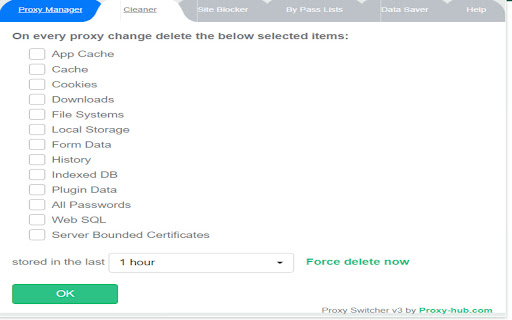


Proxy Swtich v3 is an ultimate proxy manager for proxy rotation with all needed features. Upgrade to Proxy Switch v3, the ultimate proxy manager designed to effortlessly handle all your proxy needs. Packed with powerful features, this new version is optimized for the latest Chrome requirements. It will support all proxy types, including semi-dedicated, dedicated private proxies, static residential proxies,mobile proxies and SOCKS. 2: Smart Proxy Rotation: Rotate proxies every 60 seconds or use keyboard shortcuts (Ctrl+Shift+0 for Windows, Command+Shift+0 for Mac). 3: Custom User Agents: Change and edit user agents to enhance your browsing experience. 4: Tab-Specific Proxy Auto-Change: Automatically switch proxies with every new tab or customize as per your preference. 5: Comprehensive Cleaner: Clear cache, cookies, history, forms data, passwords, and more manually or set to change with every proxy rotation. 6: Site Blocking: Block specific sites for added control over your browsing experience. 7: WebRTC/Flash Controls: Enable or disable WebRTC and Flash to enhance privacy and security. 8: Domain Bypass: Bypass proxy for specified domains when visiting, providing flexibility in your proxy usage. 9: Bandwidth Control: Safely control bandwidth by blocking images for a data-efficient browsing experience. 10: AdSense and Object Blocking: Block AdSense and other objects when visiting sites, giving you control over your ad experience. Upgrade to Proxy Switch v3 now and take your proxy management to the next level. Stay secure, private, and in control of your browsing environment

Anonymous HTTP Proxy
Access blocked web resources worldwide, surf the internet freely, and be secure online. Access blocked web resources worldwide, surf the internet freely, and be secure online. Getbehind.me offers a global network of proxy servers, enabling an anonymous, location-targeted browsing experience. With this extension, you can access websites that are blocked in your area—completely free and easy to use. Simply install the extension, select your desired location, and click the connect button. Once connected, all visited websites will recognize you as browsing from the chosen location. Should you encounter any technical difficulties, please contact us at support@getbehind.me. ** PLEASE NOTE ** This extension requires an active license, which can be purchased at getbehind.me

Oxylabs Proxy Extension
Oxy® Proxy Extension is not only free but also works with any proxy provider of your choice. Enable your proxy without having to jump through settings and menu options. Why should you use the Oxy® Chrome Extension? By using a proxy server that acts as an intermediary between your computer and the internet, you can hide your real location or access websites that would otherwise be blocked. For example, you can send requests from a different country and access websites that are not available in your current location. With the Oxy Proxy extension, you can simplify your proxy management. All you need is a couple of clicks, and that’s it! Features and benefits: * Add and switch between multiple proxies * One-click connection * Use multiple proxy providers while using only one extension * Maintain the same IP address for multiple requests * Switch between any proxy type or HTTP(S) and SOCKS protocols * Add unlimited proxies * WPAD: proxy information is not displayed in the request header. How to set up Oxy® Proxy Extension? 1. Download and add the extension to your browser 2. Open the application 3. Add your proxy profile 4. Connect with one click For more detailed integration instructions, see our documentation: https://developers.oxylabs.io/proxies/integration-guides/3rd-party-integrations/oxy-proxy-extension-for-chrome Don’t have a proxy provider yet? Try Oxylabs, a premium proxy service. We offer Residential Proxies, Dedicated Datacenter Proxies, Shared Datacenter Proxies, and Mobile Proxies. To explore these options thoroughly, register and check out our dashboard here: https://dashboard.oxylabs.io/en/ If you have a feature request or want to report a bug, get in touch with us at info@oxylabs.io.

Proxy & User-Agent Switcher for Chrome
The Proxy & User-Agent Switcher for Chrome is an extension that allows you to modify the browser proxy or user-agent while browsing. The Proxy & User-Agent Switcher for Chrome is a browser extension that allows you to quickly and easily modify Chrome's proxy or user-agent while browsing. Features: - Proxy switcher (geolocation-testing) - User-agent switcher (mobile device-testing) - Import and export custom proxy profiles - Auto turn-off proxy to keep your proxy usage under control - Auto reload the current page via selected proxy or user-agent - Auto sync the proxy configuration via Chrome user account The Proxy & User-Agent Switcher extension is also available on Firefox and Microsoft Edge browsers. Version 4.1 - Jun 26, 2024 + Fixed and updated with latest user-agents + Added donation button to support development and maintenance Version 3.0 - July 23, 2020 + Free proxies have been added + Redesigned the browser action menu options Version 2.5 - Jun 6, 2020 + Latest mobile devices and browsers added in the user-agents switcher Version 2.2 - May 6, 2020 + Fixed the user-agent switcher issue Version 2.1 - May 1, 2020 + Latest mobile devices and browsers added in the user-agents switcher Version 1.6 - July 3, 2018 + More mobile devices added in the user-agents switcher + Performance improvements + Privacy policy updated More from my backyard: >> Assay - the URL Inspection tools https://chrome.google.com/webstore/detail/dpaahndfhbkiolfhjbeaocgmphmgidih >> Malware & URL Scanner https://chrome.google.com/webstore/detail/ianpniapgjchiheejeipopldaanbjicd >> CryptoMining Blocker https://chrome.google.com/webstore/detail/fnmgefajmfpflnopkgeodcbfkgpkbcaa >> Ads Preview https://chrome.google.com/webstore/detail/moclhmphpefaimgfcdgecdbbhnelafoj >> Become a patron Please consider a donation to support the ongoing development and maintenance of this free extension https://buymeacoffee.com/d09r Thanks for using the Proxy & User-Agent Switcher for Chrome extension. I’d like to hear your valuable feedback, if you have any feature requests or just like this extension, then please rate this extension and leave a comment on the extension review page.

BP Proxy Switcher
Change your proxies with one click With our Chrome proxy addon, you can easily load your proxy list from the clipboard or a URL and switch between them with a single click. Display the country for each proxy.Clear the cache before switching to a new proxy. Automatically reload the current tab when changing proxies. Rotate proxies automatically at intervals you specify. Exclude certain URLs from using the proxy. Block specific URLs from loading. Note: Due to Chrome's limitations, it's not possible to set a different proxy for each tab. The proxy will be applied across the entire Chrome profile.
