
gedjdficbpcpddhchmofcbpjabgkacig


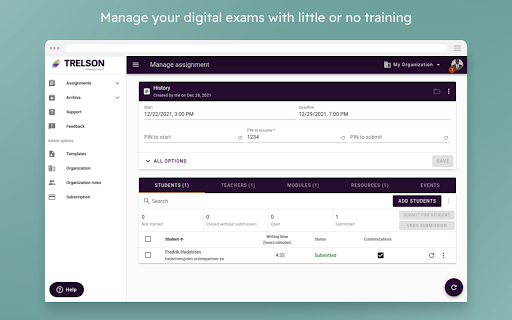
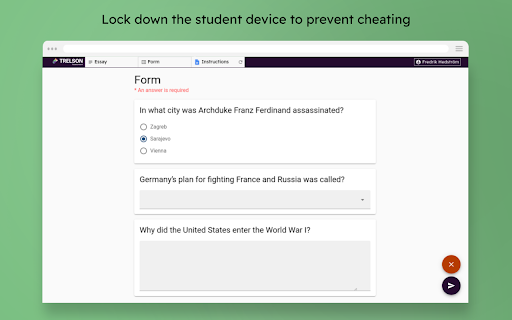
Trelson for Google Classroom allows you to use Classroom to support the formative post work of an assignment. Schools, Colleges and Universities across the world rely on Trelson to deliver online testing and transform the exam process into a digital process. Every year over 150.000 students take their tests online using Trelson and the numbers are growing rapidly. Trelson will lock down any student device to prevent cheating and only allow selected resources. The student will be blocked from searching for information and communicating with others. The integration with Google for Education makes it easy for educational institutions to switch to online testing. By using Trelson, you will quickly be able to digitally assess your students. Teachers and students will be able to manage Trelson with little or no training. At Trelson we have a strong focus on accessibility in order to give all students an equal opportunity. Assistive technology includes extended time, spell-check, text-to-speech, speech-to-text and dyslexia fonts etc. From infrastructure and administration to design and user experience, Trelson is built on Google. If you use Google for Education - Trelson is the ultimate choice for online exams. The teacher can easily add digital resources to the assignment. For example you can add any resource from Google Drive like a PDF, text, sound, images and video clips.You can also add videos from i.e Youtube. Trelson will automatically make sure that the student access settings are correct when you share a resource the students need during the test. Trelson is available for Chrome OS, Windows, macOS, iPad and Android.

Nearpod for Classroom
Access your Nearpod Library and assign Live and Student-Paced lessons directly to Google Classroom. Nearpod’s Google Chrome extension for Google Classroom allows teachers to create Nearpod Assignments within Classroom. Teachers will have the ability to access their Nearpod Library and assign Live and Student-Paced lessons directly to Google Classroom. This extension is free, easy-to-use, and available to users of any subscription type.

POCU Proctor
This extension enables POCU to view your screen, and collect webcam and audio feeds when you take an online examination on POCU - https://test.pocu.academy. We only collect this information on pocu.academy, and we do not have access to your screen, webcam and audio feeds if you are not on pocu.academy domain. POCU collects the student's screen, webcam and audio feeds to detect plagiarism or cheating during an online exam. By installing this extension, you are giving POCU permission to view your screen, and collect webcam and audio feeds during an examination.

Lingdys for Chrome
Lese- og skrivestøtte for Chrome Lese- og skrivestøtte for Chrome Lingdys for Chrome Norges mest brukte verktøy for lesing og skriving, Lingdys, er tilgjengelig for deg som bruker Google Chrome eller Chromebook. Med Lingdys for Chrome kan man lese opp tekst på nettsider, få hjelp mens man skriver med ordforslag fra ordprediksjon, stavekontroll og mulighet for å slå opp ord i ordbøker. Lingdys for Chrome inneholder følgende: - Bokmål, nynorsk, engelsk, tysk, fransk og spansk. - Opplesing med markering av ord og setning av valgt tekst på alle nettsider. - Opplesing ved skriving av bokstaver, riktige ord, feilstavede ord og setninger. - OCR: Skanning av tekst fra skjerm, der valgt tekst både kan kopieres og lagres. - OCR: Skanning av matematikk og avanserte formler. - Diktering / talegjenkjenning for bokmål, englesk, tysk, fransk og spansk. - Stavekontroll mens man skriver. - Stavekontroll og tekstkontroll av hele dokumenter. - Stavekontroll som hjelper med dialektfeil, bokstaver som ligner og sammensatte ord. - Ordforslag mens man skriver - forslag til dette- og neste ord, korrektiv prediksjon og bruk av jokertegn i prediksjon. - Ordlister - lag egne brukerordlister eller lag ordlister fra et dokument. - Brukerord - legg til egne brukerord eller importer ord fra et dokument. - Erstatninger - lag egne erstatningsregler. - Oppslag og søk i ordbøker på alle nettsider. - Lagring av tekst som lydfil. - Opplesing av PDF-er i nettleseren. - Fungerer i Google og Microsoft sine nettbaserte applikasjoner og i generelle skrivefelt.

Google Classroom To-Do List
This extension allows students to display a list of their unsubmitted assignments from Google Classroom and to select items to place on a To-Do List. Assignments include links back to google classroom and overdue items are highlighted with red due dates. (Extension icon credit: Kusniyah at the Noun Project)
