
pphabfkgdbhkogijpaodmkkelenlamgn

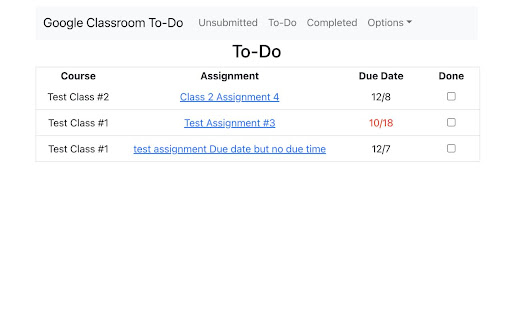
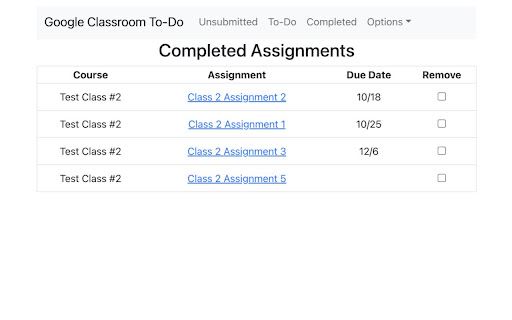
This extension allows students to display a list of their unsubmitted assignments from Google Classroom and to select items to place on a To-Do List. Assignments include links back to google classroom and overdue items are highlighted with red due dates. (Extension icon credit: Kusniyah at the Noun Project)

Better Classroom
Better Classroom is a Google Chrome extension that lets users create folders to organize their classes in Google Classroom. Better Classroom is a simple yet powerful extension that enhances your Google Classroom experience by allowing you to organize and rename your classes with ease. With Better Classroom, you can create folders to group your classes, making it easier to manage and navigate through them. Say goodbye to cluttered and disorganized classrooms, and hello to a more efficient and streamlined experience. Get Better Classroom today and take control of your Google Classroom organization!

Shopping List for Google Tasks
Bookmark products and add them to your Google Tasks shopping lists Instantly bookmark products from any shopping website and save them directly to your Google Tasks lists. Perfect for organizing wishlists, tracking prices, and managing your shopping across multiple stores. Key Features: - One-click bookmarking of products while browsing any online store - Automatically captures product name, price, and URL - Organizes products into your existing Google Tasks lists - Tracks the date you added each item - Add personal notes to remember why you want each product - Works seamlessly with Amazon, eBay, Etsy, and thousands of other shopping sites How It Works: - Browse any product page on your favorite shopping website - Click the extension icon in your browser toolbar - Review the auto-detected product details (name and price) - Choose which Google Tasks list to save it to - Done! Access your shopping list anytime from Google Tasks Why You'll Love It: Never forget about that perfect gift you saw or lose track of items you're comparing. Keep all your shopping organized in one place, accessible from any device through Google Tasks. Compare prices over time, share lists with family, and make smarter purchasing decisions. No more lost browser tabs or forgotten bookmarks - your shopping list is always synced and accessible across all your devices through Google Tasks.

Desktop app for Google Tasks
Standalone Desktop app for Google Tasks. Export and share your Google Tasks lists in one click. The TasksBoard Chrome extension let you add a task to your Google Tasks in one click from any page on Google Chrome. ✅ TasksBoard lets you manage, edit and share your Google Tasks on a full-screen interface. 👥 Collaborate with your team in real-time with the option to share the lists. ✨ TasksBoard offers a Premium plan with additional features such as unlimited shared lists, customisable boards, tags and more. 👌 Increase your productivity: Drag and drop your tasks from one list to another 🤝 Collaborate with your team: Share your Google Tasks lists with anyone 🗄️ Keep everything organized: Create multiple boards for each of your projects 🌈 Better Task management: Set highlight color to your lists to find them instantly 🏷️ Easily organize and prioritize your tasks with custom labels 📁 Attach documents from Google Drive directly to your tasks ✉️ Make emails actionable by turning them into tasks from within your Gmail inbox 💻 Access your Google Tasks directly on the desktop by installing the desktop app 🔑 Ensure secure sign-on with your team's existing Google credentials through Single-Sign-On authentication Need a helping hand? Have a look to our extensive guides, the documentation on https://tasksboard.com/support and/or contact us at contact@tasksboard.app TasksBoard has individual and enterprise Premium plans available. Check our pricing options: https://tasksboard.com/pricing By design, your data stays at all times on Google servers. We have no access to your data, and we never copy your tasks on our server.. Here's all the data we need in order to make TasksBoard work: - Your email address - to know who you are - Campaigns sent metadata (spreadsheet name, date of sending - that's all) - Emails sent metadata (date of sending, open / clicks events - that's all again) TasksBoard / TaskBoard complies with privacy laws (especially GDPR) to protect your data. Check out the full privacy policy on this page https://tasksboard.com/privacy

GQueues for Google Calendar
If you live in Google Calendar, you understand the importance of a timely reminder to get to work, and blocking out meeting-free time so you have space to actually get that work done. With the GQueues Google Calendar extension, you can view full details for GQueues tasks syncing to Google Calendar, and mark those tasks complete right from the Calendar interface. No switching back and forth between the two apps to keep track of what you’ve accomplished. If you’ve already activated Calendar syncing for your GQueues account, the next step is to install this extension to push that integration (and your productivity) to the next level. The GQueues for Google Calendar Chrome Extension requires a GQueues account to work. GQueues is a task management app specifically designed for teams on Google Workspace. With GQueues you get: • Deep integration with Google Workspace including Chrome, Gmail, Calendar, and Drive • Immediate, 2-way task syncing with Google Calendar • Unlimited, project-based calendars to share with your team • Simple, intuitive interface • Core task management including subtasks and repeating tasks • Robust search and task filters • Easy collaboration with shared folders and assignments for delegating work • Mobile apps for Android and iOS
