
gdojjgflncpbcfmenbkndfhoamlhajmf
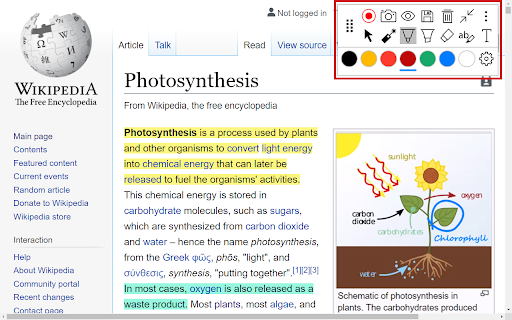

Annotate web pages, PDFs, Google Slides, and Google Docs to improve engagement. Annotate in Google Meet when screen sharing. New in v8.53+ • Support for In-Document questions for converting printable paper worksheets into fully digital assignments. New in v8.22+ • Student note taking on web pages, Google Slides, and PDFs • Student note taking during LiveStreams for Google Slides and PDFs • Livestream student work (Google Slides and PDFs) to student devices and to a classroom display using Chrome Client Lite. • Review student work and provide feedback in real time New in v8.19+ • Livestream support for PDFs and Google Slides • More robust export for web page annotations • General bug fixes Freely annotate web pages, PDF documents, Google Slides and Google Docs content when presenting. Keep your audience engaged with live annotations during your remote learning and Google Meet sessions. New! Annotate PDFs on your Google Drive or on the web by selecting “Open with Annotate”. Annotations are sticky and remain in place as you zoom, scroll, and navigate. The same user interface and annotation tools now work across PDFs, Google Slides, Google Docs, and web pages. With improved compatibility with Google Slides and Google Docs, we track annotations for every slide/ page so your annotations remain in sync as you navigate across slides/ pages. Tight integration with Google Slides and Google Docs also enables switching between app controls/ menus and our annotation tools seamlessly. Our annotations are smooth, fast, and anchored in place as you zoom and navigate, making your content look professional and engaging. Save your annotations in your account for review later. Share them with others or come back and continue working from where you left off. Capture screenshots of marked up pages and insert them directly into your Annotate notebook. All this as you share¹ your entire screen, an application, or just a single Chrome tab with a projector² and multiple student devices. The plugin works seamlessly with your Annotate.net instructor account to enable annotations over web pages and screen sharing¹ during LiveStreams. When installed on classroom devices, you can empower students to take an active role in their learning by giving them the ability to annotate web pages and share their screens using the "Pass Control" feature. Teachers, students, and Google Meet users shall be able to: • Freely annotate web pages, PDFs, Google Slides, and Google Docs using the pen and highlighter tools³. • Annotate PDFs on their Google Drive or on the web by selecting “Open with Annotate”. • Annotate Google Slides in both edit and present modes. Google slides annotations are tracked and saved for every slide. • Save annotations directly into their Annotate web account⁴. • Share their annotations with others⁴. • Capture screenshots of web pages with annotations and add them directly into an Annotate notebook. • Insert images from the web, including image searches, directly into their Annotate notebook with just a click. • Use the laser pointer tool to point out details and draw attention. • Stream their entire desktop screen, a single application, or just a Chrome tab¹. • Stream speaker and microphone audio¹ from their computer to a projector² and student devices. • Select a monitor for sharing if they have multiple screens/monitors connected to their computer¹. ¹The extension provides screen sharing and audio streaming support in your Annotate web account in older versions of Chrome. ²Requires the Annotate Mirror Client v11.0+ or the Annotate Chrome Client Lite running on the PC/ Mac/ Chromebox connected to your projector. ³Feature limitations may apply depending on your account type. Please review https://annotate.net/pricing for the list of features available in different accounts. ⁴Some features are not available in student accounts. New in v7.22+ • Page rotation in PDFs • Blank document/ Infinite canvas support for PDFs and web pages New in v7.00+ • Bug fixes and general improvements Tools and features added in versions prior to 7.0 • Screen Shade tool with Spotlight support • Comments in web pages • Improved compatibility with Canva • Drawing support when toolbar is minimized • Export Google Slides with annotations and media³ • View, add, edit, and reply to comments in PDFs • Export PDFs with annotations and media³ • Add Media (images and videos) • Timer and Stopwatch • Voice notes • Screen + Camera recording • Multi-line Equation Editor • Line, Rectangle (Box), and Ellipse

Hypothesis - Web & PDF Annotation
Collaboratively annotate, highlight, and tag web pages and PDF documents. Use Hypothesis to hold discussions, read socially, organize your research, and take personal notes on webpages, PDFs and EPUBs.

Annotate PRO
Create, share, and USE reusable comments to edit and grade faster! Use with Canvas, Google Docs/Classroom, Microsoft Teams, Bb... AP is the platform for feedback excellence. Share comment banks, syllabus content, school policiies, and rubrics for use across the EDU platforms you know and love: Canvas, Google Docs, Microsoft Word, D2L, Moodle, and more. You can: - Create and manage content centrally, assuring every teacher has the right rubric, comment bank, policy info, syllabus snippet, or LibGuide URL. - Use dynamic rubrics and comment banks to handcraft feedback in less time. With AP you write it once, to perfection, then re-use to your heart's content! See https://www.11trees.com/solutions/annotate-pro/annotate-pro-works-with/ for a complete list of supported platforms. See https://www.11trees.com/solutions/annotate-pro/features/ for a complete list of features. For Individuals: Use the forever-free version of AP to create an unlimited number of comment banks for yourself, then use them with popular education platforms. Sign up and you'll get a 14-day trial of AP+ (no credit card required). AP+ adds Feedback Forms, Dynamic Rubrics, additional sidebar options, comment history, subgroups, analytics, and Google Translate integration. You can also license content libraries like our College Edition, Presentation Skills Edition, or Legal Writing Edition that provide 100s of stock comments that can be quickly personalized. For Institutions: License AP to easily share content libraries across 5, 50, or 500+ faculty. Schools use AP to scale writing across the curriculum initiatives, writing center operations, tutoring, foreign language instruction, project-based learning, presentation skills coaching, science labs grading, and even to centralize and share school resources and policy info through AP's Knowledge Base mode. AP analytics help measure the impact of feedback and help schools document regular and substantive interaction with students. With AP+ or Institutional Licenses you can: - Create and share (institutions only) large or small content libraries to serve as comment banks, rubric sets, or knowledge bases. Quickly add pre-written feedback to documents, respond to discussion posts, create emails, or answer chats. - Turbocharge specific, personalized feedback with AP Feedback Forms including nested checkboxes. - Create simple or complex rubrics that escape the traditional grid to create rich, narrative responses for students. - Search across multiple content libraries, and hundreds of Comments, with full-text search or right-click menu to find just the right comment. - Leverage Google Translate to flip comments into another language or even provide dual language responses. - Write free form comments to effortlessly store them in your AP library for reuse. - Turn on the History feature to store ALL the comments you create in Google Docs or Canvas SpeedGrader so you can easily build out your content libraries and engage students with previous feedback. - License our College Edition, Presentation Skills Edition, or other content libraries to access hundreds of expertly written comments that you can extend and personalized. - Review usage data, see where you have invested your engagement energy by comment group, sub-group and individual comment. Release Notes: 7.21.4 | April 20, 2026 * Minor update - bugz and tweaks. 7.21.3 | March 10, 2026 * Minor update - bugz and tweaks. 7.21.2 | January 3, 2026 * Happy New Year! * Word Count on Feedback Forms and Dynamic Rubrics to help modulate feedback volume. * Feedback Forms and Dynamic Rubrics stay open by default. * Bugz!. 7.21.1 | December 3, 2025 * Persist preferred word for "Grade" in rubrics. * Disable form check if a checkbox preceeds a text entry form. * Pin text formatting toolbar when editing. * Improved rubric printing. * Improved Startup Guide (AP menu > Gear > Startup Guide). * Bugz!. 7.21.0 | October 23, 2025 * RUBRICS! * Improved Feedback Forms: nested checkboxes and bulleted lists. * Improved support for Canvas SpeedGrader. * Bugz / improvements. 7.20.3 | September 13, 2025 * Improvements to support Canvas SpeedGrader changes * Improvements to Google Docs/Classroom experience * Support longer Feedback Form editing from the AP Chrome Extension * Minor tweaks, bug fixes, and improvements 7.20.2 | July 17, 2025 * Fixes duplicate comment insert when using the green Library dropdown option in the AP toolbar. * Canvas learnings. * Improved Edit and Knowledge Base behavior. 7.20 | June 30, 2025 * Right-click a AP content to edit it - from the Extension * Introducing Feedback Forms and Knowledge Base mode * Improved Canvas Gradebook support (sidebar, student history) * Numerous improvements to support D2L's Brightspace, Schoology, Google Classroom * Bugz and performance improvements 7.16 | March 31, 2025 * Improved Forms and Checklist behavior (keep a checklist open and use across multiple windows) * Improved support for Feedback Fruits * Polish & BUGZ! 7.15 | January 31, 2025 * New toolbar options (show all comments, sort by groups). AP+ feature. * Support for GoReact (video commenting) and Perusall (social learning) * Improved support for Moodle and BrightSpace * Polish & BUGZ! For previous release notes please visit https://www.11trees.com/support/release-notes-annotate-pro-for-google-chrome/.

Brisk Teaching – AI Assistant for Teachers
Brisk Teaching is your AI-powered teaching assistant designed to save teachers 10+ hours a week. It works seamlessly with your… Brisk Teaching is your AI-powered teaching assistant designed to save teachers 10+ hours a week. It works seamlessly with your favorite tools—Google Docs, Classroom, Slides, PDFs, and more. Install the extension and get immediate access to over 20 built-in tools including creating curriculum, rubrics, lesson plans, quizzes, sub plans, math word problems, teacher exemplars, state practice tests, and more. Use it to give targeted feedback, differentiate lessons, and tackle everyday teaching tasks — right where you already work. ➤ What Can Brisk Do for Teachers? Create Content Generate lesson plans, quizzes, Google Docs, Forms, and Slides in over 30 languages—auto-saved to your Google Drive. Give Feedback Deliver fast, clear feedback in Google Docs with four powerful methods. Level Resources Adjust reading levels on articles and docs to support every student. Inspect Writing Replay students’ edits to track progress and insights in real time. Brisk Boost Design safe, interactive AI-powered activities that align with learning objectives and deepen student engagement. ➤ Getting Started Is Easy 1. Install: Add the Brisk extension to Chrome and pin it. 2. Brisk It: Click the Brisk icon to start creating, giving feedback, and boosting engagement. 3. Relax: Let Brisk handle the heavy lifting while you focus on teaching. ➤ Why Teachers Love Brisk * Works Where You Do: Compatible with Google Docs, Forms, PDFs, Slides, and more—no exporting, just instant saves to Google Drive. * AI That Saves Time: Cut down on your workload with tools that work in just seconds. * Free Tools Galore: Access over 20+ AI-powered features for free to help you teach more effectively. * Real-Time Generation: Enter your prompt and watch in real time as Brisk AI generates the resources you need. ➤ Get Brisk Today—For Free! 1. Download the Brisk Teaching Chrome extension. 2. Pin it to your toolbar. 3. Use it wherever you work online—Google Docs, Slides, YouTube, and more. ➤ Ready to save time and boost your teaching game? Visit www.briskteaching.com and join the 1 million+ teachers who’ve made teaching Brisk! ➤ Want to see Brisk in action? Connect with us on social media @briskteaching.

Annotate & Record for Google Meet: Visible to everyone including presenter
Annotate & Record for Google Meet: Visible to everyone, including presenter Welcome to Annotate & Record for Google Meet, the ultimate tool for real-time collaboration and meeting capture in Google Meet! This Chrome extension empowers you to draw and annotate directly on shared screens during meetings, with all annotations instantly visible to every participant, including the presenter. Additionally, record your meetings directly from Google Meet with high-quality screen capture. Whether you're brainstorming, teaching, or presenting, this extension transforms your Google Meet experience by making collaboration interactive and engaging. What It Does - Real-Time Annotations: Draw on shared screens in Google Meet, with your annotations appearing instantly for all meeting participants, including the person sharing their screen. - Meeting Recording: Record your Google Meet sessions directly from the interface with professional-quality screen capture, including audio when available. - Visible to Everyone: Annotations are seamlessly displayed, ensuring everyone in the meeting can follow along and contribute. - Collaborative Experience: Perfect for team brainstorming, remote teaching, design reviews, or any scenario where visual communication enhances understanding. - Easy to Use: Simple controls make it accessible for all users, no technical expertise required. Secure Data Management: Meeting data, including timestamps, annotations, and user details, is automatically deleted after some time, ensuring privacy and efficient storage. How to Use - To receive annotations, the sharer must have the extension - After install, you need to refresh the tabs in your browser - Join a Google Meet and notice the new annotation and recording buttons in the Meet control bar. - Click the annotation button to start drawing directly on the shared screen. Your drawings will be visible to all participants in real-time. - Click the recording button to start capturing your meeting - you'll be prompted to select what to record (screen, window, or tab). - Choose from various colors to highlight different parts of your screen. When you're done annotating, click the stop button to remove all annotations instantly. Recordings are automatically saved to your Downloads folder when stopped. Key Features: - Seamless Integration: The extension automatically detects active meetings and shared screens, making it effortless to jump into annotating or recording. - Privacy First: All meeting-related data (e.g., timestamps, annotations) is securely stored during the meeting and automatically deleted after some time, ensuring your data doesn't linger unnecessarily. - Performance: Lightweight and optimized to run smoothly without impacting your Google Meet performance. - High-Quality Recording: Capture meetings in WebM format with options for screen, window, or tab recording. - Compatibility: Works with any Google Meet session where a screen is shared, across various devices running Chrome. Get started today and elevate your Google Meet collaboration with Annotate & Record for Google Meet! Draw, share, record, and connect like never before.
