
gdnpkbipbholkoaggmlblpbmgemddbgb
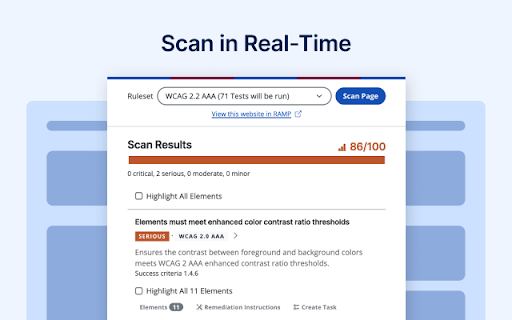


Discover and highlight accessibility violations on the web with the push of a button. Identify & resolve accessibility issues with Accessible Web Helper. This powerful Chrome extension helps you meet web accessibility compliance. With WCAG guidelines at its core, the extension offers a range of functionalities to promote an inclusive web experience. Ditch cumbersome spreadsheets and turbo-charge your accessibility efforts with RAMP and the Accessible Web Helper. Scan in Real-Time Scan any page, any time. Get instant feedback and recommendations for improved accessibility. Remediate and re-scan as you fix violations, or assign them to your team as tasks in RAMP. View Detailed Scan Results Each result allows you to view the affected elements, success criteria, and violation severity. Users with paid RAMP subscriptions will be able to view remediation recommendations custom made by our team of specialists. Highlight Affected Elements Highlight the affected elements directly on the page according to their violation. This allows you to pinpoint and visualize the exact barrier. Check Color Contrast Ratios Select any two colors on your page to check their contrast ratio and WCAG conformance. Guided Manual Accessibility Audit With a paid subscription, the guided audit tool walks you through a series of tests to comprehensively audit for all WCAG success criteria and achieve full WCAG conformance. Relevant elements are automatically detected and may be highlighted for further inspection. Streamline Your Workflow Pair the Accessible Web Helper with RAMP to unlock its full potential. Manual audit findings are pushed into your RAMP account for easy management. Remove cumbersome spreadsheets from your workflow! The Accessible Web Helper is a must-have tool for individuals and organizations committed to providing an inclusive web environment. Enhance accessibility compliance, improve user experiences, and foster a more inclusive internet with our powerful Chrome extension. Install now and embark on a journey towards web accessibility for all.

HalfAccessible - Accessibility Toolkit
The “HalfAccessible - Accessibility Toolkit” is a comprehensive Chrome extension designed to streamline web accessibility testing and reporting. By offering precise tools for target size checking, text spacing validation, automated accessibility issue identification, and HTML code copying, this toolkit enhances efficiency and ensures compliance with WCAG standards. Ideal for web developers, designers, and accessibility professionals, this extension makes it easier to create more inclusive and user-friendly websites. Precision Target Size Checks: - Validates interactive elements (buttons, links) against WCAG’s 44x44px minimum requirement, ensuring mobile-friendly designs that reduce bounce rates and improve user engagement . - Larger touch targets enhance mobile usability, a core ranking factor in Google’s Page Experience metrics . Automated Accessibility Audits: - Scans UI elements for missing `aria-labels`, `alt` text, and improper heading hierarchies, resolving issues that hinder screen readers and search engine crawlers - Alt text and semantic HTML improve image indexing and content discoverability Text Spacing & Readability Analysis: - Tests compliance with WCAG SC 1.4.12 by adjusting line height, letter spacing, and paragraph margins, ensuring readability for users with cognitive disabilities . - Clear text structure reduces bounce rates and aligns with Google’s Helpful Content Update . HTML Inspector & Code Export: - Copy HTML snippets directly via hover-to-copy functionality, enabling rapid code audits and precise debugging for SEO-critical elements like schema markup and landmark roles . Automated Color Contrast Fixes: - Real-time recommendations to resolve contrast issues, improving readability and meeting WCAG 2.2 AA/AAA criteria . Why Developers & Testers choose HalfAccessible: Efficiency: Reduces manual testing by 60% with automated checks for dynamic content and hidden properties. Future-Ready: Regular updates align with evolving WCAG standards, ensuring long-term SEO and ADA compliance. Install HalfAccessible today to automate accessibility compliance, enhance user experience, and unlock SEO gains through WCAG-aligned design. Contact: kingsaifi38@gmail.com for custom audits or feature requests.

Includia Accessibility Checker
Evaluate web pages for accessibility. Includia Accessibility Checker seamlessly integrates into your development workflow, empowering you to create inclusive web experiences. It meticulously analyzes web pages to pinpoint potential accessibility violations based on the latest WCAG (Web Content Accessibility Guidelines) standards. > In-depth Analysis: The extension conducts a thorough examination of your web page's structure, content, and functionality, highlighting areas that may impede users with disabilities. > Clear Reporting: It generates a comprehensive report outlining the identified accessibility issues, along with detailed explanations and references to the relevant WCAG success criteria. > Actionable Recommendations: The extension provides specific guidance on how to remediate each accessibility violation, ensuring that you can effectively address and improve the inclusivity of your web page. > Accessibility Score: It calculates an overall accessibility score for your page, giving you a quick snapshot of its conformance level and helping you track your progress over time. > Customizable Settings: Tailor the analysis to your specific needs by adjusting the extension's configuration options, allowing you to focus on the most critical accessibility aspects for your project.

LERA
LERA is an automated web accessibility testing and reporting tool that provides you with a detailed report of your website's accessibility issues. It can evaluate websites based on the WCAG 2.1 accessibility guidelines to identify the violations and suggest potential fixes. LERA is FREE for everyone to use (and requires no credit card information). LERA is the only fully automated web accessibility extension that provides both Accessibility Audits and Accessibility Reports for free. -Free automated Accessibility audits -A reporting dashboard with granular data -Accessibility Reporting template LERA reshapes Accessibility reporting around the globe, allowing you to enjoy free downloads of the automated Accessibility reports. Install LERA now and save time without having to write reports for automated issues. Scan - scan websites for automated Accessibility issues Save - save the scans of automated issues Report - create custom reports by choosing which issues to include in the report Data comparison - Archive and retrieve data for future comparison and analysis Simple installation - You can install and set up LERA website accessibility extension from the Chrome store with one click Compelling visualization - Use LERA’s extensive WCAG checker dashboard to identify the severe accessibility issues with 360-degree visibility and take actionable steps

Accessibility Insights for Web
Accessibility Insights for Web helps developers quickly find and fix accessibility issues. The default keyboard shortcut to launch Accessibility Insights for Web is [Ctrl+Shift+K]. If that doesn't work, follow these instructions: 1. Select Shift+Alt+T to move focus to the Chrome address bar 2. Select the Left arrow key to move focus to the Accessibility Insights for Web extension. 3. Select the Space key to open the extension.
