
gcmccmiceedebolmgjddhklghkaejbei
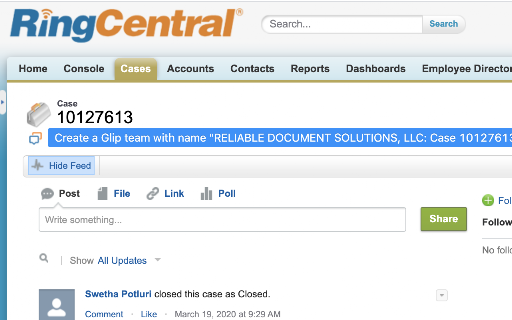

This extension assumes that for every Salesforce ticket, there should be a Glip team. Click the links and you will be redirect to the correct Glip team It works for both SalesForce classic and lightning.

Tenfold Chrome Extension
Tenfold Chrome Extension Tenfold integrates enterprise CRMs and phone systems enabling contact center agents to better serve their customers via a robust agent UI. The Tenfold Chrome Extension is the agent facing portion of the Tenfold solution. The Tenfold Chrome Extension interacts with Tenfold Cloud and Google Firebase to provide functionality to it's end users including: - Identify callers via the Tenfold UI by leveraging the contact center CRM as the system of record. Tenfold searches the CRM automatically using the phone number of the caller and presents the results to the agent. - Capture notes about the interaction and save them to the CRM using the notepad in the Tenfold UI. This call data is available in Tenfold's dashboard and the CRM so that agents and supervisors can view analytics. - Create and update cases or opportunities the contact center has associated with the caller. - Click to dial phone numbers within the CRM and on any website in the Chrome browser using the build in phone number parser in the Tenfold UI. Additionally, the Tenfold Local Presence feature enables agents to initiate outbound dials to their existing customers using localized pre-registered numbers across different area codes. - Launch online meetings with a single click from the Tenfold UI. Tenfold is designed to integrate seamlessly with most enterprise CRMs and phone systems via out of the box API’s.

RingCentral App Connect
A RingCentral extension for CRM platforms Documentation: https://ringcentral.github.io/rc-unified-crm-extension/ Release notes: https://ringcentral.github.io/rc-unified-crm-extension/release-notes/ The RingCentral App Connect embeds a fully-functional web phone into a set of supported CRM platforms. In addition, the App Connect provides a deep integration with your RingCentral account to automate a number of key functions to help sales people save time and be more efficient. With the App Connect users can easily click any phone number to call that number and send an SMS, synchronize their call history with their CRM platform, schedule meetings, enter custom call disposition notes, among a number of other things. The RingCentral App Connect currently supports the following CRM platforms: Insightly, Redtail, Pipedrive, and Clio. Don't see your CRM in the list? Submit your idea to the RingCentral Ideas portal so that we can add support for it. Disclaimer: RingCentral Labs is a program that lets RingCentral engineers, platform product managers and other employees share RingCentral apps they've created with the customer community. RingCentral Labs apps are free to use, but are not official products, and should be considered community projects - these apps are not officially tested or documented. For help on any RingCentral Labs app please consult each project's GitHub Issues message boards - RingCentral support is not available for these applications.

RingCentral Contact Center Voice
RingCentral Contact Center Voice enables voice calling directly inside the CXone Agent interface using the RingCentral voice platform – no desk phone or separate softphone required. * Make and receive calls in CXone Agent using WebRTC directly in the Chrome browser * View agent state in real time * Configure automatic or manual call acceptance * Simple browser-based setup with seamless integration with RingCentral voice services

SalesHood
Enhance your SalesHood experience by improving integrations with other systems. Boost your sales productivity with the SalesHood Chrome Extension! Sales reps can now seamlessly manage and share content with clients, right from their browser. Key features include: - Find and Share Content: Easily search for content from the SalesHood Library and share it directly to a SalesHood Client Site. - Upload and Share: Upload content and share it to Client Sites in just a few clicks. - Gmail Integration: Insert links to shared content straight into your Gmail emails, simplifying communication with prospects and customers. - Salesforce Connection: Link your Client Sites to Salesforce opportunities, keeping your sales pipeline and content in sync. - Preview Content: Within the SalesHood Library, reps can preview most content so that they do not need to open it in source systems. Streamline your content-sharing process and close deals faster with SalesHood’s Chrome extension.
