
gclnfffacbjpclfenjgefpfnafmjghhk
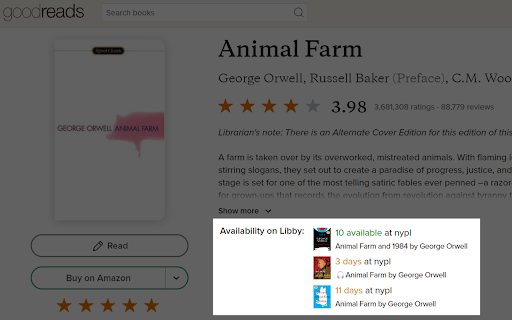

Displays availability of ebooks and audiobooks from your local library on GoodReads pages. See your local library's ebook availability right from Goodreads! This extension adds a simple listing of copies available from Libby/Overdrive on each Goodreads review page and in your Goodreads bookshelf. You can even add multiple libraries to search from!

Goodreads Right Click
Right click selected text to search for books on Goodreads. If you would like to say thanks and support continued development of this and other extensions, please consider buying me a coffee: https://www.buymeacoffee.com/jltech Search for books on Goodreads with a right click! You can now toggle whether your search opens Now or Later via a dropdown on the extension options page. Just click the Extensions icon in the top right of your browser (it looks like a puzzle piece), the click the three dots next to Goodreads Right Click and select Options. Select the text that you'd like to search (book title, author, ISBN), right click, and choose"Search Goodreads." Your results will show up in a new tab, and you can add the book to one of your lists, create a new review, or get more information about the book. If you have any suggestions or bugs that you find, let me know! I'll be looking into adding features in the future, but for now enjoy this fast way to get right to the book you want on Goodreads! Version 1.2.0 - Updated to be up-to-date with MV3 (3.7.2025) Version 1.1.0 - Searching now or later is now controlled via an extension option (3.7.2023) Version 1.0.1 - Goodreads Now and Goodreads later searches added (1.17.2013) Version 0.0.3 - Open Goodreads searches in the next Chrome tab.

eReaderIQ Integrator
Integrates eReaderIQ with Amazon for quickly checking Kindle price history & watching for Kindle price drops. This extension integrates eReaderIQ with Amazon's Kindle book pages for quickly checking Kindle price history & watching for Kindle price drops. Version 0.13.0 fixes an issue where the Integrator window would show a 'Forbidden' error. Version 0.12.0 fixes an issue where the Integrator window would no longer open. Version 0.11.7 attempts to fix issues with the Integrator window not showing up at full size. It is an issue I was not able to replicate on my end, but received enough complaints about to attempt to handle it differently. Version 0.11.6 adds support for smile.amazon.co.uk and drops support for Wish List imports and Now on Kindle services as the main site has not supported those for almost a year. Version 0.11.5 fixes an issue where the size of the popup window was not resizing correctly due to moving eReaderIQ to https. Version 0.11.4 fixes an issue where the icon was not showing up for some paperback or hardcover books. Versions 0.11.1, 0.11.2 and 0.11.3 fix issues where the icon was not showing up for some Wish Lists and others were incorrectly showing up as "Private". As of version 0.11.0, this extension supports amazon.com, amazon.co.uk, amazon.ca, smile.amazon.com & smile.amazon.co.uk.

Toolkit for YNAB
UI customizations and tweaks for the web version of YNAB. Toolkit for YNAB is a general purpose extension that adds features to YNAB and makes it more flexible. Have it your way! There are many different features available once installing the Toolkit for YNAB. You can see the full list here: https://github.com/toolkit-for-ynab/toolkit-for-ynab/blob/master/docs/feature-list.md All of these are configurable with options in the extension options page. Features under consideration and the general status of the project is on our Trello Board here: https://trello.com/b/EzOvXlil/ynab-enhanced-roadmap. Feel free to vote, comment and suggest new features. If you want to contribute, it's best if you can let us know so we don't double up on effort. You can see what is being worked on and by whom on the roadmap. This is an open source community developed and maintained extension. It is not affiliated with YNAB in any way (other than that we use it) and YNAB has not endorsed this at all. You Need a Budget and YNAB are registered trademarks of Steine LLC and/or one of its subsidiaries. This [app/plugin/script] is not officially supported by YNAB in any way. As such, your use of this [app/plugin/script] is risky. There is a very real possibility that using this [app/plugin/script] could introduce problems into your budget that YNAB, through its official support channels, will not be able to troubleshoot or fix. Please use at your own risk!

Recipe Filter
Recipe Filter shows recipes found anywhere on the web in a handy popup. This extension will detect recipes on any page you visit and will highlight them at the top of the page. Easy! No more hunting for the actual recipe when you visit a long-winded food blog! You can turn it off for specific sites if you find it's not needed and edit the blacklist under "Options" when you right-click the green Recipe Filter icon in your toolbar.
