
epjfabiijflnfmjjhanhddglfhokheae
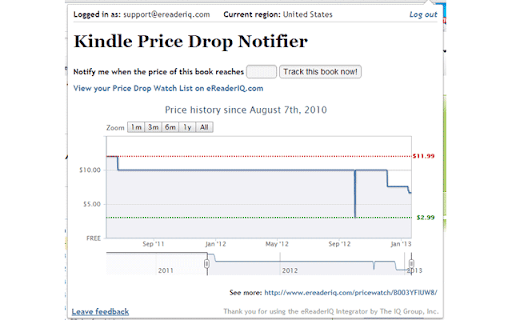

Integrates eReaderIQ with Amazon for quickly checking Kindle price history & watching for Kindle price drops. This extension integrates eReaderIQ with Amazon's Kindle book pages for quickly checking Kindle price history & watching for Kindle price drops. Version 0.13.0 fixes an issue where the Integrator window would show a 'Forbidden' error. Version 0.12.0 fixes an issue where the Integrator window would no longer open. Version 0.11.7 attempts to fix issues with the Integrator window not showing up at full size. It is an issue I was not able to replicate on my end, but received enough complaints about to attempt to handle it differently. Version 0.11.6 adds support for smile.amazon.co.uk and drops support for Wish List imports and Now on Kindle services as the main site has not supported those for almost a year. Version 0.11.5 fixes an issue where the size of the popup window was not resizing correctly due to moving eReaderIQ to https. Version 0.11.4 fixes an issue where the icon was not showing up for some paperback or hardcover books. Versions 0.11.1, 0.11.2 and 0.11.3 fix issues where the icon was not showing up for some Wish Lists and others were incorrectly showing up as "Private". As of version 0.11.0, this extension supports amazon.com, amazon.co.uk, amazon.ca, smile.amazon.com & smile.amazon.co.uk.

Library Scan: OverDrive (Libby) + Goodreads
Scan your OverDrive (Libby) libraries for available eBooks & audiobooks from your Goodreads shelves. • Find Goodreads titles immediately available for checkout at your OverDrive (Libby) library • Place holds on soon-to-be-available books • Search & filter by title, author, and media type Not affiliated with Goodreads or OverDrive, Inc. All data accessed and interpreted is available publicly online. Google Analytics 4 (via Measurement Protocol) is used to collect anonymous usage statistics to help improve the extension. No personally identifiable information is collected. Your IP address is used by Google for approximate geographic reporting but is not stored. — What's new? — • Version 2.0.0 (04/01/26) ◦ Introducing Library Scan Pro! Daily auto-scans with desktop notifications, multiple OverDrive/Libby libraries, multiple Goodreads shelves, and unlimited books per scan ◦ Completely redesigned interface with guided setup wizard & profile auto-detection ◦ Search your results & OverDrive/Libby libraries by title and author • Version 1.0.3 (09/12/21) ◦ Bug fix: only refresh while online • Version 1.0.2 (05/22/21) ◦ Improved book matching algorithm ◦ Improved setup instructions & resources ◦ Enhanced versioning analytics ◦ Bug fix: accurate badge counts ◦ Bug fix: limit auto refreshing after errors • Version 1.0.1 (07/26/20) ◦ Improved analytics • Version 1.0.0 (07/25/20) ◦ Initial release

Add Book to Goodreads
Detects books on web pages and provides quick access to add them to your Goodreads shelves. It works on book-related pages across the web, including Amazon, Google Books, publisher sites, and many others. Since the extension works across all websites to detect book information, it requires broad permissions including "Your data on all websites" and "Your tabs and browsing activity".

Goodreads Ratings on Overdrive
View Goodreads ratings on Overdrive ebooks and audiobooks This simple browser add-on shows you the Goodreads rating of ebooks and audiobooks directly on the listing page on Overdrive library pages. No more switching tabs and searching manually! This add-on is not affiliated with Goodreads, Inc. or Overdrive, Inc. For support, please visit https://github.com/wzub/goodreads_overdrive/issues * Version 1.3 (12/8/2024) * Update for compatibility with manifest v3 (Chrome) * Version 1.2 (26/1/2022) * Fix for new book page and stars on Goodreads (thanks @rubenmv) * Version 1.1.0 (8/5/2020) * Fix for Chrome CORB errors * Show rating from Goodreads as stars (thanks @rubenmv) * Improved URL matching (thanks @Foxsly) * General code cleanup * Version 1.0.2 (29/01/2018) * Chrome compatibility fixes * Version 1.0.1 (18/1/2018) * Fix error handling * Version 1.0.0 (17/1/2018) * Initial release

StoryGraph Enhancement Tools
Adds some helpful UI elements, such as direct links to search your local library, to The StoryGraph. This extension was created for users of The StoryGraph who want to enhance their reading tracking experience. The extension adds some features to the website, including direct links to search for ebooks and audiobooks from your local library through the Libby or Overdrive platform and links to search for books to purchase through Amazon and eBooks.com, Each type of link (library, Amazon, eBooks.com) can be turned on or off through the options panel. Users can choose either Overdrive or Libby as the library platform. Overdrive does not need any configuration from the user. To use Libby, you need is your library's name on the platform. Log into Libby, go to the Search menu, and find your library's name in the URL bar. To use this extension, add it to Chrome, then click on the icon in the extensions menu--enter your library's name in the settings menu that appears. This extension also now adds a context menu item, Search The StoryGraph, that appears when text is selected on any web page. When clicked, it opens up a new tab with search result in The StoryGraph for the selected text. It works on any type of text: titles, author names, keywords, and ISBNs. This extension is not endorsed by, directly affiliated with, maintained, authorized, or sponsored by The StoryGraph or its developer team.
