
gbfgefkhkofclanlcgnhlbmfgjjomock
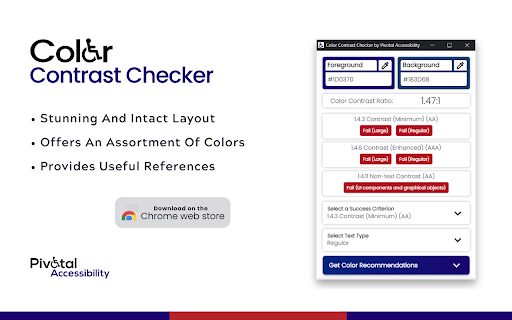

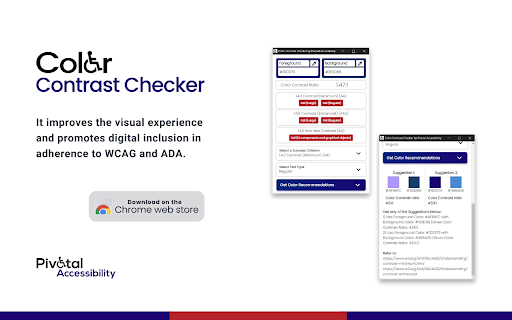

Color Contrast Checker is a tool designed to make digital spaces perceivable for a wide array of users including individuals with low vision, color blindness, and vision impairments regulating contrast and brightness levels. In its entirety, it improves the visual experience and promotes digital inclusion in adherence to WCAG and ADA. Color Contrast Checker by Pivotal Accessibility unlike no other offers recommendations and allows the user to choose from the suggested color palette. The uber-cool feature in this new-age color contrast checker is the ability to make independent background/foreground color changes providing you with on-point solutions. Technical Specifications and App Features: ❯ Stunning and intact layout ❯ Offers an assortment of colors ❯ Provides recommendations and leverage to choose between suggested color options ❯ Extremely user-friendly with single-click solutions ❯ Flexibility to choose colors from websites and applications ❯ Ability to input hex-codes to calculate the contrast ratio ❯ Displays color contrast ratio ❯ Calls out pass/fail status as per all 3 conformance levels of WCAG 2.1, i.e., level A, AA, and AAA ❯ Provides useful references

Contrast Ratio Checker
A chrome extension based on WCAG 2.0 to easily check contrast ratio. Improve your website accessibility with this tool that follows Web Content Accessibility Guidelines (WCAG) to calculate the contrast ratio between colors, plus offering validators based on WCAG AA (minimum), WCAG AAA (enhanced) and custom ratio.

IBM Equal Access Accessibility Checker
A web browser extension for checking accessibility issues The IBM Equal Access Accessibility Checker is an open source tool for web developers and auditors that utilizes IBM's accessibility rule engine, which detects accessibility issues for web pages and web applications. The extension integrates into the browser development tools, providing an integrated checking experience, helping users quickly identify the source of accessibility issues and try fixes.

Silktide Accessibility Checker
Test your website against over 200 website accessibility checks with Silktide’s easy to understand accessibility checker. ✅ Test your webpages for over 200 website WCAG accessibility checks ✅ See highlighted accessibility concerns directly on the webpage ✅ Use our straightforward, step-by-step guidance to fix the issues ✅ Check WCAG color contrast of any on-page elements ✅ Check alt text of any on-page images ✅ Listen to your website with our screen reader simulator 🔥 Check accessibility against 200 WCAG standards including 2.0, 2.1 and 2.2 🔥 Discover color contrast errors with our handy color picker 🔥 Understand which images on the page have alt text, missing alt text, or decorative alt text 🔥 Understand how your site appears to users with visual impairments. We aim for our accessibility checker to be the most user-friendly on the market. We'll help you test against the WCAG accessibility standards, up to the latest 2.2 release. Our tool can also help you find ADA website accessibility violations. We’re the comprehensive web governance platform that helps Fortune 500 companies, governments, healthcare providers, and higher education institutions monitor and improve their websites. We’re passionate about accessibility and offer a range of free tools and resources help you make the web more accessible. Visit https://silktide.com/ for more details. When you update the extension, your browser (Chrome, Edge, or whichever you use) may ask for a new permission. We know that sounds intimidating, but rest assured: • We do not collect or send data about every site you visit. • We only gather info when you specifically choose to test a page or if that page is already in your Silktide account. • We take security and privacy seriously. This permission simply lets us display the instant results you love, plus any new features coming soon. By installing the Silktide Accessibility Checker browser extension, you are agreeing to our Silktide Accessibility Checker Extension Terms of Use https://silktide.com/company/legal/accessibility-checker-extension-terms/ and Privacy Policy https://silktide.com/company/legal/free-accessibility-extension-privacy-policy/.

Accessibility Insights for Web
Accessibility Insights for Web helps developers quickly find and fix accessibility issues. The default keyboard shortcut to launch Accessibility Insights for Web is [Ctrl+Shift+K]. If that doesn't work, follow these instructions: 1. Select Shift+Alt+T to move focus to the Chrome address bar 2. Select the Left arrow key to move focus to the Accessibility Insights for Web extension. 3. Select the Space key to open the extension.
