
gbagdbjhcmodnokmjfhkhagnhgmmpgan
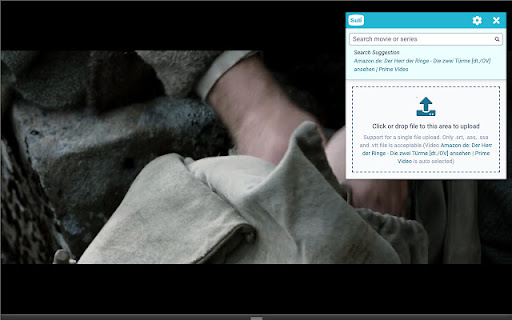
Add subtitles to any HTML5 video sites such as Youtube, Netflix, Amazon Prime Video, Disney+, HBO Max and other stream sites. Open Subtitles extension provides subtitles experience to any HTML5 video site (youtube, netflix, amazon prime, hulu and other streaming sites) Features: • Search - autodetection of title, download and view subtitles in videos from OpenSubtitles.com • Drag and drop subtitles file if you want custom subtitles • Supported subtitle formats: *.srt, *.vtt, *.ass, *.ssa • Works on iframes (embedded videos) • Synchronize subtitles to video • Customize Subtitles color, background color, transparency, font size • See transcription/text of video/subtitles, possible copy with shift+left-click • Jump to timestamp with left click How to use: - Install the extension to your browser. - We recommend to pin it to navigation bar, so you can use it easily - Open website with video - Click on "Open Subtitles" extension at the right top corner in your browser, it will open extension dialog - The first video is autodetected, title is detected, search for subtitles and download them, or drop subtitle file - Subtitles are displayed on video

SubTrans - General Subtitle Translator Suite
General Subtitle Translator for Multiple Sites. Displays bilingual subtitles. Supported sites are actively increasing. 🎯 SubTrans is a general subtitle translator Suite. It extends the original Subtitle into bilingual subtitles. The goal of SubTrans is to support as many widely used video sites as possible. 🌍 SubTrans can translate video's official subtitles / captions into almost all widely used languages. To make it work, the video should have AT LEAST one official subtitle / caption. 🛠 Subtitle styles are settable. You can set styles for bilingual subtitles separately, including font size, font color, font weight, opacity, background color, etc. 📂 External subtitles are supported. You can use local disc subtitle file or input subtitle raw content manually, then choose to display it directly or use it as a translation source. ⏰ In case subtitles' timestamps don't fit well with the video, you can choose to advance or delay the timestamps of each subtitle separately. 🚠 The subtitles are filled in a draggable box. Hence you can adjust the subtitles' position as you wish. 🗄 SubTrans remembers your settings locally. So the bilingual subtitles show up every time when you open a new video of a supported site, needless to set up repeatedly. 👉👉 Features: 👈👈 ✅ Display bilingual subtitles ✅ Support most languages ✅ Support many sites ✅ Support subtitle styles settings ✅ Support External Subtitles ✅ Adjustable Subtitle Timestamp ✅ Subtitle position is draggable ✅ Support full screen ✅ No need to set up every time 👉👉 Steps: 👈👈 1. After installation, you need to left-click the extension to set up. 2. Specify the "Translation Source". Note that it is loaded from the site you visit and literally it's the translation source of the first and second subtitles. 3. Also choose the language of "First Subtitle" and "Second Subtitle". 4. After a short process period, the bilingual subtitles should be shown up. Congratulations! 👉👉 Supported Sites: 👈👈 (you can email me of your request) (List all supported sites here is forbidden by Chrome Web Store to avoid keyword abuse) (You can find more info here: https://subtrans.cc/docs/supported-sites) 🌍 YouTube (including embedded youtube videos on any site) 🌍 Udemy 🌍 Coursera 🌍 ... 🌍 ... 🌍 ... 🌍 ... 🌍 ... ... (this list is actively increasing) 👉👉 Attention: 👈👈 🔹 In order to translate, you need to choose "Translation Source". 🔹 If no official subtitle / caption exists on your visiting site, "Translation Source" will be none. 😜 Please do not hesitate to contact us if you have any inquiries or feature requests. 📧 Email: support@subtrans.cc

Trancy - AI Translator & Dual Subtitles
Trancy provides bilingual subtitle for platforms like YouTube, Disney+, as well as AI translator for websites. Boosting language skills does not require intentional rote memorization. Trancy invites you to adapt and master new languages by watching your favorite videos and browsing daily websites. We help you understand video and web page text, gradually accumulate vocabulary, and enhance your listening and speaking skills. In addition, Trancy also provides functions for collecting videos, sentences, and words. You can use these to build a personal learning library for constant review and reinforcement. The immersive language learning process is not only easy but also highly efficient.

Movie Subtitles
Add your own subtitles almost anywhere you want such as Disney, Netflix, YouTube and many more! Add your own subtitles on almost any video/movie streaming platform you can think of, such as Amazon Prime, Netflix (with some restrictions), Disney+ (with some restrictions), Youtube, Twitch and many more! Unfortunately, Movie Subtitles does not have a subtitle search. You have to download the subtitles online before you can use them in the extension. There are many websites that offer free subtitles. Two of the most popular ones are opensubtitles.org and yts-subs.com. Once you’ve got the subtitles you're good to go! Movie Subtitles was originally developed to facilitate language learning and comes with many useful features for that purpose, such as the ability to jump between dialogues, skip silence and many more! Features: - Skip silence (scenes between dialogues) - Skip music (if supported by the subtitle file) - Synchronize subtitles - Adjust subtitle style - Select/Copy subtitle text (in edit mode) - Upload subtitles in 40+ languages - Supported formats (.txt, .srt, .sub) - Shortcuts (not on Netflix) Movie Subtitles is an open-source project. If you have any ideas for improvement, found a bug, or want to contribute in some other way, you're welcome to do so! https://github.com/gignupg/Movie-Subtitles If you want to use Movie Subtitles to skip certain scenes of a movie, such as violent scenes, sexual scenes etc. check out the article on Medium I wrote about this topic: https://gignu.medium.com/how-to-skip-violent-scenes-and-adult-content-in-movies-3c7d89b813ad - The extension was built using Ixieyang's React Boilerplate https://github.com/lxieyang/chrome-extension-boilerplate-react License: This project is licensed under the MIT License

EasySubs – Learn languages by watching films and series
Customizable subtitles and a popup dictionary to master your vocabulary while watching YouTube or Netflix. Open-source and free. Improve your language skills by watching TV shows and movies with subtitles. Enjoy seamless experience – point over a word to get it translated, the video playback will be automatically paused. You can even translate the whole phrase by clicking on it. Do you have a subtitle file in your native language? Upload it and easily sync it with the video if needed. – TRANSLATION: Hover over or click on subtitles for single-word or full-sentence translations. – WORD PRONUNCIATION: Improve your listening and speaking skills with correct pronunciations. – VOCABULARY EXPORT: Export words to language learning services like Anki, LinguaLeo, and Puzzle English. – UPLOAD YOUR OWN SUBTITLES: Supports .SRT and .VTT formats. – SMART AUTO-PAUSE: Hover over a word, and the video will pause automatically. – SUBTITLE PROGRESS BAR: Navigate subtitles easily. Click to rewind the video to the desired point. – MANUAL SUBTITLE SYNC: Adjust subtitles if they’re out of sync with the video. – REWIND AND FAST-FORWARD BY SUBTITLES: Use the right arrow key to replay the last sentence. – SHOW ALL AVAILABLE SUBTITLES: Access all subtitles and audio tracks on Netflix, regardless of region. – YouTube (videos and originals) – Netflix – Coursera – KinoPub …and more coming soon. Please note that some services may not be available in your region or may require a subscription (e.g., Netflix). We are not affiliated with these services. ❤️ QUESTIONS AND FEEDBACK EasySubs is a completely free, open-source Chrome extension with no ads or hidden costs. If you like it, please leave a positive review – it helps a lot. – Send your feedback to support@easysubs.cc – Ask your question in our Telegram group: @easysubs_ext – Contribute to the project – find more details on our GitHub page: https://github.com/Nitrino/easysubs
