
oflioiciloahhlekagfajdkigboemklf
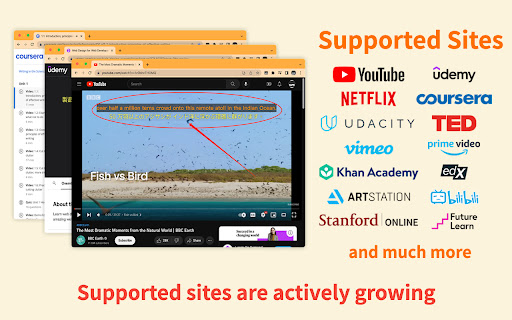

General Subtitle Translator for Multiple Sites. Displays bilingual subtitles. Supported sites are actively increasing. 🎯 SubTrans is a general subtitle translator Suite. It extends the original Subtitle into bilingual subtitles. The goal of SubTrans is to support as many widely used video sites as possible. 🌍 SubTrans can translate video's official subtitles / captions into almost all widely used languages. To make it work, the video should have AT LEAST one official subtitle / caption. 🛠 Subtitle styles are settable. You can set styles for bilingual subtitles separately, including font size, font color, font weight, opacity, background color, etc. 📂 External subtitles are supported. You can use local disc subtitle file or input subtitle raw content manually, then choose to display it directly or use it as a translation source. ⏰ In case subtitles' timestamps don't fit well with the video, you can choose to advance or delay the timestamps of each subtitle separately. 🚠 The subtitles are filled in a draggable box. Hence you can adjust the subtitles' position as you wish. 🗄 SubTrans remembers your settings locally. So the bilingual subtitles show up every time when you open a new video of a supported site, needless to set up repeatedly. 👉👉 Features: 👈👈 ✅ Display bilingual subtitles ✅ Support most languages ✅ Support many sites ✅ Support subtitle styles settings ✅ Support External Subtitles ✅ Adjustable Subtitle Timestamp ✅ Subtitle position is draggable ✅ Support full screen ✅ No need to set up every time 👉👉 Steps: 👈👈 1. After installation, you need to left-click the extension to set up. 2. Specify the "Translation Source". Note that it is loaded from the site you visit and literally it's the translation source of the first and second subtitles. 3. Also choose the language of "First Subtitle" and "Second Subtitle". 4. After a short process period, the bilingual subtitles should be shown up. Congratulations! 👉👉 Supported Sites: 👈👈 (you can email me of your request) (List all supported sites here is forbidden by Chrome Web Store to avoid keyword abuse) (You can find more info here: https://subtrans.cc/docs/supported-sites) 🌍 YouTube (including embedded youtube videos on any site) 🌍 Udemy 🌍 Coursera 🌍 ... 🌍 ... 🌍 ... 🌍 ... 🌍 ... ... (this list is actively increasing) 👉👉 Attention: 👈👈 🔹 In order to translate, you need to choose "Translation Source". 🔹 If no official subtitle / caption exists on your visiting site, "Translation Source" will be none. 😜 Please do not hesitate to contact us if you have any inquiries or feature requests. 📧 Email: support@subtrans.cc

Udemy Dual Subtitles - Subtitle Translator
Dual subtitle translator for Udemy. Bilingual subtitles in 50+ languages. Supports Udemy Business, course preview & fullscreen. Udemy Dual Subtitles — the most popular Chrome extension for bilingual subtitle translation on Udemy. Translate Udemy course subtitles into your native language and display two languages at the same time. Over 30,000 learners worldwide use this tool to watch Udemy online courses with dual language captions. Actively maintained for 4+ years with 40+ releases. Udemy Dual Subtitles is a subtitle translator that turns any Udemy course into a bilingual learning experience. It takes the original Udemy captions and adds a real-time translated subtitle underneath — so you can read both languages simultaneously while watching the video. No more pausing to look up words. No more switching between tabs to use a dictionary. Just press play and learn in two languages at once. ✅ Dual Bilingual Subtitles Display translated subtitles alongside the original Udemy captions. See both your native language and the course language on screen at the same time. The original text and translated text appear as two lines — easy to compare and follow. ✅ 50+ Languages Supported Translate subtitles into over 50 languages — one of the widest language selections among all Udemy subtitle tools. Covers European, Asian, Middle Eastern, African, and South Asian languages. See the full list below. ✅ Real-Time Subtitle Translation Translated captions appear instantly as the video plays. No delay, no buffering — just seamless bilingual subtitles synced perfectly with the course content. ✅ Customizable Subtitle Styles Full control over subtitle appearance: font size, text color, background color, font weight, and opacity. Make the dual subtitles comfortable for your eyes. You can even hide the original subtitles and show only the translation. ✅ Download & Export Subtitles Export subtitles in SRT (with timestamps) or TXT (plain text) format. Choose from three export modes: original only, translated only, or bilingual side-by-side. Great for offline review, note-taking, or building a vocabulary list from course content. ✅ Udemy Business Compatible Works perfectly with Udemy Business (corporate/enterprise) accounts. If your company provides Udemy Business for employee training, this extension works the same way. ✅ All Udemy Page Types Supported Compatible with all Udemy page layouts — the classic version, the new Beta version, and course preview pages. We continuously adapt to Udemy's platform updates so you never lose access to dual subtitles. ✅ Fullscreen Support Dual subtitles remain visible in fullscreen mode. No compromise between an immersive viewing experience and bilingual captions. ✅ Smart Language Detection On first install, the extension automatically detects your browser language and sets it as the translation target — no manual configuration needed. It also intelligently detects which subtitle language is currently active on the video player. ✅ Auto-Save Settings Your language preferences and subtitle styles are saved locally and persist across lectures and sessions. Open any new lecture and your dual subtitles appear automatically — set it once and forget. 🎯 WHO IS THIS FOR? 👨🎓 International Students Studying on Udemy but the courses are in English (or another language you're not fluent in)? Dual subtitles let you follow along in your native language while still seeing the original text — perfect for technical courses in programming, data science, web development, design, and more. 👩💼 Working Professionals Taking Udemy courses to upskill but the content is in a foreign language? Don't let language be a barrier. Translate course subtitles in real time so you can focus on the subject matter, not on deciphering every word. 🌍 Language Learners Learning a new language through immersion? Dual subtitles are one of the best tools for language acquisition. Watch real-world course content with both your target language and native language captions, and pick up vocabulary and expressions naturally. 🏢 Udemy Business Teams If your organization uses Udemy Business for employee training, Udemy Dual Subtitles helps multinational and multilingual teams get the most out of every course — no matter what language they speak. 📱 Casual Learners Just want to enjoy Udemy courses without the language struggle? One click and you have bilingual subtitles on any course that has captions enabled. Step 1: Install the extension from Chrome Web Store Step 2: Open any Udemy course and start playing a lecture Step 3: Make sure the official Udemy subtitles (closed captions) are turned on Step 4: Click the Udemy Dual Subtitles extension icon in your browser toolbar Step 5: Select the language you want to translate subtitles into Step 6: Toggle the translation switch ON That's it! Bilingual dual subtitles will appear on the video immediately. Your settings are remembered, so next time you open any lecture, dual subtitles activate automatically. Udemy Dual Subtitles supports translation into over 50 languages, covering European, Asian, Middle Eastern, African, and South Asian language families. Popular choices include: ...and 40+ more languages. The extension interface itself is also localized in 31 languages, so you can use it in your preferred language. Q: Do I need a Udemy Pro or paid account? A: No. Udemy Dual Subtitles works with any Udemy account — free or paid — as long as the course has subtitles available. Q: Does it work with Udemy Business? A: Yes! Fully compatible with Udemy Business (corporate/enterprise) accounts. Q: Why don't I see the dual subtitles? A: Make sure the official Udemy subtitles (closed captions) are turned on first. Udemy Dual Subtitles translates the existing captions — it cannot generate subtitles for courses that have no captions. Q: Can I translate from any language to any language? A: The extension translates whichever subtitle language is currently active on the Udemy player into your chosen target language. So yes — any available source language to any of the 50+ target languages. Q: Can I customize how the subtitles look? A: Yes. You can adjust font size, text color, background color, font weight, and opacity. You can also hide the original subtitle and show only the translation. Q: Can I download the translated subtitles? A: Yes. You can export subtitles in SRT or TXT format — original, translated, or bilingual. Q: Does it slow down the video or cause lag? A: No. The extension uses smart incremental translation — it only translates subtitles near your current playback position, not the entire course at once. This keeps performance smooth. Q: Does it work on Edge or other Chromium browsers? A: Yes. Any Chromium-based browser (Chrome, Edge, Brave, Arc, Opera, Vivaldi) can install and run this extension. Q: Is my data safe? A: Yes. Udemy Dual Subtitles does not collect or sell your personal data. Your subtitle preferences and settings are stored locally on your device. Q: Does it work on the Udemy course preview page? A: Yes. The extension supports course preview pages as well as full lecture pages. Q: What happens when Udemy updates their website? A: We actively track Udemy's platform changes and release updates promptly. The extension has been maintained for over 4 years through multiple Udemy redesigns. • 4+ years of continuous development since January 2022 • 40+ version releases — actively maintained and updated • Compatible with every Udemy page version (Classic, Beta, Preview) • Featured on Chrome Web Store • 50+ translation languages — one of the widest selections available • Fast response to Udemy platform changes — we ship fixes within days • Manifest V3 — built on the latest Chrome extension architecture • Privacy-first — no personal data collection, no tracking Version 4.3.0: • Support for Udemy's new preview page layout • Improved caption language detection accuracy Version 4.2.0: • Adapted to Udemy's new page style changes Version 4.0.0: • Full support for Udemy's new Beta version We actively maintain this extension to keep up with every Udemy platform change — so your dual subtitles always work. 💡 TIPS FOR THE BEST EXPERIENCE 🔹 Always enable official Udemy subtitles first — the extension translates existing captions, it does not generate new ones. 🔹 If a course offers multiple subtitle languages, choose the one closest to your translation target for best accuracy. 🔹 Use the options page (right-click the icon → Options) for advanced subtitle style customization. 🔹 The extension remembers your settings per device — just set it once and forget. 🔹 Works great for building vocabulary: download the bilingual subtitle file after watching a lecture and review it offline. Have a question, found a bug, or want to suggest a feature? We'd love to hear from you! If you find Udemy Dual Subtitles helpful, please leave a rating and review on the Chrome Web Store. Your support helps other learners discover this tool and motivates us to keep improving. Thank you!

Dual Subtitles & AI Translation - InterSub
Use dual subtitle AI translation dualsub for language learning, immersive translate meaning of words: Spanish to English to Japanese 🚀 Unlock the Full Power of Language Learning with InterSub! Turn every video session into a personal language classroom with InterSub, the premier dual subtitle translator for immersive and effortless learning. Whether you’re streaming movies on Netflix, enjoying YouTube videos, or diving into courses on Udemy, our video translator subtitle for long videos brings seamless subtitle translation directly to your screen. 💡 What’s New * Forced AI-translation for second subtitles based on original. * Support for new platforms: Bilibili.tv. * Subtitle appearance customization: subtitle background opacity, text color, text outline color. * AI Language Buddy chat – ask AI-powered questions about slang, grammar, usage, or get extra examples without leaving the screen. Now you can type your questions and save definition of a given explanation to your vocabulary. 🎥 How Does InterSub Subtitle Translator Elevate Your Viewing? 1️⃣ Instantly translate subs into multiple languages, including Spanish to English, English to Japanese, English to German, Russian to English, English to Russian, and English to Turkish. 2️⃣ Hover over subtitles for an instant word meaning, lemma details, and accurate AI language translation - no pausing or manual searches required. 3️⃣ Automatically generate missing captions through our translator, enhancing your viewing even when track in your native language isn't available. 4️⃣ Easily save new words and phrases to your vocabulary, sync with popular apps like AnkiDroid, or export your word lists to Excel for convenient review. 🌍 Your Ultimate Online Subtitle Translator: Forget traditional subtitle translation services or cumbersome manual methods like Google translation. InterSub simplifies video-based learning by embedding dualsub directly in your videos. Instantly translate subtitle tracks, words and phrases with our powerful AI video subtitles technology, optimized for accuracy and natural language fluency. 🔑 Why Choose InterSub over Others? - Supports dual subtitles (dual subs) to simultaneously display original and translated texts. - Features ChatGPT AI subtitle capabilities, allowing you to understand complex idioms, slang, and cultural nuances right in your browser. - Offers real-time AI instant translate words on a page, including collocations, frequency, and pronunciation, making vocabulary acquisition intuitive and enjoyable. 🎯 Compatible Platforms: InterSub seamlessly integrates across multiple platforms: ➤ Netflix ➤ YouTube ➤ Prime Video ➤ Crunchyroll ➤ Coursera and more! The full list is here: intersub.cc/#platforms No matter where you prefer to watch, InterSub is the ultimate AI translator companion. 📖 Build Your Vocabulary Faster: InterSub Subtitle Translator transforms passive watching into active learning: • Instantly translate Spanish to English words, phrases, and sentences, enhancing bilingual proficiency. • Translate subtitles effortlessly from Russian to English, making challenging content accessible. • Use built-in language translator features to clarify word meanings and language nuances instantly. 📝 Premium Features for Accelerated Learning: Take your experience further with our premium subtitle translation services: * Unlimited word lookups and translations * Advanced AI language translation and collocation detection * AI-generated dual subs for unmatched clarity * Full access to personal vocabulary * ChatGPT translation features for real-time linguistic insights 💲 Flexible & Affordable Pricing: InterSub offers versatile plans designed for every learner: ▸ Free Plan: Get up to 15 lookups/month or unlimited lookups with ads - perfect for casual learners. And unlimited dual subs are included! ▸ Premium Plans: Enjoy AI translation starting at just $1.5/month with our unique pay-as-you-go options for ultimate flexibility or use subscription plan for unlimited translations. 📱 Learn Anytime, Anywhere: Your vocabulary syncs seamlessly with mobile apps and chatbots: 1. Capture new words directly from videos. 2. Review them on-the-go via apps like AnkiDroid or Telegram bots. 3. Export your vocabulary data effortlessly to Excel for offline or on-the-go studies. 💬 Real-Time ChatGPT AI Subtitle Insights: No more switching tabs to translate subtitles or search meanings - integrated AI Language Buddy offers immediate insights into grammar, slang, and cultural contexts. With InterSub’s advanced AI meaning explanations, you stay focused and engaged throughout your viewing. 🎓 Ideal for Everyone: InterSub Subtitle Translator suits diverse users: • Students mastering foreign languages • Busy professionals needing rapid language comprehension • Cultural enthusiasts exploring new linguistic horizons • Educators looking for effective video-based teaching aids 🌐 Extensive Language Support: InterSub currently supports 30+ languages, delivering exceptional AI dual subtitles translation in languages like English, Spanish, Portuguese, Ukrainian, and more. Visit our platform page for a complete list! 🔧 Easy Setup in Minutes: Getting started with InterSub is simple and straightforward: ▸ Install our translate extension (completely free!) ▸ Choose your preferred subtitle translation language settings ▸ Start watching videos - translate subtitle instantly with intuitive hover interactions 🛠️ Advanced RTL Language Support: Optimized specifically for right-to-left languages such as Arabic, Hebrew, and Urdu. InterSub ensures clear, readable subs for all linguistic contexts. 🔝 Why Users Love InterSub: - Sophisticated dual subtitles with "show only on pause” feature - Real-time AI subtitle translator for effortless comprehension - Instant AI video translate functionality with no delay - Seamless mobile app integration for learning on-the-go - Transparent and flexible subscription options Forget outdated Russian word translator tools or clumsy browser tabs; InterSub dualsub is your definitive solution for effortless AI instant translate words on a page. 🌟 Ready to Revolutionize Your Video Viewing Experience? InterSub is more than an online subtitle translator - it’s a powerful AI subtitle tool designed to make language learning natural, enjoyable, and seamlessly integrated into your daily life. Start using InterSub today and transform your favorite video platforms into dynamic language classrooms! Experience the future of subtitle translation with InterSub Dual Subtitles Translator - where entertainment truly meets education!

NewTranx Subtitler - Real-time voice recognition and AI translation
Learn while watching overseas play series with the help of NewTranx Subtitler — a browser-based subtitle translation tool. Do you find it annoying? 1. You want to learn international cutting-edge technology to enhance yourself, but suffer from understanding video tutorials/materials in foreign languages. 2. You wait for so long to finally watch video of the launch event of your favorite products, but there is no subtitle in your language. 3. You also wait so long for the updates of American drama, foreign variety shows, and Japanese animations, but still need to wait for subtitles in your language. ... The NewTranx Subtitler — AI subtitle translator plugin can help you solve all the annoyances above! The NewTranx Subtitler, by NewTranx Tech, can realize the real-time speech recognize, and automatically translate it into bilingual subtitles, export subtitles and audio, and support online editing With advanced speech recognition and AI translation technology, the NewTranx Subtitler can quickly complete the recognition & translation, and automatically generate the corresponding subtitles. Whether you are listening to lectures, watching courses or dramas, or listening to songs, you will not have a fear of understanding foreign languages or feeling confused. Instructions for Use: 1. Which languages are supported? Supports recognition and translation of 130+ languages/dialects around the world. 2. How can the user set up the recognition and translation of languages? English is the default language of speech recognition. If your current video is in another language, you can alter the source language in the subtitle window.You can set up the target language, which is to be translated, in the subtitle window. In addition, you can use smart recognition to automatically identify the language of the video. You can specify the language range for intelligent recognition and set up to 5 languages. 3. Can the user be able to export subtitles and audio? Supports exporting the text that has been recognized and translated in the current subtitle window, or you can view historical subtitles and export subtitles and audio. Subtitle text supports exporting to TXT or SRT format, and audio to MP3 format. The premise is that you need to enter the personal center page and manually turn on the "Automatically save subtitles" switch. 4. Can the user be able to choose the monolingual or bilingual subtitles? Yes, we regard bilingual subtitles as the default subtitle, but you can select “source language” or “translation” in the subtitle window or user center. 5. Can the user set up the display style? It supports three preset display styles, which can be switched as needed. You can also use custom display styles to set your favorite font size and color, stroke color, background color, and background color. 6. About the usage fee? The NewTranx Subtitler includes an in-product purchase. After the new user installs and logs in the plug-in, he can get a certain amount of free usage. After the free amount is exhausted, he needs to pay to purchase the amount before continuing to use it. If you have any problem or suggestion for use, please contact us: service@newtranx.com. If you have any questions or suggestions, please email us at: service@newtranx.com, or click "Contact Customer Service" on the NewTranx Subtitler settings page.

EasySubs – Learn languages by watching films and series
Customizable subtitles and a popup dictionary to master your vocabulary while watching YouTube or Netflix. Open-source and free. Improve your language skills by watching TV shows and movies with subtitles. Enjoy seamless experience – point over a word to get it translated, the video playback will be automatically paused. You can even translate the whole phrase by clicking on it. Do you have a subtitle file in your native language? Upload it and easily sync it with the video if needed. – TRANSLATION: Hover over or click on subtitles for single-word or full-sentence translations. – WORD PRONUNCIATION: Improve your listening and speaking skills with correct pronunciations. – VOCABULARY EXPORT: Export words to language learning services like Anki, LinguaLeo, and Puzzle English. – UPLOAD YOUR OWN SUBTITLES: Supports .SRT and .VTT formats. – SMART AUTO-PAUSE: Hover over a word, and the video will pause automatically. – SUBTITLE PROGRESS BAR: Navigate subtitles easily. Click to rewind the video to the desired point. – MANUAL SUBTITLE SYNC: Adjust subtitles if they’re out of sync with the video. – REWIND AND FAST-FORWARD BY SUBTITLES: Use the right arrow key to replay the last sentence. – SHOW ALL AVAILABLE SUBTITLES: Access all subtitles and audio tracks on Netflix, regardless of region. – YouTube (videos and originals) – Netflix – Coursera – KinoPub …and more coming soon. Please note that some services may not be available in your region or may require a subscription (e.g., Netflix). We are not affiliated with these services. ❤️ QUESTIONS AND FEEDBACK EasySubs is a completely free, open-source Chrome extension with no ads or hidden costs. If you like it, please leave a positive review – it helps a lot. – Send your feedback to support@easysubs.cc – Ask your question in our Telegram group: @easysubs_ext – Contribute to the project – find more details on our GitHub page: https://github.com/Nitrino/easysubs
