
gahnhihmambbhkolajmjohaeoheedmal
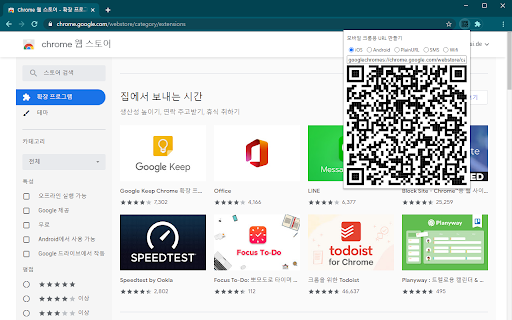
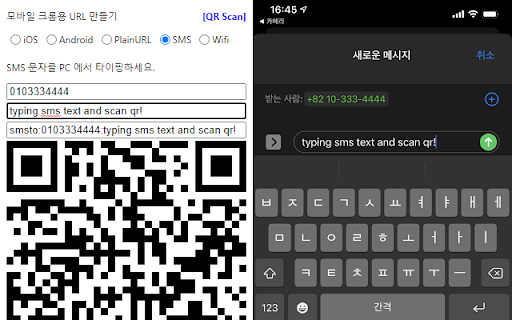

You can QR scan a url on iOS and open it with Chrome. You can create QR freely, such as SMS and Wifi. You can QR scan a url on iOS and open it with Chrome. You can create QR freely, such as SMS and Wifi.

QR Code Generator
Have you ever felt the need to quickly open an URL on your smartphone while browsing the page on your desktop or laptop? Entering it manually in your mobile browser address bar, copying and sending it via email or messenger are some of the tedious ways to achieve it. QR Generator extension to scan and generate new QR code. This extension offers a set of very unique features. Which enable users scanning and creating new QR within just a click. A powerful Barcode Scanner supports scanning from the camera or local image files and keeps the history of the last 100 scans. It supports almost all known formats, including text, link, ISBN, coupon, and contact. What is a Barcode? It is a method of representing data in a visual, machine-readable form. Initially, barcodes represented data by varying the widths and spacings of parallel lines. Thank you for use it, if you like our app, please give it 5 stars for the QR scanner extension!

QR Code Generator
QR Code Extension: A faster, more direct way to create and share QR codes, even better than short links. QR Code Generator, the ultimate tool for effortlessly shortening URLs and transforming them into QR codes. This tool is your quick solution to creating and sharing QR codes. Simply right-click, and within moments, your content is ready in QR form, as a short URL online. If you just install this extension dont forget reload the page before using. We aim to be the best in the world of QR extensions, so your feedback is invaluable. If you encounter any bugs, have feature suggestions, or just want to share your thoughts, don't hesitate to drop us a review or comment. Your insights drive our improvements.

QR Code Reader
a multiple QR- and bar-code scanner that supports scanning from webcam and local images A powerful QR-code (Quick Response code) and barcode scanner supports scanning from the camera or local image files and keeps the history of the last 100 scans. It supports almost all known formats, including text, link, ISBN, coupon, and contact. Privacy: This extension does not rely on any external services to perform detection. There is no server-side interaction whatsoever. Features: 1. Read multiple QR-codes on a single image 2. Supports multiple protocols 3. Saves the history of scanned items 4. Drop local image files to the user interface 5. Uses both native method and ZBar library to maximize the detection power. This extension uses ZBar c-library, to extract multiple QR-codes and barcodes in a single image frame. What is a QR code? It is a type of matrix barcode that is a machine-readable optical label. A QR code contains information about the item to which it is attached. A QR code uses four standardized encoding modes (numeric, alphanumeric, byte/binary, and kanji) to store data efficiently. What is a barcode? It is a method of representing data in a visual, machine-readable form. Initially, barcodes represented data by varying the widths and spacings of parallel lines.

Qr Code Generator & Scanner
QR Code Generator & Scanner is a very simple and useful application which helps you to create your own custom Bar-code image. QR Code Generator & Scanner is a robust and user-friendly application designed to simplify the creation and scanning of QR codes. This versatile tool offers a comprehensive range of options for generating custom QR codes, making it an essential utility for both personal and professional use. Here’s a detailed overview of its features: Encode any textual information into a QR code. Ideal for sharing quotes, instructions, or any text-based content. Simply input your text, and the app will generate a corresponding QR code. URL: Convert web addresses into QR codes for easy sharing. Perfect for promoting websites, blog posts, or any online content. Just enter the URL, and a QR code will be created for instant access. SMS: Create QR codes that, when scanned, open the default SMS app with a pre-defined message. Useful for marketing campaigns or quick message sharing. Specify the recipient’s number and message text to generate the QR code. Email: Generate QR codes to compose emails with preset addresses and subjects. Facilitates quick email sharing and promotional communication. Input the recipient’s email address and subject line to create the code. Call: Make phone calls directly by scanning a QR code. Efficient for business cards or contact information sharing. Enter the phone number, and the app generates a QR code for quick dialing. Location: Share geographical coordinates through a QR code. Ideal for event locations, meeting points, or any place-based information. Input the latitude and longitude to create the QR code. WiFi: Connect to WiFi networks by scanning a QR code. Convenient for guests to connect to your network without typing passwords. Provide the network SSID, encryption type, and password to generate the code. Contact: Save contact information quickly and easily. Suitable for digital business cards or personal contact sharing. Enter the contact details like name, phone number, email, etc., to create a vCard QR code. Application Benefits: Ease of Use: Intuitive interface that allows anyone to create QR codes without technical expertise. Versatility: Supports a wide range of data types, making it suitable for various applications. Convenience: Eliminates the need for manually entering information by scanning QR codes. Efficiency: Enhances data sharing and connectivity, saving time and effort. QR Code Generator & Scanner is the perfect tool for creating customized QR codes, whether for personal use, marketing purposes, or professional applications. It ensures seamless and quick information sharing, enhancing your productivity and connectivity.
