
fpcihhebdldijbieemejafhpblkaoncc

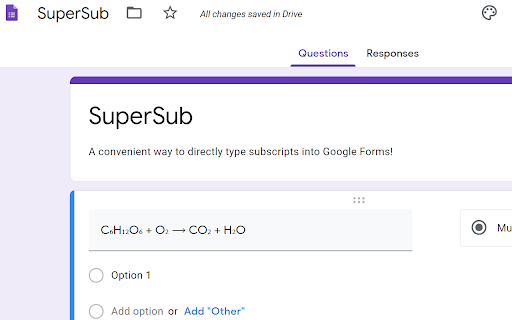


Type Superscripts, Subscripts, and Other Scientific and Mathematical Symbols Directly Into Google Forms and Google Sheets No need to copy and paste from other sources! For Superscript: type ^ before the character you want. For Subscript: type _ before the character you want. For Science or Math symbol: type \ then the character you want. For Accent or other symbols: type ` then the accent or character you want. To toggle Superscripts: press ctrl and the . key. To toggle Subscripts: press ctrl and the , key. This extension applies only to Google Forms and Google Sheets. For most fonts these Unicode glyphs for super and sub scripts are actually the numerators and denominators for diagonal fractions and so they may not look exactly the same as the equivalent markup. There are super and sub scripts for all numerical digits. However, there are some super and sub Latin letters that have not yet been encoded by the Consortium, particularly for subscripts. In those cases a message will be displayed on the screen and the original typed character will appear instead. Once installed, click on the SuperSub Extension Icon (top right corner of Chrome) to see the list of characters that have already been encoded and the required key to type. I will of course update this list as soon as we get more super and sub glyphs encoded by the Consortium. For the science and math symbols, I chose those that are, from my experience, the most commonly used in high school science and math and I tried to match the Greek letters to the closest corresponding Latin equivalents whenever I could. For the overhead vector symbol, the vector symbol needs to be typed first and then the letter for the base. Placing a space before the overhead vector symbol may be necessary in some cases. For accents above the letter: 1. the letter needs to typed first, 2. then press the ` key (usually found at the top left corner of QWERTY keyboards), 3. and then press the key corresponding to the accent that you want. Here are the keys for some of the most common accents: `1 for acute `2 for grave `3 for circumflex `4 for macron `5 for tilde `6 for breve `7 for hacek `8 for diaeresis or umlaut `9 for dot above `0 for ring above There are other keys that will also trigger these accents. Click on the SuperSub Extension Icon for the full list of accents and some other international symbols. In situations where you want ^ or _ or \ or ` to appear in the text just press the key twice. Hi, my name is Hyoun Park and I'm a high school teacher and developer living just north of Toronto in Canada. I built this extension primarily for teachers and students. These days the need for simpler, more effective time-saving tools is an even greater imperative. I am also an associate member of the teachassist foundation.

Symbol Finder
Easily find & copy any HTML5 symbol(s) from your browser toolbar popup UI. Symbol Finder is a simple extension that helps you find and copy any desired HTML5 symbol from the toolbar popup UI. Simply open the UI and click on the desired category from the drop-down list at the top. Or, type a search keyword to see all matched symbols. To copy a symbol, please click on the individual icons to see details at the bottom of the UI (the icon will be copied to the clipboard automatically). There are more than 65000 icons available to choose from. Please note that within the search bar, as you type a word, icons will appear on the fly. By default, only the most common symbols are loaded. If you want to load all 65000, please press the - Load Extra - button in the UI. Also, note that loading all icons may slow down the browser as the list is very large. Please load the complete list only if you need all icons, otherwise, use the default list. If you see any bug or have a feature request, please fill the bug report form on the addon's homepage (https://mybrowseraddon.com/symbol-finder.html).

Symbols Copy And Paste
The ultimate collection of all text symbols to copy and paste online. one click to copy cool symbol & emoji. You Can Copy The Symbol In Single Click By Using The Copy And Paste Text Symbols Extension, It Is Very Easy To Use This Extension. You Have To Click On The Symbol Of Your Choice, It Will Be Copied Directly And Use It Anywhere You Want. Feautures Of This Copy And Paste Text Symbols Extension. * Easy To Use * Almost All Types Text Symbols Available * User Friendly Interface Of This App List Of Symbols Available On This Extension: Star Symbols Like: ☆ ✱ ✯ ✭ ✲ ✪ ★ Math Symbols ∅ = ÷ ≤ √ ∫ ∡ Arrow Symbols Like: ⇝ ⇨ ⤠ ➡ ➸ ➢ ➜ ← Number Symbols Like: Ⅰ ⓵ ⑵ Ⅰ ⒈ ➊ ➋ Ⅰ Ⅰⅰ Love And Heart Symbols ♡ ❤ ♥ ❣️ 💘 💗 You Can Use These Text Symbols On Social Media Like - Facebook, Twitter, Instagram, Whatsapp, Tumblr, Discord, Snapchat, Tiktok, Skype, Telegram And Other Social Media.

Keyboard.cool (keyboard.blade.sk) - emoji & symbol keyboard
Insert emoji and symbols directly into text fields. Use super fast search to pick from over 7500 symbols. Take your texting to the next level. 🤯 use the most up-to-date emoji (version 15.1 - 2023). ⌨ insert symbols directly into the focused web page or copy them to clipboard. 💨 built for speed - loads fast, searches even faster, bring up the keyboard with customizable hotkey (defaults to 𝙲𝚃𝚁𝙻+𝚂𝙷𝙸𝙵𝚃+𝚉 / ⌘+𝚂𝙷𝙸𝙵𝚃+𝚉). ☝🏿 selectable skin tones and emoji styles (EmojiOne and native). 🥶 arguably has the coolest logos. Word of advice: the emoji and symbols you copy may or may not display correctly to you or the recipient, depending on what device they're using. Most new(-ish) devices should be fine. Some websites using non-standard input methods may not accept the inserted characters, in which case you can use the clipboard (𝙲𝚃𝚁𝙻+𝚅 or ⌘+𝚅).

Latex Math Equations for Google Chrome™
You can edit and then save it as an image to Google Drive. Do you need to finish up some math equations/online math homework on your computer? Are you struggling to write out the correct mathematical symbols on your computer for your math homework? Try using our software Latex Math Equations for Google Chrome™ today. You can write out complex mathematical equations in a user-friendly manner once you have installed Latex Math Equations for Google Chrome™. The main purpose of this software is to allow complex latex math equations to be typed out on the computer and allow students worldwide to finish their digital maths homework. Disclaimer: Please note this extension is NOT made by Google and is made by an independent development team. All copyrights belong to their respective owners. Google doesn’t endorse or sponsor this Chrome extension. Latex Math Equations for Google Chrome™ is not owned by, is not licensed by and is not a subsidiary of Google Inc.
