
fddpbejpobddgojgjoeojcicdlehlcpl

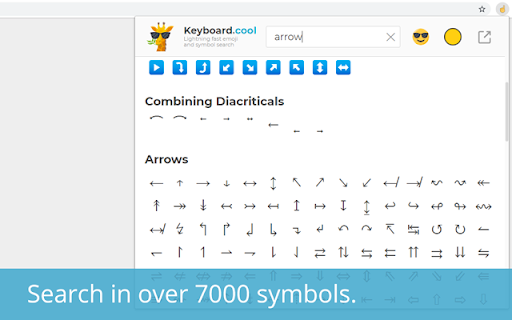


Insert emoji and symbols directly into text fields. Use super fast search to pick from over 7500 symbols. Take your texting to the next level. 🤯 use the most up-to-date emoji (version 15.1 - 2023). ⌨ insert symbols directly into the focused web page or copy them to clipboard. 💨 built for speed - loads fast, searches even faster, bring up the keyboard with customizable hotkey (defaults to 𝙲𝚃𝚁𝙻+𝚂𝙷𝙸𝙵𝚃+𝚉 / ⌘+𝚂𝙷𝙸𝙵𝚃+𝚉). ☝🏿 selectable skin tones and emoji styles (EmojiOne and native). 🥶 arguably has the coolest logos. Word of advice: the emoji and symbols you copy may or may not display correctly to you or the recipient, depending on what device they're using. Most new(-ish) devices should be fine. Some websites using non-standard input methods may not accept the inserted characters, in which case you can use the clipboard (𝙲𝚃𝚁𝙻+𝚅 or ⌘+𝚅).

Copy and Paste Emoji
Copy and Paste Emoji offers cool and cute emoji keyboard. Get all new emoticons and text symbols from emoji list on your desktop. 🚀 With Emoji Copy and Paste Chrome extension, access a full list of all emojis instantly. Easily enhance your texts, emails, and social media posts with fun and flair. 📋 Easy Emoji Copy and Paste: • Say goodbye to the hassle of manually searching for cool emojis. • Quickly copy your best emojis with just a few clicks. • Paste cute emojis wherever you need them effortlessly. • It's as simple as select, copy, and paste! ✨ All Emojis Updated Regularly: - Stay up-to-date with the latest trends. - We're constantly adding new emoticons to keep your messages fresh. 🔄 Copy and Paste History: 1. Never lose track of your recently used emojis copy paste with our emoji list history feature. 2. Easily recall and reuse your most frequently used emoticons with ease. 3. Keep your usage organized and efficient, even across different platforms and devices. 4. Access a detailed log of your history to analyze your messaging trends and preferences. 💫 Wide Variety of Text Symbols: 🌈 Explore a vast collection of emoticons for every mood and occasion. 🌈 From smileys and animals to food and travel, we've got you covered. 🌈 Whether classic symbols or the latest trends, find them here. 🌟 Cute and Cool Funny Emojis: 💖 Express yourself with over 1000 heart emojis that add a touch of cuteness. 💖 Brighten someone's day or send warm messages with ease. 💖 Our getemoji collection is sure to make an impression. 🔖 Organized Categories: 📂 Finding the perfect discord emojis is a breeze with our organized categories. 📂 Browse by theme, emoticon, or symbol effortlessly. 📂 Discover new favorite star emoji copy and paste list with our intuitive interface. 🔍 Search Functionality: 🎯 Use our built-in search functionality to find, copy and paste emojis. 🎯 Type a keyword and find what you need in seconds. 🎯 A selection of relevant emoticons is just a search away. 🎨 Customizable Emoji Keyboard: • Personalize your experience with our customizable keyboard. • Choose your favorite emoticons for easy access. • Customize the layout to suit your preferences. 🖱️ Seamless Integration: - Our Chrome extension seamlessly integrates with your browser. - Access your favorite cross emojis from any website or application. - Whether composing an email, commenting, or chatting, we're there. 🚀 Lightweight and Fast: • Designed to be lightweight and fast for a smooth user experience. • Enjoy speedy performance without slowing down your browsing. • Whether on desktop or mobile, count on fast performance every time. Frequently Asked Questions: 1️⃣ Is the Emojis Copy and Paste extension free to use? ➤ Yes, this extension is completely free to download and use. Simply add it to your Chrome browser from the Chrome Web Store, and you're ready to start using skull emoji copy and paste in your messages! 2️⃣ Can I use the Emojis Copy and Paste extension on other browsers besides Chrome? ➤ Currently, this extension is only available for Chrome. However, we may consider expanding to other browsers in the future. 3️⃣ How frequently are new emojis added to the extension? ➤ We strive to keep our library up-to-date with the latest trends and additions. New emoticons are added regularly to ensure that you have access to the freshest and most relevant ones. 4️⃣ Are the emojis in the extension compatible with all platforms and devices? ➤ While we strive to provide text symbols that are compatible with a wide range of platforms and devices, there may be some variation in appearance depending on the recipient's device and software. However, our extension offers a diverse selection of emoticons that are widely compatible across most platforms. 5️⃣ Is there a limit to the number of text symbols I can copy and paste at once? ➤ There is no limit to the number of emoji and copy paste at once using our extension. Feel free to express yourself with as many emoticons as you like! 6️⃣ Can I suggest new emojis to be added to the extension? ➤ We welcome suggestions for new symbols to add to our library! If you have any requests or feedback, feel free to reach out to us through our website or social media channels. We'd love to hear from you! ✨With Emoji Copy and Paste, expressing yourself has never been easier. 🚀Download our extension today and unleash your creativity with a world of emojis at your fingertips!

Copy Emoji: Emoji Keyboard, Emoji List & Instant Copy
Fast emoji keyboard, emoji list, and instant emoji search. Quickly browse the emoji list, search, and copy emoji to clipboard. Copy Emoji is the fastest and easiest emoji keyboard for Chrome! Quickly search, browse the emoji list, and instantly copy emoji to make your messages, social media posts, emails, and documents more fun and expressive. 🧩 This extension lets you copy emoji quickly from a handy popup in your browser. Whether you already know which emoji you want or just want to explore, Copy Emoji is here to help. 🚀 Instant Emoji Search: Can’t find the right emoji? Just type a word like "smile," "heart," "food," or "car" into the search bar. Our smart emoji finder shows you matching emojis right away. It’s the easiest way to do an emoji search! 🖱️ One-Click Emoji Copy: Just click any emoji you see in the list or search results, and it will be copied to your clipboard. Then you can easily paste emoji anywhere—on websites, in chats, or in documents. 📚 Full Emoji List: Browse through a full and well-organized emoji list. Emojis are sorted into clear categories like Smileys & People, Animals, Food, Travel, Objects, Symbols, and more. Finding the right emoji has never been easier. 🎨 Light and Dark Themes: Choose the look you like best. Use a clean Light theme or a sleek Dark theme to match your Chrome style. Switch themes any time from the popup. 🧲 Easy-to-Use Popup: Access Copy Emoji directly from your Chrome toolbar. Quickly find and copy emoji without leaving your current page. ⚡ Fast & Lightweight: Enjoy a speedy, lightweight emoji keyboard extension that won't slow down your browser. It’s always ready to use. ⏱️ Save Time: No more searching the web for emojis. Do a quick emoji search, find what you need, and copy emoji instantly. 💬 Make Messages Fun: Add emotion, style, and fun to your texts, posts, and comments with the perfect emoji. 🧰 Always Ready: Your emoji keyboard, emoji list, and search tool are always just a click away in Chrome. 👌 Simple Design: No setup needed. Install and start using it right away. The interface is clean and easy for anyone to use. 🌟 Great for Everyone: Whether you’re a social media manager, writer, student, or just someone who loves emojis — Copy Emoji makes it easy to find and copy emoji anytime. 1️⃣ Click the Copy Emoji icon in your Chrome toolbar. 2️⃣ Search: Type keywords in the emoji search bar to quickly find emoji. 3️⃣ Browse: Browse the emoji list to explore all categories. 4️⃣ Click: Click on any emoji to copy emoji to your clipboard. 5️⃣ Paste: Use Ctrl+V (or Cmd+V on Mac) to paste emoji where you want. 6️⃣ (Optional) Switch themes with the toggle button in the popup. 🙌 No more emoji struggles! Get Copy Emoji today and enjoy the fastest way to do emoji copy and paste in Chrome. The best emoji keyboard, emoji list, and emoji search extension for Chrome.

TELL.WTF - text symbols & fancy fonts
Transform your plain text with fancy font generators and style your text using symbols. Texteable and compatible ➊ (ᴏᴘᴛɪᴏɴᴀʟ) Select some text on some page. For example, some text you have just written in a text box ➋ Open this extension using ALT+T after setting up shortcut, or by clicking it. ➌ Eᴅɪᴛ and sᴛʏʟᴇ your text using symbols. ➍ (ᴏᴘᴛɪᴏɴᴀʟ) Paint to find and add symbols and emoji to the text. ➎ Copy-paste your text into any instant messenger, chat, wherever.

SmartType — Instant Smart Quotes, Brackets & Text Wrapping
Select text, press a key — wrapped! Smart typography auto-replaces quotes, dashes & symbols as you type. Works everywhere. 🔤 **Wrap selected text with any character in one keypress. Smart typography auto-replaces straight quotes, dashes & symbols as you type.** 🚀 **Save time on every keystroke.** Select a word in any text field, press a key — it's instantly surrounded with quotes, brackets, parentheses, or any character you want. No more typing characters on both sides manually, no more moving the cursor back and forth. One key, done. SmartType also boosts your productivity with **Smart Typography**: straight quotes become curly quotes, hyphens become proper dashes, and (c) becomes ©. Professional-looking text without the hassle of hunting for special characters. Whether you're writing emails, editing documents, posting on forums, or coding — SmartType removes the repetitive work and lets you focus on what you're writing. 🖥️ Developers: if you love the "Surround With" shortcut from your IDE (IntelliJ, VS Code, Sublime Text…), SmartType brings that same power to every text field on the web. 1️⃣ Select text in any editable field 2️⃣ Press a configured key (e.g. ", (, [) 3️⃣ Done — your text is wrapped! Example: select "hello", press the ( key: BEFORE: Say hello to the world. AFTER: Say (hello) to the world. Surround selected text with any character in a single keypress. Works in standard form fields, rich text editors, and any website. 🔹 Symmetric wrapping (same character on both sides): " ' ` * _ ~ - = + : ! % @ § ° and many more… 🔹 Asymmetric wrapping (different opening/closing characters): ( ) [ ] { } « » " " ‹ › and more… 🔧 Fully customizable — add, remove, or modify any character pair. All Unicode characters and emoji are supported. 💡 **Use cases:** • Markdown editing — wrap text with **, `, _, [ ] in code platforms and wikis… • Code editing in web IDEs — surround code with quotes, brackets, parentheses • Forum posts and chat — quickly quote or emphasize text in messaging apps… • Email composition — add quotes or formatting in your webmail… • Any text field, anywhere — if you can type in it, SmartType works. Automatically replaces typewriter punctuation with typographic equivalents as you type: • Straight quotes → curly quotes " " ' ' (language-aware — 48 languages supported) • Hyphens → en dashes (--) and em dashes (---) • Three dots → ellipsis … • Symbols: (c) → ©, (tm) → ™, (r) → ®, arrows -> → →, and more • Foot/inch marks preserved in numeric contexts (5'10", 6×4") • Guillemets: > → » (built-in shortcuts, always active) 🧠 **Code-block aware** — Smart Typography automatically skips backtick blocks and code blocks, so your code stays untouched. 🖱️ **Right-click → "Format Typography"** to convert existing text in a field with one click — no need to retype anything. 🌐 Configure your preferred quote style by language, dash preference, excluded sites, and ignored CSS selectors in the settings. 🔹 Exclude sites by domain with wildcard support (e.g. *.example.com) 🔹 Disable wrapping, typography, or both independently per site 🔹 Ignore specific elements using CSS selectors (e.g. .code-editor) 🔹 Optional toolbar badge shows exclusion status on the active tab ✅ Email clients, documents, and spreadsheets ✅ Messaging and team collaboration apps ✅ Code platforms and web-based IDEs ✅ Project management and documentation tools ✅ Blogs, CMS, and any website with text fields ✅ Standard form fields (input, textarea) ✅ Rich text editors (contenteditable) ✅ iframes and embedded editors ✅ Light and fast — no impact on page performance ✅ Works 100% offline — no data ever leaves your browser ✅ No ads, no tracking, no analytics ✅ Minimal permissions — only what's strictly necessary ✅ Fully customizable characters and typography settings ✅ Built-in sandbox to test your settings safely ✅ Undo/redo works as expected — editor history is preserved ✅ Selected text stays selected after wrapping ✅ Available in 13 languages (EN, FR, ES, DE, IT, PT, 中文, 日本語, HI, AR, RU, KO, TR) 📌 **Add a new character** — Enter the trigger key and optionally set a different closing character (e.g. [ and ]). 📌 **Deactivate a character** — Uncheck "Activated?" to disable it without losing its configuration. 📌 **Delete a character** — Click the delete button to permanently remove it. 📌 **Restore defaults** — Reset to the original 30+ character configuration. 📌 **Enable/disable wrapping** — Toggle text wrapping on or off globally without losing your configuration.
