
fomidgcjldkakcdhohmgfggmbpkpofmn
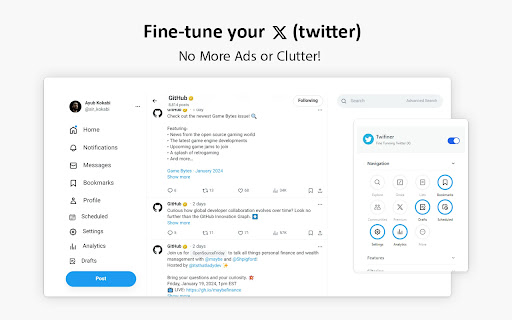
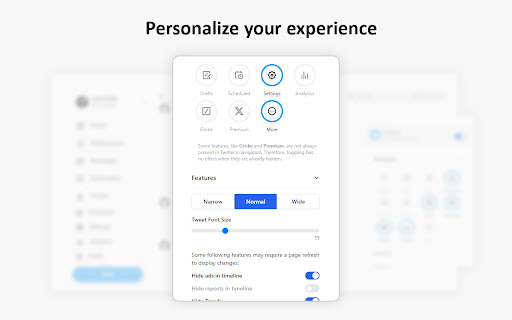

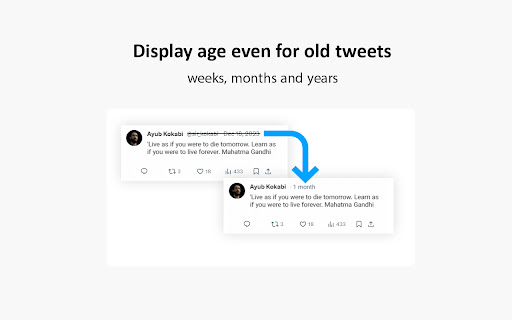
Fine-tune your 𝕏 (twitter) experience No More Ads or Clutter! 🚀 Twifiner enhances your Twitter experience by removing ads, reducing clutter, and providing cool features like easier word muting, account age display, and more. version 5: You can now add notes to other users' profiles. Tweets are now displayed using the Vazirmatn font (thanks to Saber Rasti Kardar, may he rest in peace). Fixed an issue where the profile icon was being moved to the first position. Some other minor bug fixes and improvements. version 4: Message requests are now highlighted on the Messages page for better visibility Retweets are now hidden on user profiles, in addition to the timeline #9 Hiding the "Discover More" is now optional #5 Fixed a major issue causing incorrect display of some numbers in tweets #7 Fixed an issue that prevented notification count reset when the header was hidden #8 Removed the link replacement feature and extension disabling option for better performance and enable the removal of some unnecessary permissions Removed a few permissions to address safety worries, at the value of losing some minor conveniences some refactor and enhancements version 3: Added option for justifying tweet and chat messages Fixed font issue by reverting tweet fonts to the default Fixed issue with RTL alignment of Persian chat messages Fixed issue with RTL alignment of Persian descriptions in images Hide some new inline prompts, which appear in the timeline Minor UI tweaks for better accessibility Some fixes and improvements version 2: Fixed dark mode issues in navigation, pinned tweets, follow page, notifications, and hashtags Added option to hide retweets Added option to change font size Restored default font for non-Persian tweets and Twitter UI Highlighted mutual friendships on verified followers page Made Persian tweet normalization optional Made hashtag styling optional Made ad display optional Made title display instead of link optional Made color of mutual friendships on follow page optional Made color of pinned tweets optional Made moving profile to top optional Made highlighting reply notifications optional Made advanced search link display optional Some bug fixes and improvements

Twitter Customiser
Customise what metrics and content appears in the Media tabs, List tabs and more when browsing Twitter! An extension made for customising the Twitter tabs and content panes to your liking. It can also hide metrics from all tweets. This extension allows you to hide certain types of tweets from most tabs: - Reply tweets - Retweets - GIFs - Videos - Cards (embedded links) Works for the home timeline, Media tabs, Likes tabs, Profile tabs and lists. You can also whitelist users or lists you don't want the extension to hide anything for. In addition, you can use the Misc configuration options to hide the "Trending Topics" and "Who to Follow" panes that appear on the right of the Twitter webpage, and to hide the Explore link on the left navigation menu. Note that the extension will only hide these tweets for you, not for other people viewing your Twitter profile (unless they have installed the extension as well). If you want e.g. something that hides all GIFs from your media tab for all Twitter users, the extension is not able to do that; it can only hide tweets for you in your browser. - Added the option to hide the "Edit image" buttons on top of tweet images. It only hides them for you, not other users. - Modified the main scripts to run on both twitter.com and x.com, as twitter.com links are being forcibly redirected to x.com recently, breaking script functionality. - Added option to hide the Grok tab in the Advanced Options -> Misc area. - Fixed a bug where the saved settings for removing sensitive timeline overlays was not properly reflected in the options checkbox. - Added an option to remove all sensitive content overlays, in the Advanced Options -> Misc area. - Metrics can now be hidden from all tweets. The options for this can be found under Advanced Options -> Metrics. - Added options to hide the "Who to Follow" pane from the right of the Twitter page, and the Explore link in the left navigation menu. These options can be found under Advanced Options -> Misc. - Added the option to hide the "What's happening" / "Trending topics" pane from the top right of the Twitter page. This option can be found under Advanced Options -> Misc. Additional options will come in future updates.

Better Twitter
Make Twitter great again by removing unwanted contents from your timeline. The current settings allow you to hide the following elements: - view counts - tweet analytics - share buttons - ads & promoted tweets - promoted account (who to follow section only) - 'You might like' tweets Please note that in case of any new UI changes on Twitter, it may take 1-3 days for our extension to update. Feels free to leave feedback and suggestions, as I will be continue improving the extension and add more features later on. Changelog: v.10.3 (18/01/2023) - Added new option to hide 'You might like' tweets

Old Twitter Layout (2026)
A new extension that returns old Twitter's look. Extension to return old Twitter layout from 2015 (or 2018). WORKS IN 2026! This extension doesn't add any CSS on top of original Twitter. It's fully different client that replaces original new Twitter client, making it faster than alternatives that just add style on top of Twitter. This extension requires you to be logged in to Twitter account. Please visit https://twitter.com/old/settings after installing to make it work just as you like. It switches to chronological timeline by default, you can switch back to algorithmical timeline in settings. You can visit unchanged Twitter by visiting https://twitter.com?newtwitter=true. The code is open source! Check https://github.com/dimdenGD/OldTwitter to see the code and report any issues. Features - Almost all of Twitter functionality is implemented - Custom profile link colors supported - You can change custom profile link color and it'll appear for other extension users (priority: oldtwitter color db -> twitter color db -> default color) - Removes all analytics and tracking from Twitter - Track your unfollowers for free - Search, sort and filter your followers - Removes all ads - Easy download of videos and GIFs - Translate tweets without having to open them, also ability to set specific users/languages to autotranslate - Shows why tweets were added to algorthimical timeline - Dark mode support - Ability to enable/disable Twemoji, disable stars (favorites) back to likes (hearts), change font, default link color and any other color in extension - Lot of hotkeys - Mobile support - Custom CSS support If you found this extension useful please consider donating: https://dimden.dev/donate/ or following me on Twitter: https://twitter.com/dimden

Calm Twitter
This extension hides trending information from twitter timelines to make your mind calm. - Hide unnecessary items from navigation - Hide numbers of replies, retweets, likes, bookmarks, and view counts - Hide trends, who to follow, subscribe prompts, and news from sidebar - Hide following and follower counts - Show "Calm" next to the logo This extension requires a permission to save the settings and only toggles hide or show. The source code is available on Github https://github.com/yusukesaitoh/calm-twitter
