
jgejdcdoeeabklepnkdbglgccjpdgpmf


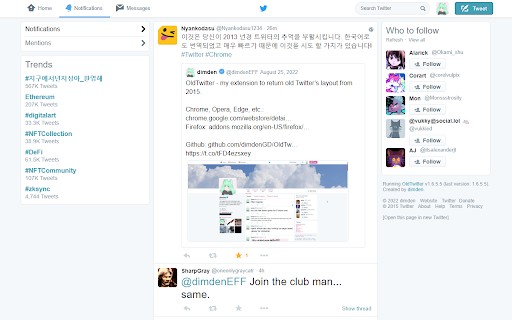
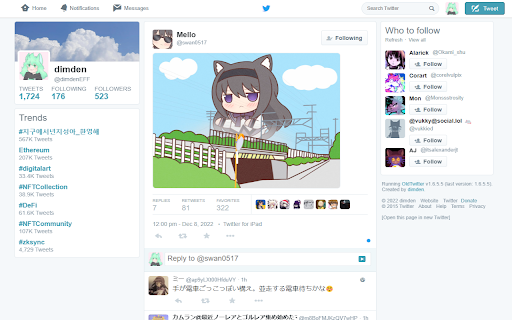
A new extension that returns old Twitter's look. Extension to return old Twitter layout from 2015 (or 2018). WORKS IN 2026! This extension doesn't add any CSS on top of original Twitter. It's fully different client that replaces original new Twitter client, making it faster than alternatives that just add style on top of Twitter. This extension requires you to be logged in to Twitter account. Please visit https://twitter.com/old/settings after installing to make it work just as you like. It switches to chronological timeline by default, you can switch back to algorithmical timeline in settings. You can visit unchanged Twitter by visiting https://twitter.com?newtwitter=true. The code is open source! Check https://github.com/dimdenGD/OldTwitter to see the code and report any issues. Features - Almost all of Twitter functionality is implemented - Custom profile link colors supported - You can change custom profile link color and it'll appear for other extension users (priority: oldtwitter color db -> twitter color db -> default color) - Removes all analytics and tracking from Twitter - Track your unfollowers for free - Search, sort and filter your followers - Removes all ads - Easy download of videos and GIFs - Translate tweets without having to open them, also ability to set specific users/languages to autotranslate - Shows why tweets were added to algorthimical timeline - Dark mode support - Ability to enable/disable Twemoji, disable stars (favorites) back to likes (hearts), change font, default link color and any other color in extension - Lot of hotkeys - Mobile support - Custom CSS support If you found this extension useful please consider donating: https://dimden.dev/donate/ or following me on Twitter: https://twitter.com/dimden

CustomTube - Restore the Old YouTube Layout
Choose your own YouTube layout, and more! What if you could just choose your YouTube layout? Well, now you can! CustomTube lets you choose between recreations of any YouTube layout from 2008-2021, all with a single click! Outside of the layout selector, CustomTube has even more options, including: -Ability to loop videos by default (with an option to exclude playlist videos) -Choose the size of the video player -Make search better by hiding some irrelevant results -Hide the "Shorts" button on the sidebar -And more, with even more options planned for future updates!

Sky Follower Bridge
Easily transfer your following users and list members from X to Bluesky. 🚀 How to use 1. Open your target page. - Twitter Following (https://x.com/following) - Twitter Followers (https://x.com/followers) - Block (https://twitter.com/settings/blocked/all) - List members page - Threads follower tab (https://www.threads.net/) - Instagram follower dialog (https://www.instagram.com/your_account/following) 2. Press "Alt + B" shortcut or click on the toolbar icon to launch the Sky Follower Bridge. 3. Sign in with Bluesky (click the button to open Bluesky and authorize the extension). 4. Press the "Finding Bluesky Users" btn. 5. The modal will open and detect Bluesky users. 6. The "View Detected users" will be displayed once the scan is complete. 7. Press the button to check the results, and then click the Follow button. - Please feel free to mention @sky-follower-bridge.dev on Bluesky. They will provide support to ensure the tool is functioning properly. ( https://bsky.app/profile/sky-follower-bridge.dev ) - The main solutions for errors are posted on this site. https://www.sky-follower-bridge.dev/troubleshooting.html 🚨 Limitations User search may fail due to late limit in Bluesky's API. In this case, please wait for 2 to 3 minutes and execute the search again.

PlayerTube
The secret ingredient for a older (and better) looking YouTube. PlayerTube is a free browser extension that is used for editing and changing up the style of the current YouTube player to a more older (and better) look. PlayerTube provides lots of features & options that can change the YouTube player's functionality and/or look, each can be enabled or disabled from it's extension menu. Users can customize the style of their YouTube player and share it across the web for others to use with custom theming. PlayerTube provides a whole page dedicated to it's custom themes feature so users can jump right in without looking up a YouTube tutorial. Latest update (v1.12.2): More bug fixes!!! (I just can't catch a break can I?) Also sorry for being a little late on sending this out to browser stores... * Fixed an issue where the settings popup would crash because of latest update (#95) * Fixed an issue with 2015 not disappearing (with & without fade out setting option) * Fixed settings menu not sizing on first launch with "Minify settings menu" enabled * Added error log to popup page/window * Touch ups to pt-resize

Control Panel for Twitter
Gives you more control over Twitter and adds missing features and UI improvements Control Panel for Twitter is a browser extension for Twitter - its main goals are to reduce the amount of algorithmic content you see, give you more control over your timeline and make the UI less distracting. By default, your Home timeline will be the reverse-chronological "Following" timeline, which will only contain tweets and quote tweets from the people you follow. The algorithmic "For you" timeline will be hidden, and Control Panel for Twitter will keep you on "Following" if Twitter tries to automatically take you off it. Everything is configurable, so start by opening the options popup and customizing to your liking. Changes you make in the options will be applied immediately. • Use the "Following" (chronological) timeline by default • Hide the "For you" (algorithmic) timeline • Retweets • Show in separate tab / Hide • Quote Tweets • Show in separate tab / Hide • Enable muting of Quote Tweets • Hide "See new Tweets" • Hide "Who to follow", "Follow some Topics" etc. in the timeline • Hide inline prompts in the timeline • Full-width timeline content • Hide the sidebar and let timeline content go full-width • Add "Add muted word" to the "More" menu • Fast blocking (skips confirm dialog) • Hide quotes and replies to blocked and muted accounts • Hide Retweets in user profiles • Retweets in Lists • Default to "Latest" tab in Search • Hide the quoted tweet when viewing Quote Tweets • Redirect to twitter.com • Tweak new layout • Hide Toggle navigation • Replace X branding changes • Hide Views under tweets • Hide "Verified" Notifications and Followers tabs • Restore headlines under external links • Restore Quote Tweets link under Tweets • Restore other links under Tweets • Default sorting of replies • Latest / Likes • Premium blue checks • Replace with Twitter Blue logo / Hide • Hide Premium blue check replies • Hide Premium upsells • Hide Grok • Hide Jobs • Hide Subscriptions • Don't use the Chirp font • Disable bold and italic text in tweets • Use normal text font style in navigation bar • Navigation density • Comfortable / Compact • Use normal font weight in dropdown menus • Uninvert Follow / Following buttons • Monochrome / Themed • Unblur sensitive content • Hide sidebar contents • Hide Explore page contents and use it only for searching • Hide "Discover more" tweets • Hide metrics • Reduced interaction mode • Hide the action bar under tweets – replies are now the only means of interacting • Hide the Compose Tweet button • Disable the home timeline • Find yourself wasting too much time on Twitter? Try preventing use of the home timeline • Notifications • Hide badges only / Hide Hide UI items you don't use • Bookmark button under tweets • Share button under tweets • "View post engagements" under your tweets • Tweet box in timeline • Account switcher • Messages drawer • Explore • Communities • Hide "More" menu items you don't use TWITTER, TWEET and RETWEET are trademarks of Twitter Inc. or its affiliates
