
lnlejnkgobhbdidibbjnmaamnonlfnge
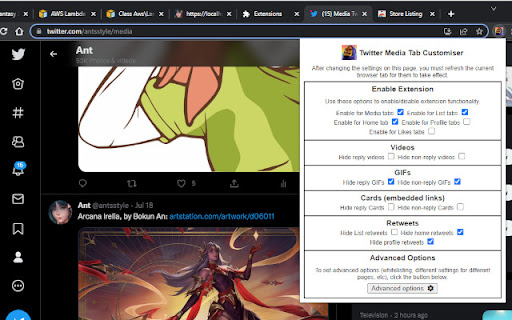
Customise what metrics and content appears in the Media tabs, List tabs and more when browsing Twitter! An extension made for customising the Twitter tabs and content panes to your liking. It can also hide metrics from all tweets. This extension allows you to hide certain types of tweets from most tabs: - Reply tweets - Retweets - GIFs - Videos - Cards (embedded links) Works for the home timeline, Media tabs, Likes tabs, Profile tabs and lists. You can also whitelist users or lists you don't want the extension to hide anything for. In addition, you can use the Misc configuration options to hide the "Trending Topics" and "Who to Follow" panes that appear on the right of the Twitter webpage, and to hide the Explore link on the left navigation menu. Note that the extension will only hide these tweets for you, not for other people viewing your Twitter profile (unless they have installed the extension as well). If you want e.g. something that hides all GIFs from your media tab for all Twitter users, the extension is not able to do that; it can only hide tweets for you in your browser. - Added the option to hide the "Edit image" buttons on top of tweet images. It only hides them for you, not other users. - Modified the main scripts to run on both twitter.com and x.com, as twitter.com links are being forcibly redirected to x.com recently, breaking script functionality. - Added option to hide the Grok tab in the Advanced Options -> Misc area. - Fixed a bug where the saved settings for removing sensitive timeline overlays was not properly reflected in the options checkbox. - Added an option to remove all sensitive content overlays, in the Advanced Options -> Misc area. - Metrics can now be hidden from all tweets. The options for this can be found under Advanced Options -> Metrics. - Added options to hide the "Who to Follow" pane from the right of the Twitter page, and the Explore link in the left navigation menu. These options can be found under Advanced Options -> Misc. - Added the option to hide the "What's happening" / "Trending topics" pane from the top right of the Twitter page. This option can be found under Advanced Options -> Misc. Additional options will come in future updates.

Tweetlio X: Twitter Companion
Tweetlio Explore: Elevate Twitter engagement with curated content, trusted by 30,000+ users for a productive social experience. Streamline your Twitter experience and uncover the most impactful content with Tweetlio Explore. This browser extension redefines Twitter engagement by curating top-performing tweets and optimizing your browsing for meaningful interactions. Tweetlio Explore is your essential Twitter companion, seamlessly integrating to guide you towards discovering influential tweets and fostering meaningful connections. ✅ Trending Highlights: Access the most engaging tweets from your timeline effortlessly. ✅ Showcase Insights: Explore the top-performing tweets of any user for research or inspiration. ✅ Conversational Insights: Review past tweets and replies within specific conversations. ✅ Quoted Perspectives: Track public sentiment and reactions to tweets. ✅ Enhanced Search: Simplify Twitter searches with intuitive shortcuts and optimizations for a seamless experience. 💟 AI-driven Enhancements (Exclusive for Subscribers): Gain access to AI-powered insights on viral tweets and an AI writing assistant, enriching your Tweetlio Explore experience. Tweetlio X Trusted by over 50,000 individuals for a purpose-driven and productive approach to Twitter engagement.

Clean Twitter/X.com (Hide Tweets,Ads,etc)
A browser extension that filters out unwanted tweets. (Hides tweet by keywords, Hides ads, etc) Clean Twitter/X.com is a browser extension designed to enhance your Twitter browsing experience. It allows you to hide tweets in Twitter threads that contain specified keywords. Additionally, it provides options to hide Ad tweets and suggestions for who to follow or subscribe to. Key Features - Keyword Filtering: Set specific keywords to filter out unwanted tweets. - Hide or Notify: Choose to either hide the tweet/Ads completely or display a notice that the tweet/Ads was hidden. - Granular Options: Customize your filtering preferences for tweets, ads, and suggestions separately. - Privacy-Focused: No tracking or sign-in required. All options can found in the extension popup menu.

Twitter Media Preview Blocker
Block media (image, GIF and video) previews on your Twitter timeline. Perfect for avoiding those pesky spoilers!! Want to hide media previews on Twitter to avoid seeing unexpected and unwanted images, GIFs, or videos on your timeline? Then this is the perfect Chrome extension for you! Once enabled, you will no longer see actual media previews on your Twitter timeline. If you are 100% sure you want to view the media, just click on the tweet and you'll be able to do so. So, what are you waiting for? Download Twitter Media Preview Blocker now!

Twifiner
Fine-tune your 𝕏 (twitter) experience No More Ads or Clutter! 🚀 Twifiner enhances your Twitter experience by removing ads, reducing clutter, and providing cool features like easier word muting, account age display, and more. version 5: You can now add notes to other users' profiles. Tweets are now displayed using the Vazirmatn font (thanks to Saber Rasti Kardar, may he rest in peace). Fixed an issue where the profile icon was being moved to the first position. Some other minor bug fixes and improvements. version 4: Message requests are now highlighted on the Messages page for better visibility Retweets are now hidden on user profiles, in addition to the timeline #9 Hiding the "Discover More" is now optional #5 Fixed a major issue causing incorrect display of some numbers in tweets #7 Fixed an issue that prevented notification count reset when the header was hidden #8 Removed the link replacement feature and extension disabling option for better performance and enable the removal of some unnecessary permissions Removed a few permissions to address safety worries, at the value of losing some minor conveniences some refactor and enhancements version 3: Added option for justifying tweet and chat messages Fixed font issue by reverting tweet fonts to the default Fixed issue with RTL alignment of Persian chat messages Fixed issue with RTL alignment of Persian descriptions in images Hide some new inline prompts, which appear in the timeline Minor UI tweaks for better accessibility Some fixes and improvements version 2: Fixed dark mode issues in navigation, pinned tweets, follow page, notifications, and hashtags Added option to hide retweets Added option to change font size Restored default font for non-Persian tweets and Twitter UI Highlighted mutual friendships on verified followers page Made Persian tweet normalization optional Made hashtag styling optional Made ad display optional Made title display instead of link optional Made color of mutual friendships on follow page optional Made color of pinned tweets optional Made moving profile to top optional Made highlighting reply notifications optional Made advanced search link display optional Some bug fixes and improvements
