
fohfnhgabmicpkjcpjpjongpijcffaba
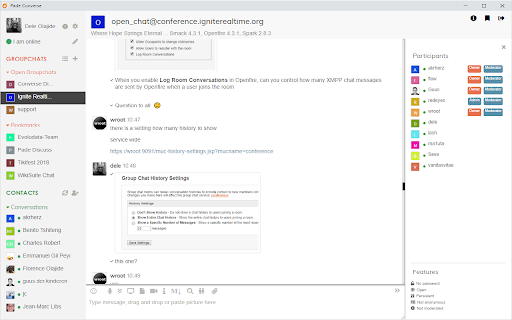
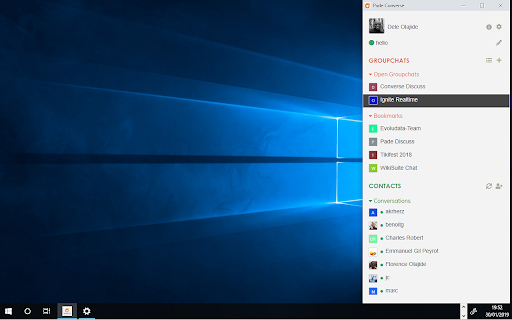

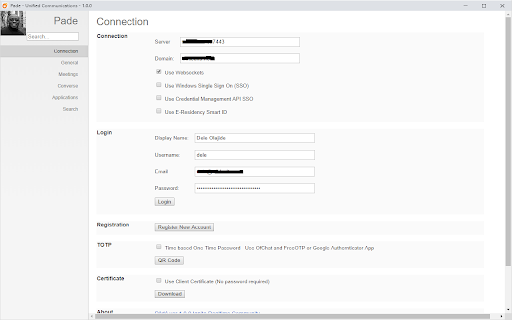
Pade is a web extension application for unified communications Pàdé is the Yoruba word for "Meet". It is a unified communications client for Openfire and uses the following front end web applications. - Converse.js for XMPP chat, group-chat and voice-chat with XMPP - Jitsi Meet for SFU-based WebRTC audio/video conferencing/meetings and screen share All web application run from within a browser extension in native application windows and combine together to provide: Modern HTML5 user interface; Single user authentication and sign-on; Windows SSO, Credential Management API and Smart ID support Modern chat user experience; chats, group chats and message broadcasts with private chat responses. Message Styling with markdown plain text Interactive content; mentions, hashtags, forms and H5P/xAPI support Audio Video conferencing (WebRTC); Webinars; Single talker and multiple listeners Online Meeting/Conference planner with a calendar or CRON trigger; Screen sharing, Co-browsing and Application sharing/real-time collaboration Agent support for live conversations with web site visitors using chat, audio and video conferencing. Support hardware devices like MIDI touch-pads and HID USB touch devices like the Elgato stream deck

Owncloud Bookmarks
This extension now supports current versions of ownCloud/Nextcloud. It was tested with Nextcloud 12 and Bookmarks 0.10. Because of changes in latest ownCloud/Nextcloud username and password has to be filled in options and it's send in url to fetch the bookmarks, so https should be used all the time. First go to options and fill info about your ownCloud/Nextcloud installation. Middle button click opens new tab, but not closes extension, so it's possible to open more tabs. Click on label opens all bookmarks with this label.

Boomerang - SOAP & REST Client
Seamlessly integrate and test SOAP & REST services. Boomerang is a powerful yet lightweight API testing tool that runs directly in your browser. With over a decade of proven reliability, it provides developers, QA engineers, and integration teams with a streamlined solution for testing both REST APIs and SOAP services. Test your APIs effortlessly with Boomerang's intuitive interface. Create, organize, and execute API requests without the bloat of traditional desktop applications. Whether you're validating endpoints, debugging integrations, or automating test workflows, Boomerang offers the perfect balance of simplicity and capability. Key Features: ★ Test REST APIs and SOAP services with a clean, intuitive interface ★ Import service definitions from OpenAPI/Swagger specifications and WSDL files ★ Organize requests in projects and collections for better workflow management ★ Switch between environments (development, staging, production) seamlessly ★ Create dynamic requests using variables and scripting ★ Run collections of requests to test complex API workflows ★ Dark mode support for comfortable testing in any lighting condition Boomerang stands out with its browser-native approach, eliminating the need for separate applications or complex setups. Your API testing workflow stays right where you need it - in your browser. Perfect for developers who need: ★ A fast, reliable tool for API testing ★ Support for both REST and SOAP services ★ Simple organization of API requests ★ Quick switching between development environments ★ Collection-based testing capabilities ★ Local data storage without cloud dependencies The extension works offline and stores all your data locally, ensuring your API testing remains secure and private. Join thousands of developers who've made Boomerang their go-to API testing companion. Experience the difference that a thoughtfully designed, browser-based API client can make in your development workflow.

floccus bookmarks sync
Sync your bookmarks privately across browsers and devices **Floccus Bookmarks Sync: Private, Cross‑Browser & Device Sync** *Securely synchronize bookmarks across Chrome, Firefox, Edge, and more using your own cloud storage.* **Seamless Cross‑Browser & Cross‑Device Sync** - Sync bookmarks between Chrome, Firefox, Edge, and any browser that supports extensions. - Works on desktop, mobile, and tablet. - Syncs instantly when you add or edit a bookmark. **Ultimate Privacy & Control** - No data is stored on Floccus servers. - All data stays on your chosen backend (Nextcloud, WebDAV, Google Drive, or Git). - Optional end‑to‑end encryption for WebDAV and Google Drive. **Flexible Backend Support** - Nextcloud, Linkwarden, KaraKeep any WebDAV server, Git repositories, Google Drive, Dropbox - Choose the backend that best fits your workflow. **Easy Setup & Usage** - One‑click installation from the Chrome Web Store. - Simple wizard guides you through selecting a backend and configuring sync. - Automatic updates keep your bookmarks in sync. - **Privacy‑First** – Your bookmarks never leave your chosen storage. - **Cross‑Platform** – Works on all major browsers and devices. - **No Ads / No Fees** – Free to use, no hidden costs. Although, I do appreciate donations :) - **Customizable** – Pick any backend you trust. - **Community‑Supported** – Open‑source code and active community. **Get Floccus now and take control of your bookmarks!** If you'd like to support the creation and maintenance of this software, you can donate here: https://floccus.org/donate/ Please file bug reports or requests for help over on Github: https://github.com/floccusaddon/floccus

Secure Shell
Terminal emulator and SSH and SFTP client. Secure Shell is an xterm-compatible terminal emulator and stand-alone ssh client for Chrome. It uses Native-Client to connect directly to ssh servers without the need for external proxies. A SFTP command line client is included. On ChromeOS, you can create SFTP mounts and access them from the Files app! It has been well tested for a couple of years. Please read the FAQ, available here: https://hterm.org/x/ssh/faq. You can also exchange feedback in the chromium-hterm mailing list, available here: https://hterm.org/x/ssh/contact. The changelog is available here: https://hterm.org/x/ssh/changelog
