
eomolhpeokmbnincelpkagpapjpeeckc
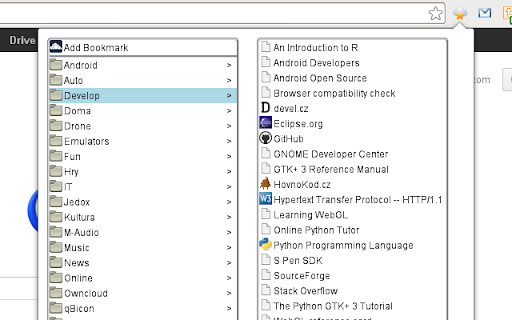
This extension now supports current versions of ownCloud/Nextcloud. It was tested with Nextcloud 12 and Bookmarks 0.10. Because of changes in latest ownCloud/Nextcloud username and password has to be filled in options and it's send in url to fetch the bookmarks, so https should be used all the time. First go to options and fill info about your ownCloud/Nextcloud installation. Middle button click opens new tab, but not closes extension, so it's possible to open more tabs. Click on label opens all bookmarks with this label.

Custom Scrollbars
Give your browser a personal touch with customized scrollbars! Give your browser a personalized touch with custom scrollbar colors! You can select from any range of colors and toggle between the default width and thin scrollbar... or hide it altogether if that's what floats your boat.

Quick Bookmarks Menu
Just click on the toolbar button to access your bookmarks. Main feature: 1. Browse bookmarks with a breadcrumb navigation. 2. Enter a folder when mouse hovering over it automatically. 3. Search bookmarks easily. 4. Set startup folder by clicking current folder title. 5. Hide any items by right clicking on it. (Only hide in Quick Bookmarks Menu) 6. And many other customizations!! Includes horizontal layout, dark mode etc. If you have any questions or suggestions, you can go to the support page and tell me, thanks!😀 [0.6.0] - 2021-10-12 - Add options page. - Add context menu. - Add middle button and keep showing customization. [0.5.1] - 2019-09-14 - Rewrite all code for better maintainability. - New feature: Hide items by right click.

Bookmarks Automatic Cleaner || MarkTidy
Bookmark manager that helps you manage your bookmarks automatically. Tidy Up Your Bookmarks with MarkTidy. This extension helps you manage your Chrome bookmarks cleanly and efficiently. - Remove Stale Bookmarks (time-based) - Remove Duplicate Bookmarks (URL) - Remove Dead Bookmarks (connection checks) - Remove Empty Folders - Automatic Bookmark Cleaning: Efficient, hands-free bookmark management. - Removal Target Notifications: Review and approve changes before they happen. - Exclusion List: Protect critical bookmarks from automatic cleaning. Icons: "settings" and "open_in_new" from Google Material Icons (https://fonts.google.com/icons), licensed under the Apache License, Version 2.0 (https://www.apache.org/licenses/LICENSE-2.0).

Save to Bookmark OS
The Bookmark OS extension makes it easy to save bookmarks and tabs (for session and tab management) to the Bookmark OS website. Bookmark OS is a bookmark manager and online desktop for organizing your digital life. Easily manage your bookmarks, to-dos, notes, and files, all in one elegant, customizable desktop.
