
fnpfnkfggchkcaheehdgmdapnomokajo
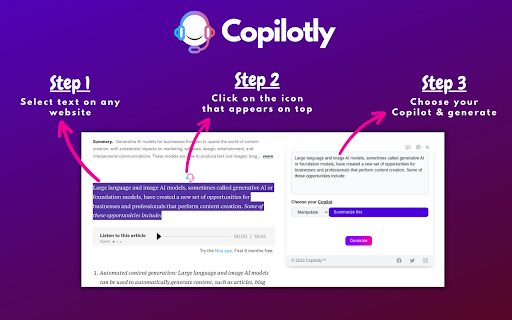

Unlock your potential with Copilotly. Navigate the digital realm with an AI copilot that understands your unique needs. 🚀 Copilotly - Your Team of AI Expert Copilots 🎉 Meet Your Team of AI Expert Copilots - Available 24/7, Right in Your Browser! 🌟 Copilotly isn't just another AI writing tool – it's your personal team of AI-powered expert copilots that understand your industry, speak your language, and deliver professional-level guidance on demand. 💡 Imagine having instant access to legal guidance, health insights, financial expertise, marketing strategies, technical support, and dozens of other specialized copilots – all in one browser extension, ready to help you whenever you need them. 🎯 What Makes Copilotly Different? Unlike ChatGPT or Claude that give generic responses, Copilotly provides profession-specific AI copilots that think, analyze, and respond with domain expertise: 🔥 ...and 100+ more specialized copilots across every domain! 🔌 Smart AI Assistants Built Into Your Favorite Platforms Copilotly integrates directly into the tools you already use – no copy-pasting needed: 🚀 How Copilotly Works ⚡ Method 1: Text Selection (Instant Help) 1️⃣ Select any text on any webpage 2️⃣ Click the Copilotly popup that appears 3️⃣ Choose your action: Summarize, Explain, Translate, or pick a specialized copilot 4️⃣ Get expert-level results instantly! 💬 Method 2: Sidebar Chat (Deep Conversations) 1️⃣ Press Ctrl+M or click the Copilotly icon 2️⃣ Select your specialized copilot (Legal, Medical, Financial, etc.) 3️⃣ Have a full conversation with context and history 4️⃣ Get detailed, domain-specific guidance! 🔗 Method 3: Platform Integration (Native Buttons) 1️⃣ Open any platform. 2️⃣ Look for the Copilotly button in the compose area 3️⃣ Click and let AI draft your message with perfect context 4️⃣ Review, edit, and send! ✨ Powerful Features 🤖 Multi-AI Engine - Powered by GPT-4o, Claude, Gemini, DeepSeek & more 💬 Full Chat Interface - Conversational AI with complete history 📎 File Attachments - Upload images, PDFs, spreadsheets for AI analysis 🎨 24 Craft Templates - Quick actions for common tasks 🔧 Custom Copilots - Create your own AI assistants with custom prompts 🌍 30+ Languages - Full internationalization support 🌓 Dark/Light Mode - Easy on the eyes, day or night ⚡ Streaming Responses - Watch AI think in real-time 📊 Usage Dashboard - Track your credits and history 💡 Real-World Use Cases 🏢 For Entrepreneurs & Business Owners ✅ Get legal insights on contracts before signing ✅ Create marketing campaigns with expert strategy ✅ Understand tax implications with financial copilot ✅ Draft professional emails and proposals 🎓 For Students & Researchers ✅ Simplify complex academic concepts ✅ Get help with research papers and citations ✅ Translate foreign language sources ✅ Proofread and improve your writing 👨💻 For Developers & Engineers ✅ Debug code with AI assistance ✅ Generate PR descriptions automatically ✅ Explain complex codebases ✅ Get architecture recommendations 🏋️ For Health & Wellness Enthusiasts ✅ Research health topics and terminology ✅ Plan fitness routines and meal prep ✅ Understand wellness concepts ✅ Track and optimize lifestyle habits 🎬 For Content Creators ✅ Write engaging social media posts ✅ Generate video scripts and captions ✅ Create SEO-optimized blog content ✅ Repurpose content across platforms 🔐 Privacy & Security First ✅ Your data stays secure with enterprise-grade encryption ✅ No training on your private conversations ✅ Secure authentication with Google OAuth support ✅ Full control over your data and history 💳 Flexible Plans for Everyone 🆓 Free - Try Copilotly with limited credits ⭐ Optimizer - Perfect for individuals who want more 🧙 Wizard - For power users and small teams 🦅 Maverick - Unlimited access for businesses and professionals 🚀 Key Takeaways 🔹 Not just writing – A full team of AI expert copilots 🔹 121+ Specialized Copilots – Legal, Medical, Financial, Marketing & more 🔹 Multi-AI Powered – GPT-4o, Claude, Gemini, DeepSeek 🔹 Works Everywhere – Browser extension for any website 🔹 Custom Copilots – Build your own AI assistants 🔹 Privacy-First – Your data stays secure 🎯 Stop switching between AI tools. Get specialized expertise on ANY topic, on ANY website, in ANY platform – all from one intelligent browser extension. 🔥 Download Copilotly now and unlock the power of having a full team of AI expert copilots at your fingertips!

PopAi - Your Personal AI Assistant
Unlock full potential of PDF: Summarize,chat and image recognition - your all-in-one AI extension for smarter document interaction Transform your browsing experience with PopAi, the cutting-edge Chrome extension that brings the power of AI to your fingertips. Designed for professionals, educators and students, PopAi offers an unparalleled suite of features to optimize your digital interactions. Key Features: - Interactive AI Conversations: Engage in real-time discussions with PopAi, asking questions and receiving instant, accurate responses. - Advanced PDF Analysis: Upload PDFs for swift, comprehensive summaries and detailed outlines. Ideal for quick reviews and deep dives into complex material. - Screenshot Q&A &Chat in Documents: Capture and interact with images within PDFs, unlocking new levels of understanding and insight. - User-Friendly Interface: Modeled after the simplicity and elegance of Apple's design ethos, PopAi is intuitive and accessible to all users. - Multi-lingual Support: Catering to a global audience, PopAi offers its services in multiple languages. - Continuous Updates and Enhancements: Regular updates ensure an ever-evolving user experience, with new features and improvements based on user feedback. Upcoming Enhancements: - Extended Document Interaction: New tools for more dynamic interaction with various document types. - Enhanced Customization: Tailor PopAi's responses to suit your specific needs in education, research, or professional work. Limitations and Notes: - PopAi integrates seamlessly with your browser, ensuring data privacy and security. - The extension is continually tested and updated for reliability and speed. Join the PopAi Community: Become part of a growing community of PopAi users. Share your experience, suggest features, and help shape the future of this innovative tool.Follow us on @popaiinone to know more ! Download PopAi Today: Ready to experience the future of AI-driven web interaction? Download PopAi from the Chrome Web Store and elevate your digital experience now!

ChatX - Your AI Copilot for Web
An AI copilot available for all websites. It can answer any complex questions, also capability to auto-summarize and translate. Do you want to use ChatGPT directly in your browser without needing to create an additional ChatGPT account? Do you want ChatGPT/GPT-4 to assist you while browsing web pages? Do you want to use artificial intelligence to gain a deeper understanding of browsing knowledge? All of this can be achieved with ChatX AI Copilot! Whether the content is lengthy or difficult, ChatX AI Copilot will help you quickly find satisfactory answers based on your needs. Simply select the content while browsing the web and click on the shortcut button on ChatX AI Copilot! Or engage in conversations with multiple AI models in the browser sidebar, send your questions, and receive real-time AI feedback. Hope that ChatX AI Copilot can become your on-the-go intelligent advisor! - ChatX has achieved integration with mainstream large language models (LLMs), allowing you to choose your preferred model as your default productivity tool. - Currently supported models include GPT 3.5, GPT 4, Google Gemini Pro, Claude Instant, Claude 2 and Claude 3, among others. - You can utilize the power of AI for translation, summarization, or even to ask for more information about the content you are reading. - Quickly translate or understand selected content using the context menu. - Quick ask questions about selected content and receive real-time answers. - Create and save custom prompts for reuse when needed. - How to use it? ⬇️ - Simply drag your mouse to select the content you want to understand and click on the ChatX toolbar icon to perform the desired action. - Alternatively, you can use the ChatX menu in the browser's right-click menu to perform full-text translate/summarize on the current webpage. - Engage in conversation with designated models, answer any questions or generate various creative texts based on your needs. - Upload images and ask questions utilizing the exceptional visual recognition capabilities of GPT-4V and Gemini Pro Vision. - Chat with multiple models at the same time and compare their answers in real-time. - Immersive paragraph and full-text translation, generating translated results compared to the original text. - Summarize webpage content by paragraphs to enhance reading efficiency. - Enhanced search engine results for improved search effectiveness. ChatX AI Copilot currently aggregates various mainstream LLMs. With our AI Copilot, you can translate, summarize, or gain a deeper understanding of the content you are reading. ChatX AI Copilot will help you find more accurate and higher-quality information, saving you time and effort. ChatX can be used on any webpage, and its built-in chat assistant can answer any complex questions. This allows you to have deeper insights into the content you are browsing by discussing with the AI assistant accompanying you everywhere. ➕ How to use in your browser? We currently offer extensions for Chrome and Edge. Simply download and log in to our extension to use AI and ChatGPT on any website without needing to create additional accounts. 📪 How to get support? If you have any questions or feedback, feel free to contact us at contact@chatx.im. 🔏 Privacy Policy We have updated our privacy policy to ensure it includes detailed information about user data collection, processing, storage, and sharing. You can view it at https://chatx.im/privacy.

Chat with Desksense AI Powered by GPT4
The Ultimate AI Assistant with GPT-4 powered responses. Answers any queries, summarize articles, create emails, content & AI images. Desksense ChatGPT AI app provides Free Chat GPT & GPT-4 access, AI writer for Email, Blogs, Articles, Tweets, Linkedin posts, Facebook Posts, Replies and more. Desksense AI uses OpenAI ChatGPT to summarize Youtube videos & Blog in one-click. Desksense AI app revolutionizes your online search experience by integrating Open AI ChatGPT alongside your Google search engine. With Desksense you can access instant AI-generated responses, providing valuable insights and information right alongside the search results you're browsing. With just a CMD+ I OR CTRL+ I Desksense makes it easy for you to access the ChatGPT on any website. Use "Shortcuts" for Advanced users. 👉👉 Save ANY ChatGPT, GPT-4, Claude3 OR Genini Pro response to your Desksense Account in one-click. 👉 [New Update] Desksense comes with new Chat GPT models like; GPT-4-o-mini and other LLM's like Claude3, Gemini Pro & Llama 3version. 👉 [New Update] Desksense comes AI Image Analyzer 👉 Desksense iOS App is now live in App Store. 👉 New AI Summarizer is now live with upload file feature. 👉 AI Writer for ANY content with ChatGPT-4, GPT-4-o-mini, Claude 3 & Gemini Pro option (Emoji, character limit included with a different lanuage model.) 👉 FREE AI Chatbot integrated with ChatGPT & GPT-4 in web app 👉 Get ChatGpt AI response or replies with 'Tone' and 'Emoji' 👉 Unlimited AI response on Google Search 👉 One-click AI summarizer for Youtube videos 👉 One-click AI summarizer for ANY website 👉 ChatGPT AI Image generator using Dall-E 👉 Save ChatGPT response in your account for later use. 👉 Save your frequently used prompt(s) 👉 List of 100+ preset prompts and option to edit and save in your account. 👉 Easy Access with CMD + I OR CTRL + I on ANY website 👉 Grow your Social Media presence using Desksense AI response in LinkedIn posts, Twitter & Facebook posts. 👉 Write faster and smarter emails on Gmail, Tweets, Linkedin Posts and Facebook posts 👉 Generate online content, video script, hashtags & keywords and topics for blog posts, articles and socials using Desksense AI ChatGPT App. 👉 Share your saved response to social media using our Desksense Web App 👉 Copy to clipboard, Save, Favorite and add tags to ChatGPT responses as Card. 👉 Desksense Chat GPT & GPT 4 Android Mobile App 👉 Auto Dark/light mode 👉 Change the Tone of your response and include emoji when needed. 👉 AI Chatroom Collaboration with your Team 👉 AI Chatbot in Extension 👉 AI Content Generator - AI Email Writer, AI Article Writer using ChatGPT, GPT-4, GPT-4-o-mini, Claude3 and Gemini Pro., AI Code Generator, AI Social Media Post Generator and more... Are you a busy professional juggling multiple tasks? A student striving for academic excellence? Or someone seeking to optimize their daily routines? Look no further! Desksense is here to revolutionize your digital experience. Desksense is a powerful chrome extension that leverages the ChatGPT API to enhance your productivity. It provides a range of AI applications, including ChatGPT & GPT-4 AI chatbot, summarizers, AI writers, and more, accessible on any website. Yes, Desksense is completely free to download and use. Every free user gets 5000 Word limit for month. No, you do not require a separate ChatGPT account. Simply sign up for free at Desksense.com to access the extension. Yes, Desksense chrome extension works seamlessly in all countries, ensuring that users worldwide can benefit from its features. To install Desksense on your browser, you will need to follow these steps: 1) In your browser open the browser's app store or extension store 2) Search for the Desksense in the browser's app store or extension store (or click for : Google Chrome | Edge) 3) Click on the "Add to Browser" or "Install" button to begin the installation process. 4) Follow the prompts to give the extension permission to access certain parts of your browser, if prompted. 5) Once the installation is complete, you will be redirected to our onboarding page 6) That’s it ! you are done :) Please pin the ext. on top bar to get on-time updates. If you have any questions, please feel free to reach us at support@desksense.com === VERSION 1.0.13 ==== * NEW FEATURE: AI Writer for ANY content with newest version of GPT models (Emoji, character limit included with a different lanuage model.) * NEW FEATURE: AI Image Analyzer that analyses any image and gives you response describing the image. * File Summarizer: Upload any file & summarize in one-click * Minor Bug fixes

Definio AI: Multi-Modal AI Sidebar
Definio runs every LLM model from one sidebar. Throw your question at any of them, switch on a whim, never open a new tab. Definio AI is a powerful AI assistant that brings multiple language models together in a single browser extension—helping you explore, reason, and research faster, directly within your browsing flow. 🚀 CHAT WITH THE TOP AI MODELS – ALL IN ONE PLACE: Models from all major providers. 🧠 ASK BETTER QUESTIONS, GET SMARTER ANSWERS: Select any text on a page and start a conversation with multiple AI agents at once. Cross-check facts, get diverse insights, or bring specialised models into the discussion—right from your browser sidebar. ⚡ BUILT FOR DEEP THINKING AND FAST WORK: Use AI to break down dense content, summarize complex topics, compare perspectives, or brainstorm ideas—all without switching tabs. Definio adapts to your browsing context for precise, real-time assistance. 📷 COMPUTER VISION & SCREENSHOTS: Capture the active tab or snip a region with one click and drop it straight into the chat. Vision-capable models read the screenshot for you—ask "what does this chart say," "translate this menu," "what's broken in this UI," or "summarise the page I just captured." You can also drop in your own image files (PNG, JPG, WebP) and combine selected text, screenshots, and typed questions in the same message for richer prompts. ⌨️ CHAT SHORTCUTS – TYPE "/" TO RUN COMMANDS: - /new — start a new chat - /model — switch the AI model mid-conversation - /search — toggle web search on or off - /think — toggle extended thinking on or off - /theme — flip between dark and light mode - /capture — screenshot the visible tab - /snip — screenshot a region you draw Plus Alt+Shift+O (Option+Shift+O on Mac) to open the side panel from anywhere—rebindable in chrome://extensions/shortcuts. 🔄 YOUR AI WORKFLOW, SUPERCHARGED: Whether you're a student, researcher, or professional, Definio helps you turn questions into knowledge. Use customizable shortcuts to boost productivity—summarize articles, extract key points, or auto-respond to content. 💡 WHY DEFINIO? Unlike traditional AI chatbots, Definio lets you bring multiple minds into the room. It's not about one model's opinion—it's about reaching clarity through comparison, consensus, and control. 📝 Whether you're researching, learning, or need quick explanations — Definio AI Chat is your intelligent companion right in your browser. Multiple Access Options: - Keyboard Shortcut: Press Alt+Shift+O (default shortcut, customizable in Chrome extensions settings) to open the AI Chat side panel instantly - Right-click Menu: Right-click anywhere on any webpage and select "Open Chat" to launch the AI Chat side panel - Extension Icon: Click the Definio AI extension icon in your browser toolbar to open the side panel Quick Access Methods: - Once the side panel is open, you can select any text on the page to automatically send it to the AI Chat for analysis or questions - Use the right-click "Open Chat" option for instant access without needing to select text first - The side panel stays open as you navigate between different websites, keeping your chat history accessible Chrome Limitations: - ⚠️ The extension does not work with PDF files viewed in the browser - ⚠️ For best experience with text selection, open the side panel first and then select the text you want to discuss with AI - Privacy First: Unlike popup extensions, Definio AI works in its own dedicated space without injecting content into web pages - Non-Intrusive Design: The side panel never covers or alters the content you're reading - Better Workflow: Ask questions about what you're reading without losing your place in the text or having floating boxes interrupt your flow - Persistent Chat: Keep your AI conversation visible while continuing to read and navigate the web - Seamless Integration: Instantly discuss any text you encounter while browsing
