
fngcgekjdbcidfgnddjnhlhkgmbfmhpd
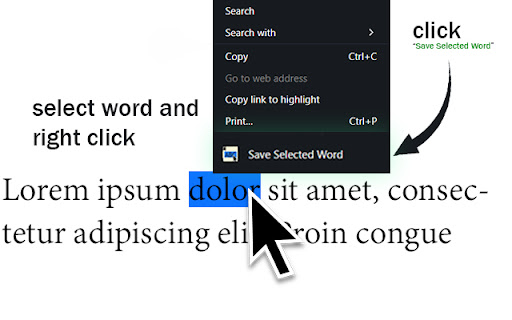
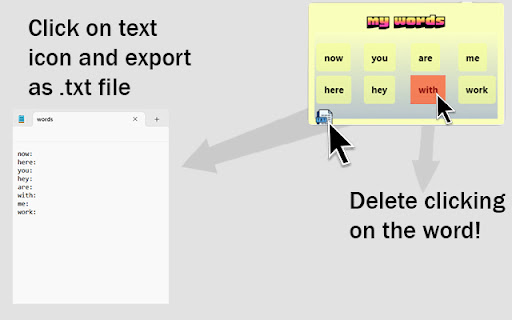
Chrome Extension that will make our learning easier while learning a foreign language -recommended to restart the browser after installing the extension ✅ Simple and purposeful use only! 🧠 Save Word Chrome Extension 📄 Save Word Chrome Extension saves words for you. Save the word you don't know just in 2 clicks 📥 TXT format: If you wish, you can export all the words you saved as .txt.

Extension Manager Panel
Efficiently manage and control your browser extensions from the sidebar, enhancing your browsing experience. 1. Quick Access: Manage extensions directly from the browser sidebar. 2. Boost Performance: Easily disable unused extensions to improve browser speed. 3. Enhanced Productivity: Switch between extensions effortlessly. 4. User-Friendly Interface: Choose between icon and list views for intuitive management. 5. Search Function: Find extensions quickly with built-in search. 6. Developer Tools: Identify and manage development extensions easily.

Word Stash
Save words from any webpage with their meanings. Word Stash is a Chrome extension that lets you save words from any webpage, automatically fetch their meanings, and store them in your personal dictionary. You can view, edit, export, or clear your word stash anytime. Quickly look up word meanings by double-clicking any word on a page. Get instant definitions in a popup and jump to Google for more context.

Word Catcher - Save Words from Websites
A tool to save words from websites for language learning. Want to learn a new language? This extension will help you learn a new language easily and quickly! The extension allows you to save words from websites easily and quickly. Install the extension, Pin it to your extension list, Browse any website, Highlight a word you want to save, A star icon will appear, Click on the star. That’s it :-) The word is saved :-) Click on the extension icon, and you'll be able to see the word you saved. You can click on the "Copy Words" button to copy the words to your clipboard. You can click on the "Save to Excel" button, and all the words you saved will be downloaded to an Excel file. You can delete the list of words. Through the extension, you can control: Easily turning the extension on/off anytime you want. You can choose whether the star will also appear on words in your own language or only on words that are not in your language. The extension does not collect or send any user data. All the words are saved locally in the browser storage and are accessible only to the user. We have no access to your information, and it is not saved anywhere with us. Everything is stored only on your browser. We have no information about you, the websites you browse, or the words you add. No data is transmitted to us; everything is stored solely on your browser. So, you can be sure that none of your information is transferred to us or any third party.

Copy Text Fields Extension
A Chrome extension for copying multiple text fields. Copy Text Fields Extension is a powerful Chrome extension that helps you manage multiple text snippets efficiently. It provides a clean interface where you can create, store, and manipulate multiple text fields simultaneously, with the ability to copy individual snippets to your clipboard with a single click. The extension saves your text automatically, supports importing and exporting your data to JSON files, and includes convenient features like clearing individual fields or all fields at once. Perfect for anyone who frequently needs to manage and reuse multiple pieces of text while browsing.
