
ihkgapjpdfnmhhhmjiajiedphjdginci
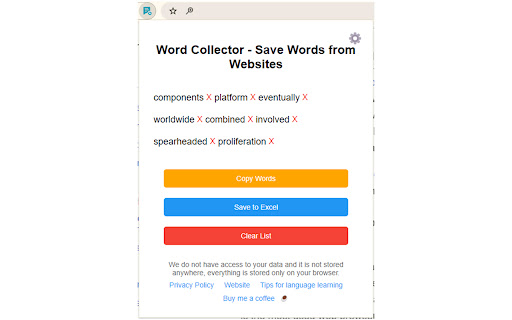


A tool to save words from websites for language learning. Want to learn a new language? This extension will help you learn a new language easily and quickly! The extension allows you to save words from websites easily and quickly. Install the extension, Pin it to your extension list, Browse any website, Highlight a word you want to save, A star icon will appear, Click on the star. That’s it :-) The word is saved :-) Click on the extension icon, and you'll be able to see the word you saved. You can click on the "Copy Words" button to copy the words to your clipboard. You can click on the "Save to Excel" button, and all the words you saved will be downloaded to an Excel file. You can delete the list of words. Through the extension, you can control: Easily turning the extension on/off anytime you want. You can choose whether the star will also appear on words in your own language or only on words that are not in your language. The extension does not collect or send any user data. All the words are saved locally in the browser storage and are accessible only to the user. We have no access to your information, and it is not saved anywhere with us. Everything is stored only on your browser. We have no information about you, the websites you browse, or the words you add. No data is transmitted to us; everything is stored solely on your browser. So, you can be sure that none of your information is transferred to us or any third party.

Read Frog - Translate & Learn
Read Frog is an open source browser extension designed to help you learn languages deeply from any website. 🐸 Read Frog - Open-Source AI Language Learning Extension Transform your everyday web reading into an immersive language learning journey! Read Frog is an open-source, AI-powered browser extension that makes language learning natural and personalized. 🔄 Bilingual / Translation Only Switch between bilingual mode (original + translation side-by-side) or translation-only mode for cleaner reading. 🧠 Context-Aware Translation AI understands the full article context for accurate, domain-appropriate translations. ✨ Selection Translation Select any text to translate, get detailed explanations tailored to your level, or listen with TTS. 📝 Custom Prompts Create your own translation prompts with dynamic tokens for domain-specific translations. 📦 Batch Requests Save up to 70% on API costs with intelligent request batching. 🤖 20+ AI Providers Support use API Key from 20+ providers to translate including OpenAI, DeepSeek, Gemini, Ollama, and more. Plus free options: Google Translate, Microsoft Translate. 🎬 Subtitle Translation (Beta) Translate YouTube subtitles directly in the video player. 🔊 Text-to-Speech (TTS) Listen to text with high-quality AI voices. Adjustable speed from 0.25x to 4x. 👤 Perfect for: Join our growing community and help shape the future of Read Frog!

Protect text
Use Protect Text — a Chrome extension to store secure notes and passwords. Encrypt text in the notepad directly in the browser! Introducing Protect text — a powerful Chrome extension designed to give you absolute control over your private notes, confidential information and passwords. If you’ve ever needed a secure way to keep sensitive notes safe and encrypted, this is the tool for you. Say goodbye to standard notes on your PC, insecure notepads, and outdated methods of securing your files. With Protect text, you can protect and encrypt directly in your browser with ease. 🛡️ What is Protect text? Protect text is a versatile Chrome extension that combines the simplicity of a digital notepad with the security of a password vault. It’s the most secure notepad, allowing you to create, store, and manage secure notes that are encrypted locally on your device. Whether you’re writing personal notes, sensitive information, or drafting confidential business plans, you can rely on this tool to keep your data safe. 📄 Why Choose Protect text? This isn’t just another notepad offline tool. It’s built to safeguard your data using text encryption AES (Advanced Encryption Standard), one of the most trusted encryption methods in the world. Whether you’re jotting down quick reminders, login credentials, or securing sensitive documents, this extension provides unmatched text protection on your gadgets. Top Features of Protect text: ◉ Best Encryption: The extension uses AES encryption to ensure that all your notes are protected. ◉ Local Storage: All data stays on your device. No third-party access to your encrypted notes or password txt files. ◉ WebCrypto API: The extension uses the browser’s built-in cryptography for seamless, faster performance without external libraries. ◉ Key Size: The tool uses AES encryption with 256-bit keys, allowing you to choose your desired level of security. ◉ Easy to Use: You don’t have to be a tech expert to use protect text. Its intuitive interface makes encrypting/decrypting notes a breeze. ⚙️ How It Works: Protect text is as simple as it is secure. Here’s a step-by-step guide on how to get started: • Install the extension from the Chrome Web Store. • Open the extension and create your first secure note. • Enter your note and click the encrypt button. • Your note will immediately be encrypted, stored locally with AES protection. • Whenever you need access to a protected.text file, simply enter your password to unlock it. Who Will Benefit from Protect text? 🔸 Freelancers: If you work on confidential projects, protective text helps you store your sensitive information safely. 🔸 Students: Organize your notes and assignments with encrypted notes. Store your notes and ensure that only you can access them. 🔸 Professionals: If you’re in an industry that deals with confidential client information, it guarantees your notes are stored well. 🔸 Everyday Users: Whether you want to store login details, make quick protected notes protect notes, or this extension has you covered. 🔒 Why Security Matters Encryption has been adopted worldwide because of its ability to provide robust security, and protect text leverages this to offer unmatched security for your encrypted note files. ➡ AES Encryption: AES is recognized as a gold standard in encryption. Once your note is encrypted, it stays that way unless you unlock it. ➡ No Cloud Storage: Since protect text relies on local storage, your encrypted notes stay on your machine, away from online vulnerabilities. ➡ Safety Browser with Protected Extension: You can save encrypt text file directly in the browser. ➡ Credential Manager: Use Protect Text as the secure storage for your important data. Frequently Asked Questions: 📌 Q1: How do I protect a note with a passcode? • Simply write your note, set your desired password. Your note will be converted into an encrypted text file that only you can unlock. 📌 Q2: Can I use this tool offline? • Yes! Protect text is a notepad offline tool that stores everything locally, so no internet connection is needed. 📌 Q3: Is it free? • Yes, protecte text is free to use, offering all its powerful encryption features without any cost. 📌 Q4: Does it work on Mac? • Absolutely - protcted text is a Chrome extension. it works across all platforms, including Mac. This extension works on any system running Chrome. 📜 Conclusion Protect text is more than just a text notes tool. It’s your personal secure text vault, offering high-level security without compromising ease of use. Whether you need to write down a quick note, store sensitive passwords, or ensure your important data remains private, this extension is your go-to solution.With its easy-to-use interface, local storage, and robust encryption, proceted text provides the perfect balance between functionality and security. Download protectted text today! Make secure notes, encrypted credentials, and protected text.

Window Recorder
Window Recorder – reliable screen recorder for Chrome browser. Handy window tool for screenshots and video capture in your browser. Window Recorder is a flexible and intuitive recording utility for your browser that helps users log everything displayed on their screen with ease. Whether you need to record the screen in opened tabs, capture a screenshot in your browser, or create detailed tutorials, this extension is your all-in-one tool for visual session saving. With smooth integration into your browser environment, this extension supports both dynamic screen logging and still image grabbing, giving you full control over visual output—whether motion or static. 🎯 What you can do with window recorder: 🔹 Record content shown on your monitor 🔹 Save full-page site screenshots 🔹 Take visual stills of specific browser sections 🔹 Create explainer videos with the built-in video recorder 🔹 Use the screenshot capture tool for high-resolution stills 🔹 Record the screen in your browser with one click 🚀 Key features: 💎 Includes standard screen recorder and video capture modes 💎 High-quality screen capture recording web performance 💎 Full support for screenshot capture software 💎 Seamless switch between session recording and visual stills 💎 Functions smoothly as a Chrome screenshot extension 💎 Allows preservation of scrolling content from full webpages 💎 One-tap Chrome screenshot feature 📌 Why choose Window Recorder? Whether you're learning how to screen record on Windows or need to save an entire web layout as an image, this tool offers a streamlined approach. It merges several separate utilities into one lightweight add-on that’s simple to activate and efficient in use. No bulky software required — just pin this browser-based add-on and gain access to its powerful feature set instantly. Window Recorder delivers consistent performance across the web environment. Whether you’re grabbing full page screenshot Chrome images, logging video instructions, or capturing on-screen actions, this solution is built to handle it. The integrated functionality also includes screenshot capture components designed to help you collect, save, and manage visual content right from your browser. 📽️ Features for content creators: ➤ Screen record web walkthroughs or meetings ➤ Screenshot taker Chrome for crisp UI captures ➤ Works fast and reliably in modern browsers ➤ Friendly interface for all experience levels 📷 Static image features: ➤ Save current view or full site screenshot ➤ Preserve either visible portion or extended content ➤ Generate complete site screenshot sets ➤ Capture your browser’s display area with precision ➤ Clean and efficient interface for screenshot capture ➤ Great for marketers, designers, QA testers, educators 🎞️ Video session features: ➤ Log any visible pane using screen recorder mode ➤ Supports resolutions like HD, Full HD, and 4K ➤ Record with internal and external audio sources ➤ Useful for courses, tutorials, and team communication ➤ Perfect for product showcases or process documentation ✨ Common use cases: 1️⃣ Instructors producing lessons using screen recorder tools 2️⃣ Developers logging issues with screen recorder window actions 3️⃣ Marketing teams saving layouts using Chrome record window tools 4️⃣ Businesses creating content via screen recording program Windows 5️⃣ Anyone needing to screen record Windows interactions or build visual media 🚀 Performance & flexibility: This utility is optimized for consistent cross-platform use. If you’re wondering how to screenshot on Chrome or seeking Chrome window recorder solutions, this extension covers it all. 🔹 Capture full screenshot with one click 🔹 Use video logging tools for live interactions 🔹 Save visual data for analysis or reference 🔹 Rely on smooth functionality across browsing sessions No matter what you work on — educational content, tech support, documentation — Window Recorder adapts to your needs. 🔐 Privacy and storage: Your recordings and visuals are stored locally or available for instant download. No cloud usage. No third-party access. Your data stays yours. 💡 Summary: Window Recorder is your all-purpose browser extension for: 🎥 Logging on-screen activity 📸 Saving accurate screenshot Chrome extension outputs 🧩 Combining video recording tool and image saving tools 🖼️ Preserving full-page views or interface elements It unifies powerful screen recording tools and screenshot site utilities—designed for everyday users, creators, and professionals alike. Install Window Recorder today and simplify the way you manage what appears on your display.

Word Counter
Count words and characters with the word counter tool. Get word and character count in any text. The word counter chrome extension specializes in counting words, characters, and characters without spaces on any webpages, text documents, articles, assignments, or even Google Search. It's more than just a word counter tool! All you need to do is select the text you want to identify the word count and let the word counter extension provide the number of words, characters, and characters without spaces. The word counter tool provides the following key features (and more below): ✅ Precision in Counting: Provides a precise number of words, characters, and characters without spaces. Hence, you don't need to worry about accuracy in real-time while writing. ✅ Versatile Input Options: The extension is not limited to counting words and characters on text documents, but you can also count text within any text input on a webpage (Google search). ✅ Paste text from clipboard: If you want to check the word count for some text from your clipboard, paste the text into the extension window. ✅ Offline and maintain Privacy: One standout feature of the "Word Counter" extension is it can be used offline. Hence, you don't need an internet connection always to use as an "online word count tool". 📜 How to Use the word counter extension. 1️⃣ Install the Word Counter extension from the Chrome Web Store initially. 2️⃣ After you install it, please enable it to be used through the Chrome menu bar. 3️⃣ Now, it is time to test the functions of the word count tool you use four key ways as follows: ▸ Select text: Select all the words or paragraphs to which you want to analyze how many words and characters there are, including without spaces among the selected words. ▸ Use text input fields: When you type the words in text input fields, it will show you the word count and characters within a text input field in real-time. For example, typing the word "online word processor" will show you a detailed count of words in real-time. ▸ Use text from the clipboard: Paste the copied text from the clipboard and get the analysis of the word count of text or total number of words immediately. ▸ Type in the extension: Click the Word Counter extension icon from the extension toolbar and start typing your text. Instantly, the word count and character counts will update in real-time when you type. 🖱️ Real-time Counts When you select text on any webpage while enabling the Word Counter extension, it will instantly calculate and display the count of words, characters, and characters, excluding spaces, in real-time. Thus, it helps to meet instant specific text length requirements effectively. 💬 Text Input Field Checking This extension allows you to instantly analyze static webpage text, including text input fields. For example, you can type some text in a Google search while enabling the extension, and it will show you its text analysis on a different basis effectively. 🌟 Free Online character checker You can use this extension to effectively identify the number of words and characters, including and excluding spaces. Thus, you can effectively tailor your entire document or writing style based on your requirements. 🔀 Clipboard text integration Do you want to paste some text from the clipboard to check the word count? No worries, we've got you covered! The extension allows you to paste text from the clipboard directly into the extension window to display word count via the word count tool. 💻 Direct typing into the extension window Alternatively, you can proceed by typing directly into the extension’s interface of the online word counter to check the word count and character count instantly in real-time. Thus, you can quickly identify the text length and make real-time adjustments. 👀 Offline availability One of the critical advantages of the Word Counter extension is that it can be used without an internet connection. Thus, the word count tool works perfectly whether you are in environments with limited or no internet access (not limited to an online word counter or an online tool like other word counters). 🔒 Privacy assurance When using these extensions, your text data’s privacy is crucial. However, we ensure we don't send text data to external servers or store them online or anywhere. Hence, all the text processing activities and word count performed happen locally on your device, and your text is ensured to be confidential and secure. 👷 Upcoming Features We are continuously improving the word counter extension to meet your diverse requirements. Here are some of the exciting features coming soon: ▸ Google Documents compatibility: In the future, the extension will be compatible with Google Docs. Thus, you can get the word count and characters from your Google Docs documents and track your word counts. ▸ Advanced Analytics: Our future improvements will show advanced analytics features, including average word count, word length, sentence count, sentence length, number of lines, speaking time, paragraph count, reading time, reading level, and readability scores. These advanced analytics would be helpful for SEO purposes, analyzing each pages, assignments, essay, and more! ▸ Customizable settings: The extension will provide customizable settings such as notifications when it reaches a specific word limit, set writing goals, strict word limits, sentence counter, identify writing mistakes (including grammar) or character limits, and more. ▸ Export options: We plan to integrate to export your text analysis, including advanced analytics, an auto-save feature, speaking time, and reading time, which would be helpful for future reference, to edit, or reporting purposes. FAQs What is the function of the word counter? The function of a word counter is to accurately give the word count, characters, and characters without spaces. ❓ Is Word Counter safe? Yes, Word Counter is safe as it does not store your text information, which you check to analyze the word count. ❓ Does word count count spaces? Whether the word count spaces depends on the extension, but the “Word Counter” extension provides character analysis without counting spaces. ❓ Can the online word counter be used offline? Yes, you can use the word counter extension in offline as a word frequency counter to identify how many words and further format your text based on your word count requirements. So, what are you waiting for? Integrate the Word Counter Chrome extension and actively count words even through a text box and character counts efficiently. Thus, you can streamline your writing process effectively by handling the words, characters, and paragraphs to meet ideal word counts at your fingertips!
