
alljghnmaenfjfcbcjhibdhcnmbpmppp
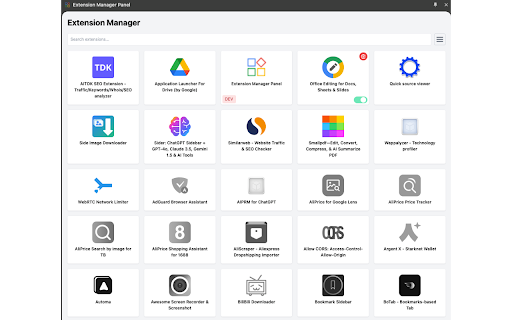
Efficiently manage and control your browser extensions from the sidebar, enhancing your browsing experience. 1. Quick Access: Manage extensions directly from the browser sidebar. 2. Boost Performance: Easily disable unused extensions to improve browser speed. 3. Enhanced Productivity: Switch between extensions effortlessly. 4. User-Friendly Interface: Choose between icon and list views for intuitive management. 5. Search Function: Find extensions quickly with built-in search. 6. Developer Tools: Identify and manage development extensions easily.

Control Panel for Twitter
Gives you more control over Twitter and adds missing features and UI improvements Control Panel for Twitter is a browser extension for Twitter - its main goals are to reduce the amount of algorithmic content you see, give you more control over your timeline and make the UI less distracting. By default, your Home timeline will be the reverse-chronological "Following" timeline, which will only contain tweets and quote tweets from the people you follow. The algorithmic "For you" timeline will be hidden, and Control Panel for Twitter will keep you on "Following" if Twitter tries to automatically take you off it. Everything is configurable, so start by opening the options popup and customizing to your liking. Changes you make in the options will be applied immediately. • Use the "Following" (chronological) timeline by default • Hide the "For you" (algorithmic) timeline • Retweets • Show in separate tab / Hide • Quote Tweets • Show in separate tab / Hide • Enable muting of Quote Tweets • Hide "See new Tweets" • Hide "Who to follow", "Follow some Topics" etc. in the timeline • Hide inline prompts in the timeline • Full-width timeline content • Hide the sidebar and let timeline content go full-width • Add "Add muted word" to the "More" menu • Fast blocking (skips confirm dialog) • Hide quotes and replies to blocked and muted accounts • Hide Retweets in user profiles • Retweets in Lists • Default to "Latest" tab in Search • Hide the quoted tweet when viewing Quote Tweets • Redirect to twitter.com • Tweak new layout • Hide Toggle navigation • Replace X branding changes • Hide Views under tweets • Hide "Verified" Notifications and Followers tabs • Restore headlines under external links • Restore Quote Tweets link under Tweets • Restore other links under Tweets • Default sorting of replies • Latest / Likes • Premium blue checks • Replace with Twitter Blue logo / Hide • Hide Premium blue check replies • Hide Premium upsells • Hide Grok • Hide Jobs • Hide Subscriptions • Don't use the Chirp font • Disable bold and italic text in tweets • Use normal text font style in navigation bar • Navigation density • Comfortable / Compact • Use normal font weight in dropdown menus • Uninvert Follow / Following buttons • Monochrome / Themed • Unblur sensitive content • Hide sidebar contents • Hide Explore page contents and use it only for searching • Hide "Discover more" tweets • Hide metrics • Reduced interaction mode • Hide the action bar under tweets – replies are now the only means of interacting • Hide the Compose Tweet button • Disable the home timeline • Find yourself wasting too much time on Twitter? Try preventing use of the home timeline • Notifications • Hide badges only / Hide Hide UI items you don't use • Bookmark button under tweets • Share button under tweets • "View post engagements" under your tweets • Tweet box in timeline • Account switcher • Messages drawer • Explore • Communities • Hide "More" menu items you don't use TWITTER, TWEET and RETWEET are trademarks of Twitter Inc. or its affiliates

Extension Manager
Manage and control your browser extensions more easily This extension helps you to manage your extensions more efficiently. It offers lot one click enable and disable features. ✅ Manage extensions efficiently ✅ One click enable or disable extensions ✅ Easier access to the extension manager ✅ Offers clean and great user experience

Tab Manager in Side Panel
Compatible with built-in and adds more easy-to-use features, lives in side panel This extension provides some easy and intuitive ways to manage all your tabs across all your windows in side panel. In particular, a simplified tree style tab feature can facilitate the management and deletion of many temporarily opened tabs. ✨ Help you easier to find the target tab ✨ 1. Support searching opened tabs and history. 2. Support show 7 most recent tabs. ✨ Help you easier to create and close tabs ✨ 1. Create a new adjacent child tab for any tab with one click. 2. Support tabGroup and display non-tabGroup tabs with auto group(one level tree), and you can close all tabs belong same tree by "Alt + click" close icon of the parent tab. ✨ Help you easier to navigate through tabs ✨ 1. Navigate to any tab across all your windows with one click, even when tab group which tab belongs to has been collapsed. 2. Collapse or expand all tab groups in same window with one click. 3. Collapse or expand any tab group with one click. 4. Press "Tab" and "Shift+Tab" to navigate and "Enter" to switch. ✨ Help you easier to organize tab and tab group ✨ 1. Drag some tab or tab group and drop into a new postion ✨✨ Bonus tips: 1. You can go to chrome://extensions/shortcuts and set your shortcut for any chrome extension. 2. You can go to chrome://settings/appearance and adjust side panel's some appearance, such as left or right postion, font size and page zoom. Tab Manager In Side Panel is designed to help you save time, reduce clutter, and improve your productivity when working with multiple tabs across multiple windows, such as easily managing and deleting many temporary opened tabs. It is lightweight, fast, easy to use and compatible with built-in features. If you are looking for a simple tab manager in side panel, give this extension a try! Here is recent change log: v1.4.5 Feature: improve search function v1.4.4: Feature: add simple view transition animation v1.4.3: Feature: support close tab in recent tabs v1.4.0: Feature: support drag and drop to organize tab and tab group v1.3.13: Feature: stick tab group name when scrolling tabs v1.3.9: Feature: support show 7 most recent tabs v1.3.5: Feature: indent tab by one click v1.3.2: Feature: simple dark mode v1.2.4: Feature: create a new adjacent tab from one tab with one click

IExtension
Extension Manager, conveniently manage your browser extensions "IExtension" is a browser extension that aims to provide users with more plugin management functions. It allows users to search, pin, visit the plugin homepage, enable/disable plugins, download CRX files, and configure management, etc. This makes it easier for users to organize and manage plugins in their browser. If you encounter any problems during use, please don't panic. Negative reviews cannot solve the problem. You can provide feedback via the link below and I will follow up promptly. If this has been helpful to you, can you please give me a good review? 🌹
