
fmgdaijoloejblknjgnbmdhinchoihid
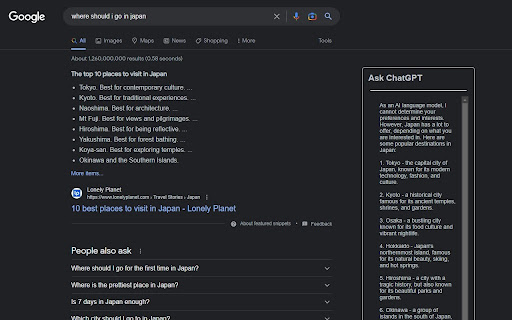
ChatGPT Assistant for Web Search is a cutting-edge browser extension that harnesses the power of OpenAI's ChatGPT to revolutionize your search experience, providing you with AI-generated answers, insights, and suggestions directly on the search results page. Seamless Integration: The ChatGPT Assistant effortlessly works with popular search engines like Google, adding an intuitive chat interface alongside your search results. This allows you to engage in a dynamic and interactive manner with the AI, helping you find the information you seek quickly and easily. AI-Powered Answers: Driven by OpenAI's advanced language model, ChatGPT, the extension processes your search query and generates accurate, reliable, and detailed answers. This not only saves you time by eliminating the need to sift through multiple web pages but also empowers you with a deeper understanding of the subject matter. Interactive Conversations: Ask follow-up questions, clarify doubts, and request additional information through the chat interface. ChatGPT Assistant facilitates an engaging and interactive search experience, simulating a conversation with a knowledgeable AI companion. User-Friendly Interface: The clean, minimalistic, and intuitive design ensures a smooth and enjoyable user experience. The ChatGPT Assistant helps you focus on getting the information you need without any distractions or unnecessary clutter. Secure and Private: Your API key and search queries are stored locally on your device, ensuring that your data privacy is maintained. The extension does not share your data with any third parties. Customizable Options: Configure the extension to use your own ChatGPT API key and manage other settings (coming soon) to personalize your experience. Tailor the ChatGPT Assistant to your preferences for a truly unique search experience. To begin, simply install the ChatGPT Assistant for Web Search extension, provide your ChatGPT API key, and enjoy a smarter, more efficient, and engaging search experience that will change the way you interact with the internet. Note: This extension requires a valid ChatGPT API key, which can be obtained from the OpenAI website. Usage of the ChatGPT API may be subject to OpenAI's pricing and usage limits. Please ensure you are aware of these limitations before using the extension.

ChatGPT Bulk Delete
A Chrome extension to bulk delete ChatGPT conversations This Chrome extension is designed to help users quickly and efficiently delete conversations in the ChatGPT’s left sidebar. With the extension installed, users can add checkboxes to each conversation in the sidebar, select multiple conversations to delete or archive, and accomplish this with just a few clicks. Hold Shift and click to select multiple conversations for efficient bulk actions. This extension is particularly useful for users who frequently use ChatGPT and need to manage their conversations efficiently. Instead of deleting conversations one by one, users can remove multiple conversations at once, saving both time and effort. Additionally, this extension now offers a “bulk archive” feature for a one-time fee of $0.99 USD. This paid feature allows users to archive multiple conversations simultaneously, further enhancing the tool’s utility and convenience. The extension popup includes a small advertisement labeled “Ad” in the footer, linking to TubeVocab (https://www.tubevocab.com/), a third-party language-learning product. This ad helps support the continued development and free distribution of ChatGPT Bulk Delete. Clicking it is entirely optional and does not affect any of the extension’s core functionality.

ChatGPT for Google by cloudHQ
This extension gives you ChatGPT query responses alongside Google search engine results. This extension is easy to use and enhances your Google search experience. Features: ✅ OpenAI Responses alongside your Google search results ✅ A summary of search results ✅ Supplement responses with data after 2021 via search results ✅ OpenAI API and multiple version support ✅ Toggle on/off as desired ✅ Copy to clipboard ~~~How to use it~~~ 1. Get an OpenAI account here if you don't already have one: https://chat.openai.com/chat and create an account 2. Install this extension 3. Open Chrome and search for anything in Google Search 4. AI-generated responses alongside conventional search engine results will be displayed on the right side of your window 5. When in ChatGPT, simply type in your prompt, and the results will be ChatGPT's response, and will then provide you with a Google Search summary on the subject (very helpful for up to date information) ~~~FAQ~~~ 1. What is ChatGPT? ChatGPT is a computer program created by OpenAI that can generate human-like text. It's like a super-advanced version of autocorrect: it predicts and generates what it thinks should come next in a conversation or a piece of writing. This is useful for many things, such as writing emails, creating content, answering questions, and even tutoring in different subjects. It's important to note that it doesn't know any personal data unless you tell it during the conversation, and it doesn't know specifics about the documents it learned from. 2. What does this extension do? This browser extension is developed by cloudHQ LLC. The extension enhances search engine results with the power of artificial intelligence from OpenAI. The extension operates by displaying AI-generated responses alongside conventional Google search engine results, offering users an enhanced search result experience. 3. Is this extension free to use? Yes, the extension is free to use. 4. Is this extension integrated with other cloudHQ products? Yes. This extension is fully integrated with other cloudHQ products such as Save Emails to PDF by cloudHQ, Export Emails to Sheets by cloudHQ, and more. 5. Do I need an OpenAI (chat.openai.com) account? Yes, you need to have an OpenAI account to use this extension. Go to https://chat.openai.com/chat and create an account. If you choose to use an API, you need to have a developer account. You can create it here: https://platform.openai.com/ We hope you enjoy your new search result experience and find it helpful for your overall knowledge about anything you wish to know about. cloudHQ. Helping your productivity, 1 click at a time. cloudHQ website: https://www.cloudhq.net/ App website: https://www.chatgpt-for-google-search.com/ Pricing: https://www.chatgpt-for-google-search.com/pricing Support page: https://support.cloudhq.net/category/browser-extensions/chatgpt-for-google/ FAQ page: https://support.cloudhq.net/ Blog: https://blog.cloudhq.net

ChatGPT Search Connect with internet access
Inject relevant search results from the web to your ChatGPT prompts. Inject Google search results into your ChatGPT prompts with the free extension that contains no ads. This extension is available for the free ChatGPT plan. ChatGPT received its last update in September 2021. For the most recent information, you can utilize ChatGPT Search Connect. This tool sends your question to Google and integrates the text from the resulting pages into your prompt. ❌ Without ChatGPT Search Connect: >zelda totk As of my last knowledge update in September 2021, "The Legend of Zelda: Tears of the Kingdom" doesn't appear to be a known or officially announced title in the "Legend of Zelda" video game series. It's possible that there have been developments or announcements since then that I'm not aware of. ✅ With ChatGPT Search Connect: >zelda totk Based on the information you provided, it seems like you're referring to "The Legend of Zelda: Tears of the Kingdom" (TOTK). This is an action-adventure video game that was highly anticipated and released on May 12, 2023, for the Nintendo Switch platform. It is considered one of the most highly acclaimed games of 20231. "Tears of the Kingdom" continues in the tradition of the Zelda series, offering players a vast open world and a high degree of freedom in their actions. The game features a distinctive haircut for a character named Hudson, who is a carpenter. Hudson's design in this game is recognizable, and he is a recurring character in the series, with ties to older Zelda games2. Quick: inject first N symbols from each google result Full text: summarize each result with ChatGPT and use it to answer your question ---- 🤔 Why does the extension request permission to access all websites? 👉 The extension necessitates access to all websites because it lacks a backend server for handling web requests; all operations take place within the browser locally. Web searching demands access to the search engine, while extracting URL text necessitates access to any website.

YouChat AI for Google
A browser extension to display YouChat response - like ChatGPT, but with knowledge of recent events and source citation - alongside Google and other search engines results, supports Chrome/Edge/Firefox Troubleshooting: Please check out https://github.com/fedebotu/youchat-google-extension for troubleshooting. Feel free to submit issues there! Changelog: 1.0.1 - Fix error due to API change - Better documentation and troubleshooting solutions 1.0.0 - Dynamics links: numbering of links is done automatically - Reference listing: for each reference in the main response, there is now the corresponding source link! - Update to latest YouChat API Source code: https://github.com/fedebotu/youchat-google-extension Also check out: https://github.com/wong2/chat-gpt-google-extension
