
flpilgddmpnebaiedbkofhofmplgiiil
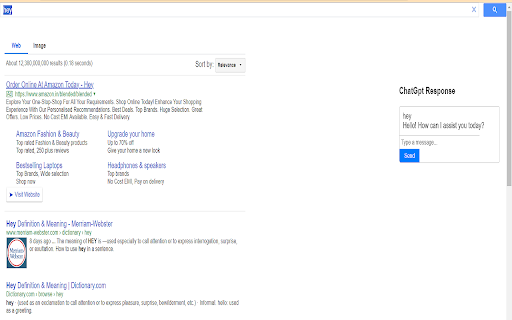
Shows ChatGPT Response on every Google Powered CSE. Power of ChatGPT with Google Search. ChatGPT for Google CSE is an extension that changes your search engine to our Google Powered Custom search engine that displays responses from ChatGPT along with search results. You can also start a chat with AI as soon as you get a response. Feature: * Supported by Google Custom Search technology which is the most advanced search engine technology available right now. * Chat with AI about questions and answers. * Support official OpenAI API (Both GPT-3.5-Turbo and GPT-3) * Supports ChatGPT Plus and GPT-4 (GPT-4 requires manual enable in options) * Feedback for improving AI * Custom trigger mode * Copy to clipboard 1. What is ChatGPT? It is a language model developed by OpenAI, it is a type of AI capable of understanding and generating human-like text. Having been trained on large amounts of text data from the internet, so has a good understanding of various topics and can perform various natural language processing tasks such as language translation, text summary, and text completion. Basically, it's a computer program that can communicate with people in a way that feels natural and human-like. 2. What is ChatGPT for Google? It is a browser extension that enhances search engines with the power of AI. It works by showing AI responses along with normal search engine results. 3. Is it free to use? Yes, this extension is free to use. 4. What search engines are supported? Currently, ChatGPT for Google supports Google CSE search engine. 5. Do I need a OpenAI account? No, you Don't need to have a account to use this extension. How to Use ChatGPT for Google CSE 1. Install the extension. 2. Accept our search engine my giving approval to change your default search engine whenever asked. 3. Enjoy chatgpt for Google everytime you search using default search.

ChatGPT Automation - Auto ChatGPT on chatgpt.com
Auto ChatGPT for your prompts at scale. Batch generate and auto-download responses and images on ChatGPT.com. ChatGPT Automation is an Auto ChatGPT tool built to fully automate your workflow on OpenAI's chatgpt.com. No more manually typing prompts one by one — let ChatGPT run automatically. This extension turns ChatGPT into a batch-processing engine, allowing you to auto-submit prompts, auto-generate content, and auto-download results at scale. 🔥 What ChatGPT Automation does Auto ChatGPT prompts continuously without manual interaction Batch generate AI text, images, and visual content Automatically download results with smart file naming Handle long prompt queues safely with smart random delays 🤖 Auto ChatGPT Batch Processing Queue dozens or hundreds of prompts and let ChatGPT Automation automatically: - Submit prompts to ChatGPT - Wait for generation to complete - Move to the next prompt No clicks. No babysitting. 🎨 Image to Image Transformation Batch transform and enhance images using AI with text prompts Chain mode: automatically use the previous generated image as input for the next prompt 🧩 Ingredients to Text Mode Upload reference images and batch-process them with prompts Auto-add character images based on filename matching ⚙️ Professional Automation Controls - Smart Random Delay System to avoid rate limits - Configurable min/max delay between prompts - Auto Download once generation completes with custom folder organization - Auto-rename files based on prompt content - Max Retries on failure — automatically retry failed prompts - Multiple outputs per prompt (1–4) 📊 Real-time Queue Monitoring - Live prompt queue with per-prompt status (Queued → Running → Completed) - Visual progress tracking inside the Side Panel - Retry counter per prompt ✅ Perfect for - Content creators and copywriters - AI image and visual producers - Automation & productivity users - Anyone who wants to Auto ChatGPT at scale

ChatGPT for Google by cloudHQ
This extension gives you ChatGPT query responses alongside Google search engine results. This extension is easy to use and enhances your Google search experience. Features: ✅ OpenAI Responses alongside your Google search results ✅ A summary of search results ✅ Supplement responses with data after 2021 via search results ✅ OpenAI API and multiple version support ✅ Toggle on/off as desired ✅ Copy to clipboard ~~~How to use it~~~ 1. Get an OpenAI account here if you don't already have one: https://chat.openai.com/chat and create an account 2. Install this extension 3. Open Chrome and search for anything in Google Search 4. AI-generated responses alongside conventional search engine results will be displayed on the right side of your window 5. When in ChatGPT, simply type in your prompt, and the results will be ChatGPT's response, and will then provide you with a Google Search summary on the subject (very helpful for up to date information) ~~~FAQ~~~ 1. What is ChatGPT? ChatGPT is a computer program created by OpenAI that can generate human-like text. It's like a super-advanced version of autocorrect: it predicts and generates what it thinks should come next in a conversation or a piece of writing. This is useful for many things, such as writing emails, creating content, answering questions, and even tutoring in different subjects. It's important to note that it doesn't know any personal data unless you tell it during the conversation, and it doesn't know specifics about the documents it learned from. 2. What does this extension do? This browser extension is developed by cloudHQ LLC. The extension enhances search engine results with the power of artificial intelligence from OpenAI. The extension operates by displaying AI-generated responses alongside conventional Google search engine results, offering users an enhanced search result experience. 3. Is this extension free to use? Yes, the extension is free to use. 4. Is this extension integrated with other cloudHQ products? Yes. This extension is fully integrated with other cloudHQ products such as Save Emails to PDF by cloudHQ, Export Emails to Sheets by cloudHQ, and more. 5. Do I need an OpenAI (chat.openai.com) account? Yes, you need to have an OpenAI account to use this extension. Go to https://chat.openai.com/chat and create an account. If you choose to use an API, you need to have a developer account. You can create it here: https://platform.openai.com/ We hope you enjoy your new search result experience and find it helpful for your overall knowledge about anything you wish to know about. cloudHQ. Helping your productivity, 1 click at a time. cloudHQ website: https://www.cloudhq.net/ App website: https://www.chatgpt-for-google-search.com/ Pricing: https://www.chatgpt-for-google-search.com/pricing Support page: https://support.cloudhq.net/category/browser-extensions/chatgpt-for-google/ FAQ page: https://support.cloudhq.net/ Blog: https://blog.cloudhq.net

ChatGPT Timestamp
Displays timestamps for ChatGPT messages ⭐ Love it? Star the GitHub repo! → https://github.com/Hangzhi/chatgpt-timestamp-extension Follow long chats with ease ✨ A tiny fix for a big blind spot — once you try it, you’ll never go back. ➡️ Install now and make every message count.

YouChat AI for Google
A browser extension to display YouChat response - like ChatGPT, but with knowledge of recent events and source citation - alongside Google and other search engines results, supports Chrome/Edge/Firefox Troubleshooting: Please check out https://github.com/fedebotu/youchat-google-extension for troubleshooting. Feel free to submit issues there! Changelog: 1.0.1 - Fix error due to API change - Better documentation and troubleshooting solutions 1.0.0 - Dynamics links: numbering of links is done automatically - Reference listing: for each reference in the main response, there is now the corresponding source link! - Update to latest YouChat API Source code: https://github.com/fedebotu/youchat-google-extension Also check out: https://github.com/wong2/chat-gpt-google-extension
