
flehofiklehmnnolpjcamplcnmhgcbkk
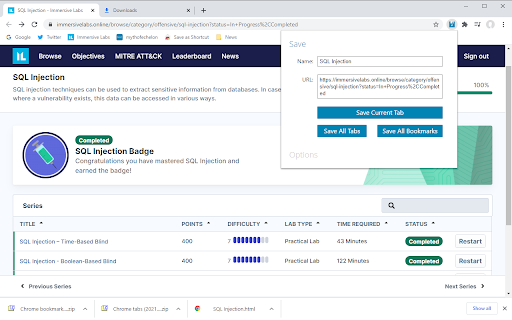


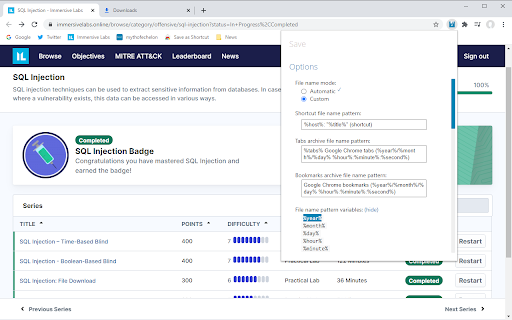
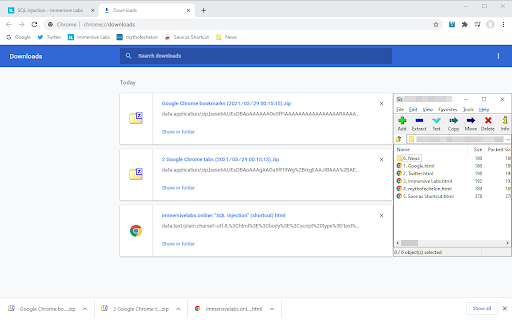
Offers the ability to save tab(s) and bookmarks as Internet shortcut files. PLEASE NOTE: If you're experiencing a problem, please DO NOT SUBMIT A REVIEW. Email me for a fast reply or submit a support ticket for a slow reply. -Description- Personally, I've always used Internet shortcut files for a variety of reasons. For example: 1. To passively share links to content via shared folders. 2. To supersede the temporary use of pinned tabs and bookmarks. 3. As portable links. 4. To accompany resources (installers with links to the websites, projects with links to assets, etc). However, I always found them so awkward to create, hence me creating this extension. -FAQ- Q: As Chrome manifest v2 is being depreciated in 2024, is this extension being updated to support v3? A: Yes, after quite a lot of work, I have successfully rewritten Save as Shortcut to support Chrome manifest v3 and its asynchronous service workers. Q: Why does this extension say that it reads my browsing history? A: I don't know. It does not. To see the real permissions, check file "%localAppData%\Google\Chrome\User Data\Default\Extensions\flehofiklehmnnolpjcamplcnmhgcbkk\_0\manifest.json" → section / key "permissions". Q: Are you aware of X issue? A: As of 2025/04/21, the only issue that I'm aware of is an incompatibility with sites that use Wix Thunderbolt's overrideGlobals.inline which I believe cannot be worked around. Q: Can this extension be updated to do X? A: I'm open to ideas so feel free to contact me. Q: Can I test upcoming features and fixes? A: Yes, there is a beta version available here: https://chrome.google.com/webstore/detail/save-as-shortcut-beta/kmemfmaclfmhaddkneldhbcmlpoanbmg Q: Does this extension have any tracking or collect any personal information? A: Nope. Simple as that. In fact, third parties regularly offer to pay me relatively large sums of money per month to inject their code into my app and I have always refused because I hate it when other developers do that so I don't want to be that person. -Version history- • 5.70.2294, 2024/11/10 (published to beta first): - Changed method of triggering the download from chrome.downloads.download to chrome.scripting.executeScript with simulated clicks, hence adding "permissions" → "active_tab" and "scripting" and removing "permissions" → "downloads". This should resolve the following issues caused by the Chrome API: + File name conflicts with other extensions. + Saved folder always being "Downloads". + Potentially other things like inconsistent triggering. • 5.68.2220, 2024/09/15 to 2024/09/22 (published to beta first): - Consolidated popup logging to service worker so all data is in one place which makes it easier to diagnose on-load issues with the popup as closing the popup closes the inspect window. - Added instructions on enabling developer mode which reveals the option to inspect the service worker in order to get the diagnostic log. - Implemented usage of chrome.downloads.onDeterminingFilename to resolve conflict with other extensions which was causing the saved file to be named "download". • 5.67.2213, 2024/05/25 (published to beta first): - Changed manifest version from 2 to 3 which required the following: + As background pages have been removed, replaced with a service worker. + As service workers cannot access localStorage, replaced usage with chrome.storage.local and message passing between service worker and popup. + As service workers are inherently asynchronous but code needs to be processed synchronously, changed all functions to be async and all function calls to use await. + As service workers don't have a page, changed download method from simulating a click on the background page to chrome.downloads.download (hence new permission "downloads"). + Replaced chrome.contextMenus.create → onclick with chrome.contextMenus.onClicked.addListener. + As service workers cannot use chrome.extension.getViews to access the popup page, replaced usage with message passing. - Upgraded JSZip from v3.2.1 to v3.10.1. • 4.66.1952, 2024/06/06: - So that user options / preferences are preserved, added code to frequently migrate the data from localStorage to chrome.storage.local (hence new permission "storage") in preparation for the migration to already-completed Save as Shortcut v5 which uses Chrome manifest v3 which cannot access localStorage. • 4.65.1944, 2021/07/20 (published to beta first): - Implemented trimming of file names larger than 225 characters (Windows NTFS maximum of 255 minus spacing for prefixes of 30), as these were breaking extraction of ZIP files. • 4.64.1939, 2021/06/11: - Implemented workaround for Google Chrome version ~91.0.4472.77 bug / error "Unchecked runtime.lastError: Tabs cannot be queried right now (user may be dragging a tab)." Refer to https://stackoverflow.com/questions/67806779/im-getting-an-error-tabs-cannot-be-edited-right-now-user-may-be-dragging-a-ta • 4.64.1936, 2021/05/15: - Fixed bug where context menu wouldn't be removed. This was due to an old localStorage variable name being referenced in a catchall if statement and, therefore, always being null and matching. • 4.64, 2021/03/27 to 2021/03/28 (published to beta first): - Changed option "Diagnostic log and console" from opening background page to including guidance on how to open the background page, as it was opening a secondary one that didn't include the logging data. - Added copying to clipboard when selecting file name variables. - Added help tooltips to the more obscure file name variables. - Improved diagnostic logging details (greater detail, greater readability, consolidated background.js logging to also use function, removed 'background_Log("")' and added newline characters to actual logging line, fixed logging of tab info objects). - Improved performance by removing calls to background_processData_Generate_Name_Shortcut() from background_Tabs_Single_setDetails_* and adding them to the end of each original function. - Changed option "Preserve order in bookmarks archive" to default to enabled. - Changed handling of unnamed bookmarks, appending host in parenthesis to give some indication. - Added handling of 0 tabs (happens when DevTools window is focused). - Updated description to include saving of bookmarks as a feature. - Converted the URL and archive name pattern fields from to too and set maximum heights on both. - Added calculation of bookmarks variable size to selectively display banner warning about ETA. • 4.63, 2021/03/24 (published to beta first): - Disabled diagnostic logging by default and added option to enable it. • 4.62, 2021/03/22 to 2021/03/24 (not published): - Fully modularised background functions so modes are no longer required. - Added option to save all favourites / bookmarks as an archive. - Increased width of popup from 350px to 400px to accommodate width of new buttons. - Disabled preservation of tab order in archives by default. • 3.61.1708, 2021/03/20: - Modified file "popup.html" marking macOS / .WEBLOC option as not recommended. • 3.61.1707, 2021/03/13 (not published): - Modified file "popup.html" removing reference to removed file "info.css" to resolve console error "Failed to load resource: net::ERR_FILE_NOT_FOUND". • 3.61.1706, 2020/10/28 (published to beta first): - Modified replacing of invalid characters so that quotation marks are replaced with properly opened and closed Unicode versions. • 3.60, 2020/10/10: - Fixed initialization of option "Remove prefixed or suffixed site name". - Modified option "Work around Windows' restricted characters" changing from recommended and enabled by default to disabled by default as it's personal preference and still experimental. - Modified option "Remove notification indicators" fixing the code to initialize as enabled by default to match the UI. - Modified option "File name mode" so that it's automatically set to "Custom" if the user previously set a filename suffix. • 3.59.1694, 2020/10/03 (published to beta only): - Bolded tooltips that are both default and recommended to make them stand out more. - Fixed unequal width of name and URL fields. • 3.59.*, 2020/10/02 (published to beta only): - Prevented newlines from being entered into the name textarea via Enter / Return. - Modified options section "File name pattern variables" making it hidden by default with the option to show and hide it (not saved / remembered). - Modified option "Work around Windows' restricted characters" so that it applied to macOS and Linux shortcut types too and updated tooltip to state this. - Added option to trigger button "Save All" via Enter / Return when it's focused on. - Refactored code for minor efficiency / de-duplication improvements. - Modified option "File name mode" adding missing "Default" tooltip. • 3.58.*, 2020/09/30 (published to beta only): - Changed save field "Name" from a text input to an auto-sized textarea so that the entire content can be seen. - Fixed bug that would cause %host% and %URI% to be all the same and wrong for each shortcut in an archive. - Modified option "Remove site name" (1) adding support for delimiter "–" (U+2013 EN DASH) used on sites like Dropbox, (2) adding tooltip explaining when it's particularly useful, and (3) renaming to "Remove prefixed or suffixed site name" as it doesn't do so when the title is only the site name. - Extended outline colouring to save buttons ( elements). • 3.57.*, 2020/09/29 (published to beta only): - Modified option "Remove suffixed site name" removing recommendation as it's down to personal preference. - Added option "Remove notification indicators" which is recommended and enabled by default. - Fixed bug that would cause changing the option "Remove suffixed site name" and "Remove notification indicators" from Enabled to Disabled to have no effect on the current page. - Modified option "Remove suffixed site name" renaming to "Remove site name" and re-designing the code to dynamically detect and remove the site name wherever it appears in the title. - Modified options where the first step is clicking on a link prefixing "In the new tab, " to step two. • 3.56.*, 2020/09/28 (published to beta only): - Added migration of old append string / filename suffix value. - Added variable %tabs% (total number) for archive file names. - Added automatic selecting of entire variable when it's clicked on. - Added option "Remove suffixed site name". • 3.55.*, 2020/09/24 to 2020/09/26 (published to beta only): - Fundamentally rewrote code to fully support customisable names for both the individual shortcut and archive files, including variables in any position. - Removed option "Single file name suffix" as it's now redundant. - Added variables %title%, %host%, %URL%, and %URI%. - Modified option "Shortcut type" renaming to "Shortcut file type". - Fixed bug where only one quotation mark would be replaced. - Split options into top group of file-related and bottom group of extension-related. - Refactored elements IDs, variable names, and function names so that they're more consistent to avoid confusion. - Modified options adding tick / checkmark tooltips for recommended / default settings. - Renamed and migrated localStorage names so that they're up to date with the options and less confusing. - Added promo tiles. - Removed unnecessary icon files from package. • 2.54.*, 2020/09/23 (published to beta only): - Modified option "Filename suffix" renaming to "Single file name suffix" and adding support for date and time variables. • 2.53.*, 2020/09/23 (not published): - Added banners for app installation and updates. - Added console logging of app installation, app updates, and Chrome updates. • 2.52.*, 2020/09/23 (not published): - Added elements and styling to make direct extracts stand out better. - Modified option "Download prompting" renaming to "Download folder". - Modified options "Download folder" and "Keyboard shortcuts" splitting onto separate lines like the others and with instructions. - Tweaked some styling. - Modified option "Preserve tab order by numbering files in ZIP file" renaming to "Preserve tab order in ZIP file" and adding a tooltip explaining how. This makes the UI a bit neater. - Modified option "Windows" → tooltip to bold red as a warning. - Modified option "Cross-platform" replacing " ← Recommended" with a tooltip as it's been set by default for a while and hopefully the red question mark next to the option "Windows" will warn people off from it. - Modified styling of tooltips adding padding to tooltip so that they're easier to trigger and setting to colour to the same as links so users are more likely to know that they're interactive. - Modified tab opening changing active mode from true to false so that users can continue reading the instructions before choosing to close the extension popup. - Modified option "Download folder" adding explanation for why things currently work the way that they do. • 2.51.*, 2020/09/22: - Adjusted options section for diagnostic log and console to account for the fact that Opera and Edge (Chromium) don't display links to the background page. - Re-ordered function background_Save_Generate() so that the filename suffix also has its invalid characters processed. • 2.50.*, 2020/09/21 (published to beta only) - Added tooltip to Windows shortcut type to advise of problems. - Renamed options and context menus to "Save Current" and "Save All" for UI consistency. - Added CSS to prevent elements from affecting line height, thereby making line spacing inconsistent. - Added console logging for addition of Chrome event listeners. - Added section at the bottom of the options on how to access the diagnostic log. - Increased height of spacer elements by 2px as options were starting to look a bit crowded. - Added tabbing to the button "Save All". • 2.49.*, 2020/09/19 (published to beta only) - Fixed a bug where Unicode spaces and forward slashes were still set for the ZIP file name even when the option "Work around Windows' character restrictions" was disabled. - Refactored code so that: + It is more intuitive which will make future changes easier and less error-prone. + Options' localStorage values are initialised and centrally. + All console logging is done on the background page and is easier to read. For older version history, see file "%localAppData%\Google\Chrome\User Data\Default\Extensions\flehofiklehmnnolpjcamplcnmhgcbkk\_0 otes\Versions.txt"

Save as Shortcut beta
Offers the ability to save tab(s) and bookmarks as Internet shortcut files. This is for users who want to test and provide feedback for the developmental and potentially unstable versions of Save As Shortcut before they're published to the public channel (https://chrome.google.com/webstore/detail/save-as-shortcut/flehofiklehmnnolpjcamplcnmhgcbkk). Current changes different to the public version: • 5.71.2295, 2025/04/21 (published to beta first): - Max file name (not file path) length will now be 100 for Windows and 255 for other OSes (e.g., macOS and Linux).

Shortcuts for Google™
For the latest features, install G App Launcher: https://chrome.google.com/webstore/detail/ponjkmladgjfjgllmhnkhgbgocdigcjm Display all Google™ services as buttons in a space-saving popup next to your address bar. Reach services like Gmail, Google Drive, Google Keep, Google Maps, Google Calendar, and many more in just two clicks from your browser. The extension includes more than 1000 Google services and websites. Main features =================================== ✓ More than 1000 Google™ shortcuts, continuously updated ✓ shortcuts can be sorted and rearranged according to your needs (take a look at the screenshots) ✓ Support for different icon sizes ✓ Add your own custom URL button like a link to Facebook ✓ Change names of services ✓ Integration of GMail this!, Map this!, etc. Support =================================== Please report bugs and requests using the following link and not the comments: https://apps.jeurissen.co/shortcuts-for-google/contact The developer of this extension is not affiliated in any way with Google Inc. All Google icons and names are a trademark of Google Inc. Use of this trademark is subject to Google Permissions. Notice: All referenced brands, product names, service names and trademarks are property of their respective owner(s). The extension is free at the moment, you can buy me a coffee here: https://apps.jeurissen.co/shortcuts-for-google/donate

Bookmarks Commander
A dual-pane Norton Commander liked bookmarks manager that supports sorting, dark theme, search, and duplicate detection This is a two-panel bookmarks manager for your browser. It works similar to the famous Total Commander. You can move items between the panels or view two different directories simultaneously. Instruction: Click on the toolbar button once to open the commander in a new browser tab. By default the left panel has focus. Use arrow up and arrow down keys to navigate. Use Enter to move to a directory. To move the other panel simply press The left or right arrow key. Shortcuts: [open links]: Press Enter key to open on the same tab. Press Ctrl + Enter or Command + Enter to open in a background tab or use double-click to open on the same tab. Press Ctrl/Command while double-clicking to open in a background tab. [select multiple bookmarks]: Ctrl/Command with left-click to select more items. [copy links to the clipboard]: Ctrl + C or Command + C to copy selected links to the clipboard. [copy titles to the clipboard]: Ctrl + X or Command + X to copy selected titles to the clipboard. [directly navigate to a bookmark]: Press the first character of the title multiple times to navigate between items starting with this particular character [move one step up]: Use backspace to navigate to the parent directory [move between left and right panels]: use Tab key to toggle between panels. Use Ctrl + 1 or Command + 1 to move to the left tab. Use Ctrl + 2 or Command + 2 to move to the right tab. You can alternatively use arrow-left and right to move between panels. [move selected bookmarks and folders to the other panel]: Use Ctrl/Command + right arrow key to move selected items to the right panel when the left panel is focused. Use Ctrl/Command + left arrow key to move selected items to the left panel when the right panel is focused. [sort items]: Ctrl/Command + J for A-Z and Ctrl/Command + Shift + J for Z-A [find duplicated bookmarks]: Ctrl/Command + Shift + F; use the "duplicates" keyword on the search bar to find all duplicated bookmarks in the current directory and subdirectories. [move bookmarks between different browsers]: Ctrl/Command + Y to export selected bookmarks to the clipboard, then use Ctrl/Command + P to import them to the new machine. This way you can transfer bookmarks between two browsers. [configurations]: Use Ctrl/Command + S to access configuration panel. You can change the font size and font family of the interface or change the color scheme (theme) of the interface (dark, light, or based on your OS color scheme) or toolbar icon's color. It is also possible to use the new "VIM" mode to support VIM-compatible navigation (still in progress). Notes: 1. When an operation is not allowed, the button is disabled. 2. You can see all the shortcuts by placing your mouse over the buttons. 3. You can drag and drop bookmarks between panes 4. You can use right-click context menu to open links in new windows

Shortcuts for Chrome
Navigation menu of Chrome URLs: internal pages of the Google Chrome browser. Chrome browser navigation is optimized for non-technical users. For users who want to inspect what is happening with indexedDB, service workers, or Bluetooth devices etc., this menu brings shortcuts to those hard-to-find, internal browser pages. This menu lists all Chrome URLs in a single, flat list, configurable menu. This application is free and open-source software, built by Chrome users for Chrome users. ✔️ Pin your favorites on top for fast access ✔️ Drag and drop pinned links to change their order ✔️ Discover hidden browser features you never knew existed ✔️ Automatically matches dark/light mode based on browser setting
