
fkmibejcfnaoglanjfceecmljgkjaici
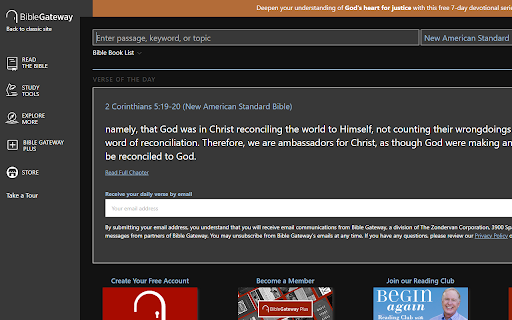
Creates a dark mode for biblegateway.com This extension creates a dark mode for BibleGateway.com

Midnight Dark mode - Dark theme Chrome
Turn on dark mode across all websites. Customize dark theme and brightness. Dark reader - dark skin for Chrome. Dark Mode - Midnight Chrome: A Night-Time Companion for Your Browsing Experience Transform your browsing experience with Dark Mode - Midnight Chrome, the ultimate Chrome extension designed for comfortable and eye-friendly internet usage at any hour.* Key Features and Benefits: 1. Universal Dark Mode: Instantly apply a sleek, dark theme across all your favorite platforms, including YouTube, Facebook, and more, ensuring a consistent and strain-free viewing experience. 2. Reading Night Shift Mode: Automatically adjusts your screen to warmer tones during night-time, reducing blue light exposure and aiding in better sleep quality. 3. Collaborative Browsing Support: Enhance group work or shared screen experiences with an interface that's easy on everyone's eyes, ideal for late-night study sessions or team projects. 4. Customizable Viewing: Tailor your browsing experience with adjustable brightness, contrast, grayscale, and color temperature settings, providing personalized comfort and accessibility. 5. Enhanced Contrast for Accessibility: Specialized contrast settings to aid users with visual impairments, ensuring the web is accessible and enjoyable for everyone. 6. Free to Use: Enjoy all these premium features at no cost, making it an ideal choice for students, professionals, and casual users alike. 7. Multi-Language Support: Catering to a global audience, ensuring a user-friendly experience for diverse users. 1. Install with a Click: Simply add the "Dark Mode - Midnight Chrome" extension to your Chrome browser from the Chrome Web Store. 2. One-Touch Activation: Enable dark mode across all sites with just one click. 3. Customize Your Experience: Access the extension's menu to adjust brightness, contrast, and more to fit your viewing preferences. 4. Enjoy Collaborative and Individual Browsing: Whether it's for personal use or while collaborating, the extension adapts to your needs. - Eye Comfort: Reduces eye strain, particularly during night-time browsing. - Enhanced Readability: Improves text clarity and reduces glare. - Energy Efficient: Can lead to reduced screen power consumption. - User-Friendly: Intuitive design for ease of use and customization. With "Dark Mode - Midnight Chrome," night-time browsing is no longer a strain on your eyes. Whether you're a night owl, a professional working late, or someone who enjoys a customizable browsing experience, this extension is your go-to solution for a more comfortable and personalized internet experience.

Night Mode Bible
Make Bible.com dark for easier reading at night Tired of staring at the bright white Bible.com? Night Mode Bible provides a dark theme that gives your eyes a break, and makes night reading easier on your eyes. Have a bug to report? Want to contribute? Dark Mode Bible is open source and available at https://github.com/JosNun/night-mode-bible. All help is welcome :)

Doulingo Darkmode
Changes the duolingo werbsite to darkmode Gives the Duolingo Webpage a Darkmode.

NYT Crossword Dark Mode
Adds a dark mode to the New York Times Crossword page A simple extension that will change the visual theme of the New York Times Crossword to match any aesthetic you like, including a dark mode! Use one of the given preset themes, or create your own! Works with the mini and regular crosswords. Now you can solve your favorite puzzles without straining your eyes! NEW IN VERSION 2.0! - Select from six different preset color schemes: default, dark mode, fall, winter, summer, or spring! - Customize your own theme in the extension popup! (Change the color selectors, hit the save button, then select the preset called Custom Preset!) - Settings are saved across browsers, so you can keep your theme on any computer! - Squashed various bugs If you like this extension, please leave a positive review! :) If you have feature requests or would like to report a bug, please do so at this extension's GitHub page: https://github.com/burgerhex/NYTCrosswordDarkMode You can open a new issue by going to the Issues tab and clicking the New Issue button. If you're having a problem, please describe it in detail and how to replicate it if possible. If you would like to suggest a new feature, please include as much detail as possible so I can know what you would like. I will try to respond to these as quickly as I can. Upcoming features (planned for future versions): - Seasonal decorations - Fading rainbow text - Other fun things
