
fkmaohpngenfoccdgceedjkfhkdcohmg
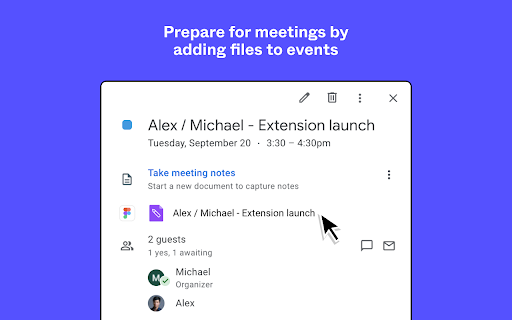
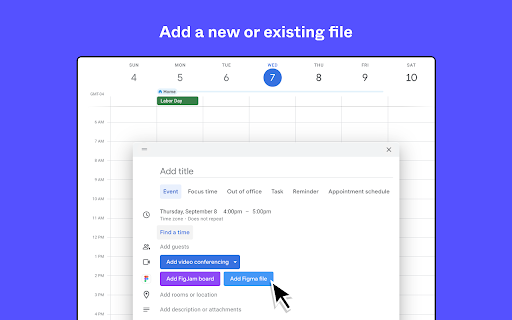
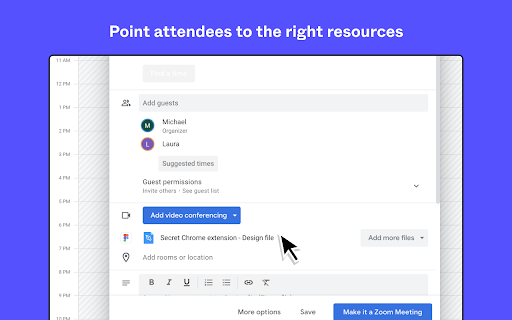
Start meetings off on the right foot by connecting Google calendar to Figma. Use the Figma for Chrome extension to attach Figma and FigJam files to your Google Calendar events and make every brainstorm, project kick off, and critique a jam. PREP FOR MEETINGS Stay in the flow by quick-adding Figma or FigJam files to events as you add them to your calendar. ADD RELEVANT FILES Create a new file on the spot, or attach one or many files that you’ve already prepared. POINT ATTENDEES TO THE RIGHT RESOURCE Files appear right in the calendar event, so it’s easy for participants to see which resources will need their attention. BETA (Pro+ users) Capture your production websites and bring them into Figma as layers

Site Palette
Site Palette now has an official Figma plugin. Import your saved palettes directly into Figma as local variables, no copy-paste of hex codes: https://www.figma.com/community/plugin/1631159048065020915/site-palette Now available for Microsoft Edge, Brave, and Opera via Chrome Web Store. Site Palette is a color palette extractor for designers and front-end developers. Install the extension, visit any website, click the icon in your toolbar, and instantly get an accurate palette of the colors that page actually uses. Save it to your account, share it via a unique link, or export to Figma, Sketch, Adobe Swatch, or SVG. Unlike eyedropper tools that pick one color at a time, Site Palette analyses the full page and returns a coherent palette using multiple algorithms: Color Cube, Median Cut, Material Design mode, and live viewport extraction ranked by on-screen area. Every palette you generate is saved to your personal history and synced across devices. - Multiple extraction algorithms: Color Cube, Median Cut, Material Design, live viewport - Figma plugin with palettes synced as local variables, ready for tokens and themes - Sketch template, Adobe Swatch (.ase), and SVG export - Google Art Palette and Coolors.co integration for fine-tuning - MagicLink sign-in, no passwords - Personal Palette History with unique shareable links - Manage subscription from My Profile - Competitor color audits: compare 10 sites side by side in minutes - Brand discovery: capture a client's existing palette before a rebrand - Design system seeding: bootstrap new files with real-world references - Mood boards: pull colors from any visual reference

Enable UI3 Beta for Figma
This extension enables UI3 Beta for Figma for all users, without the need to wait on the waitlist. Note: This extension only works in web browsers and does not enable AI features. This extension is open source and available at https://github.com/Inclushe/figma-ui3

Web to Figma
Web to Figma extension to capture pages and components and import them into Figma as editable designs. No more screenshots. Web to Figma lets you import full webpages using the plugin, or import specific components from a website, using our Chrome Extension. Convert any HTML to design file in Figma. Import components or webpages using the Chrome Extension: 1. Download the Web to Figma Chrome Extension 2. Go to any page in your Chrome Browser 3. Invoke the extension, and then choose if you want to capture the entire page or a single component 4. Once the extension captures the page, save the page/component to a Collection 5. Go to Figma and run the plugin 6. Go to the Collections tab of the plugin 7. Find your latest capture and click on Add to Figma Import webpages using the plugin: 1. Install the plugin 2. From within any file, run the plugin by going to Plugins menu and selecting Web to Figma 3. In the Import tab of the plugin, enter the URL of the webpage that you want to import. For example, https://github.com/home 4. Choose the relevant settings 5. Click on Import 1. Create a library of design inspirations using Collections 2. Create a moodboard 3. Collaborate with developers by importing their implementation and comparing against the reference design 4. Learn how some of the more complex websites have been structured 5. Quickly explore various design patterns when solving a new task

Muzli - Design inspiration hub
Your daily dose of design with industry news, tools, and inspiration - all in one place. Muzli takes the center stage as it replaces your default tab and becomes your simple and beautiful design oriented home page. Loved by hundreds of thousands designers worldwide, Muzli is the leading go-to browser extension for creative professionals. Once installed, Muzli becomes your visual hub for the latest and most cutting-edge Design, UI, UX, and interactive content. It serves daily content from all major design and inspiration sources that ensures you will never miss the next big thing. Plus, our hand-picked, professionally curated "Muzli Picks" journal ensures you're treated to the crème de la crème of design inspiration. You can always make Muzli personalised, by choosing from over 160+ creative design sources that cater to your unique interests, so you can always find the content that resonates with you the most. We always try to deliver a design-centric browsing experience that ensures you will always keep up with the creative realm and make your exportations feel seamless.
